
Clay Box
Screenshots

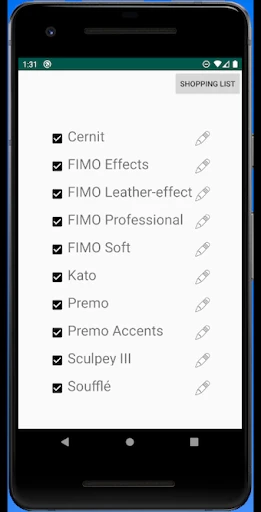


Description
About Clay Box Feature - A Digital Garden for Your Thoughts
Clay Box is a minimalist note-taking and knowledge management application designed to help users capture, organize, and connect their thoughts seamlessly. It moves beyond traditional linear note-taking by offering a flexible, canvas-like workspace where ideas can exist as individual "clay" blocks—text, images, links, or to-dos—and be freely arranged, linked, and nested. This approach transforms scattered information into a personal, visual knowledge network, making it ideal for thinkers, learners, and creators who seek to cultivate their ideas in a non-restrictive digital environment.
Chapter 1: Function
Clay Box operates on a core principle of atomic note-taking combined with spatial freedom. Its primary function is providing an infinite canvas where users create individual content blocks, each serving as a discrete unit of information. These blocks can be plain text, formatted notes, checklists, embedded images, or web links. Users can drag and drop these blocks anywhere on the canvas, grouping them visually or stacking them to create hierarchies. A key functional pillar is bi-directional linking, allowing any block to connect to another, forming a web of relationships. The app supports tagging for categorization and offers a global search to instantly locate any block. Essentially, it functions as a malleable digital clay that users can shape to mirror the non-linear nature of their thinking, from fleeting notes to complex project plans.
Chapter 2: Value
The core value of Clay Box lies in its ability to reduce cognitive friction and enhance thinking clarity. Unlike folder-based systems that force premature categorization, Clay Box’s open canvas and block-based structure honor the organic flow of ideas. Users experience the key advantage of frictionless capture: ideas are jotted down instantly without deciding where they belong. The true value emerges in the connecting phase, where bi-directional links reveal unexpected relationships between concepts, fostering creativity and deeper understanding. This transforms the app from a mere storage vault into a thinking tool. Furthermore, its minimalist and intuitive interface ensures focus remains on content, not complex features. It serves as a single source of truth for personal knowledge, consolidating notes, project details, and resources in an interconnected, easily navigable space. By externalizing mental models visually, Clay Box helps users overcome information overload, build a second brain, and ultimately unlock more innovative and structured thought processes, making it a valuable long-term investment for personal knowledge capital.
Chapter 3: Scenarios
Clay Box is particularly valuable for students, researchers, writers, project managers, and creative professionals. A student can use it to link lecture notes, research snippets, and essay outlines, seeing how course themes interconnect. A writer can plot story elements, character bios, and plot points on the canvas, using links to track narrative threads. Project managers can maintain a visual dashboard of tasks, meeting notes, and resources for each initiative, with blocks serving as both documentation and action items. In everyday use, a user might quickly capture a book quote, later link it to a related personal reflection block and a to-do item for further research. During brainstorming sessions, ideas can be dumped onto the canvas and rearranged in real-time to identify patterns. It is the go-to tool for anyone needing to manage complex information, prepare for presentations, plan content, or simply maintain a journal that grows smarter through connections, effectively supporting both structured planning and free-form ideation.
Uninstall Instructions
For step-by-step guidance on how to safely remove this application from your device, please refer to our 《Uninstall Instructions》 document.
Pros
- real-time physics simulation for organic clay sculpting
- haptic feedback mimics real clay resistance and texture
- unlimited virtual clay without material cost or mess
- supports multi-layer sculpting with non-destructive editing
- export high-resolution 3D models for 3D printing
Cons
- steep learning curve for traditional sculptors adapting to VR
- requires high-end VR hardware for optimal haptic feedback
- limited texture and color options compared to painting apps
- no real-time collaboration or shared workspace feature
- large file sizes for detailed sculptures strain storage
Frequently Asked Questions
What is Clay Box and what does it do?
Clay Box is a 3D sculpting and modeling application designed for digital artists and hobbyists. Its core function is to provide intuitive virtual clay-like tools for creating detailed 3D models directly on your device. It positions itself as an accessible entry point into digital sculpting, featuring a gesture-based workflow for pulling, pinching, and smoothing digital mesh.
Is Clay Box free to use or does it have in-app purchases?
Clay Box typically operates on a freemium model. The app can be downloaded for free, offering a basic set of sculpting tools and features. For advanced functionalities like higher polygon limits, export formats, or specialized brushes, it offers one-time purchases or subscription plans through in-app purchases. No additional physical equipment is required.
What devices and operating systems is Clay Box compatible with?
Clay Box is primarily designed for tablets and touchscreen devices to leverage its gesture-based controls. It is commonly available for iOS (iPad) and Android platforms. For optimal performance, especially with complex models, newer device models with sufficient RAM and processor power are recommended. Specific version requirements are listed on the respective app store pages.
How does Clay Box handle exporting or sharing my 3D creations?
The app allows users to export their sculptures. The available formats (like OBJ or STL) and resolution options may depend on the app version (free or pro). Exported files can typically be shared to other apps, cloud services, or sent to 3D printers for physical creation. Some advanced export features might be part of the premium offering.
What should I do if the app crashes or my model is lost?
For stability issues, ensure your device meets system requirements and has updated OS and app versions. The app includes an auto-save feature, but manually saving projects regularly is advised. For persistent crashes or data loss, standard support involves checking the developer's official website or app store page for contact information, known issues, or community forums for troubleshooting steps.
App Info
Technical Info
Recommended For You

Nomad Sculpt
Art & Design

Job Search by ZipRecruiter
Business
Poseit
Art & Design

Animic AI: Anime Generator
Art & Design

UKG Dimensions
Business

Picrew PFP & OC Maker
Art & Design

Twenty-Four Hours a Day
Books & Reference

AR Draw Sketch: Trace & Paint
Art & Design

Square Point of Sale: Payment
Business

Joyread
Books & Reference

Shell: Fuel, Charge & More
Auto & Vehicles

Monster Job Search
Business

Pixel Studio PRO: editor
Art & Design

Gospel Library
Books & Reference

GIMP
Art & Design

Messages: Text SMS
Communication

Figma: view. comment. mirror.
Art & Design

CL theme 3D Glass
Auto & Vehicles

VIN Check Report for Used Cars
Auto & Vehicles

Passio GO!
Auto & Vehicles