
Google Messages
Screenshots


Description
About Google Messages Feature - A Modern Gateway to RCS Communication
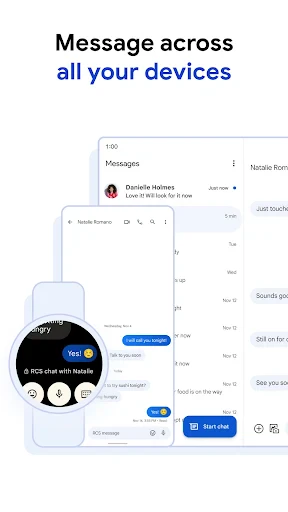
Google Messages is the official messaging application developed by Google for Android devices, serving as a modern replacement for traditional SMS. It seamlessly integrates the familiar SMS/MMS standard with the advanced Rich Communication Services (RCS) protocol, known as Chat features within the app. This dual-support system allows users to enjoy high-quality media sharing, read receipts, typing indicators, and group chat enhancements when communicating with other RCS-enabled contacts, while maintaining universal compatibility with all phone numbers via fallback to SMS. With a clean, intuitive interface and deep integration with the Android ecosystem, Google Messages aims to elevate the default texting experience to rival modern messaging platforms, all while prioritizing user security and accessibility.
Chapter 1: Function
Google Messages functions primarily as a comprehensive messaging hub. Its core capability is sending and receiving SMS and MMS messages, ensuring universal connectivity. The app's standout feature is its implementation of RCS (Chat), which, when enabled, upgrades conversations to include features like high-resolution photo and video sharing, messaging over Wi-Fi or data, end-to-end encryption for one-on-one chats, and dynamic group messaging with the ability to name groups and add/remove participants. It also incorporates useful organizational tools such as message categorization into Personal, Business, and OTP tabs, a robust search function, and scheduled messaging. For media, it provides a dedicated gallery view. Furthermore, it integrates Google Assistant for smart suggestions and actions directly within conversations, and supports business messaging features for verified enterprises, allowing users to interact with businesses for tasks like booking appointments or checking order status.
Chapter 2: Value
The value proposition of Google Messages lies in its ability to modernize the universal SMS inbox without requiring users or their contacts to download a separate, non-universal app. Its key advantage is bringing a rich, iMessage-like experience to the open Android ecosystem through the RCS standard, bridging the gap between platform-specific apps and universal SMS. By offering end-to-end encryption for RCS chats, it addresses growing privacy concerns in default messaging. The app adds significant value through intelligent features like spam protection, which automatically filters suspicious messages, and the verified SMS system for businesses, which enhances trust and security in commercial communications. Its seamless integration with the Android OS and Google services, such as automatic copying of one-time passwords (OTPs) and easy sharing to Google Photos, creates a cohesive and efficient user experience. Importantly, it maintains backward compatibility, ensuring no user is left out. Google's stewardship of the app and its active development, including driving industry-wide RCS adoption, positions it as a future-proof, reliable, and feature-rich core communication tool that is both powerful for tech-savvy users and simple enough for anyone to use as their default text messenger.
Chapter 3: Scenarios
Google Messages is ideally suited for Android users seeking an upgraded default messaging experience. Its primary target groups include everyday consumers who want richer messaging features like high-quality media sharing and better group chats without convincing all their contacts to switch to a third-party app. It is particularly valuable for users frequently communicating with businesses, as they can receive verified updates, boarding passes, and appointment reminders securely. Tech enthusiasts and privacy-conscious individuals benefit from its evolving RCS standard and end-to-end encryption. The app is also highly practical in everyday scenarios: organizing personal and promotional messages separately, quickly retrieving OTP codes without leaving the app, planning events with friends using improved group messaging features, and sharing vacation photos in full resolution with family members who also use RCS. In professional settings, its scheduled messaging feature allows users to send reminders at appropriate times. For users in areas with poor cellular signal but good Wi-Fi, RCS messaging over Wi-Fi ensures reliable communication. Essentially, it serves as the central, intelligent communication hub for any Android user's daily digital interactions.
Uninstall Instructions
For step-by-step guidance on how to safely remove this application from your device, please refer to our 《Uninstall Instructions》 document.
Pros
- integrates RCS chats seamlessly with SMS fallback
- offers end-to-end encryption for one-on-one RCS chats
- provides Google Photos integration for high-quality sharing
- features a clean
- searchable message organization interface
- supports business messaging with verified sender icons
Cons
- requires carrier and recipient support for full RCS features
- Google Photos sharing consumes sender's storage quota
- business messaging can blend with personal conversations
- advanced features like reactions vary by device and region
- message categories auto-sorting cannot be fully disabled
Frequently Asked Questions
What is Google Messages and what does it do?
Google Messages is the official messaging app for Android, primarily designed for SMS and MMS. Its core function is to send and receive text messages. A key feature is its support for Rich Communication Services (RCS), which enables advanced messaging over Wi-Fi or data, including read receipts, high-quality media sharing, and typing indicators, similar to other modern chat apps, when both parties use RCS.
Is Google Messages free to use? Are there in-app purchases?
Google Messages is completely free to download and use. There are no in-app purchases or subscription fees. Standard messaging rates from your mobile carrier may apply for SMS/MMS. Using its RCS features requires a data connection (Wi-Fi or mobile data) but does not incur extra charges from the app itself. The app is ad-free and does not offer premium tiers.
What devices and systems is Google Messages compatible with?
Google Messages is primarily designed for Android devices. It is commonly pre-installed on many Android phones and is available for download from the Google Play Store for devices running Android 5.0 (Lollipop) or later. It is not officially available for iOS. For full RCS functionality, both the user and the contact's carrier and device must support the RCS standard.
How does the RCS feature work in Google Messages?
RCS in Google Messages works automatically when both you and your contact have the feature enabled (via 'Chat features' in settings) and are connected to the internet. It upgrades standard texting to a richer experience. Key technical characteristics include end-to-end encryption for one-on-one chats, delivery and read receipts, and sharing of large files. It falls back to SMS/MMS if the other party's device or network doesn't support RCS.
Can I use Google Messages to text iPhone users?
Yes, you can text iPhone users with Google Messages. However, messaging will default to standard SMS/MMS protocols, as iMessage is a separate, Apple-only system. This means advanced RCS features like read receipts, typing indicators, and high-quality media sharing will not function in conversations with iPhone users. The experience will be that of a traditional text message.
App Info
Technical Info
Recommended For You

Trace Drawing-Sketch and Paint
Art & Design

Sticker.ly - Sticker Maker
Communication

Speak and Translate Languages
Communication

OBD JScan
Auto & Vehicles

Hairstyles step by step
Beauty

Hairstyles for short hair
Beauty

Torque Pro (OBD 2 & Car)
Communication

ThinkDiag+
Auto & Vehicles

Pixel Studio PRO: editor
Art & Design

myQQ – Quick Quack
Auto & Vehicles

HD Camera for Android
Beauty

VINELink
Books & Reference

Doodle Art: Magic Drawing App
Art & Design

AI Photo Editor: BG Remover
Art & Design
ibis Paint
Art & Design

Messenger
Communication

VSD Viewer for Visio Drawings
Business

Truth Bible: Audio+Verse
Books & Reference

Slack
Business

Opera GX: Gaming Browser
Communication