Librera PRO - Book reader
Screenshots


Description
About Librera PRO Book Reader Features
Librera PRO is a powerful and highly customizable ebook reader application designed for Android devices. It stands out in the crowded market of reading apps by offering an extensive range of supported formats and deep, granular control over the reading experience. Catering primarily to avid readers, students, and professionals who handle diverse digital documents, Librera PRO transforms your device into a versatile portable library. Its core philosophy revolves around user empowerment, providing the tools to tailor everything from visual aesthetics to navigation gestures, thereby creating a personalized and immersive reading environment for every type of document.
Chapter 1: Function
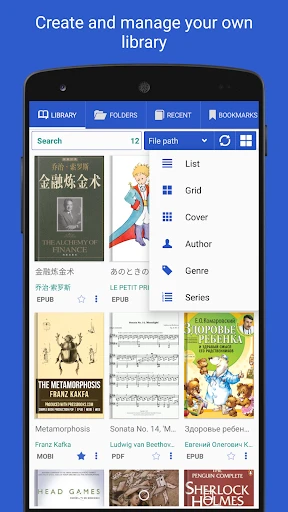
Librera PRO functions as a comprehensive document and ebook manager. Its primary capability is reading a vast array of file formats, including popular ebook types like EPUB, PDF, MOBI, and DJVU, as well as less common formats such as FB2, TXT, RTF, and even comic book archives (CBR, CBZ). The app provides a dual-engine rendering system for EPUB files, allowing users to choose the best rendering for their specific book. Core reading functions include adjustable text parameters (font, size, spacing, margins), multiple theme modes (day, night, sepia), and smooth scrolling or page-turning animations. It supports advanced PDF features like reflowing text, annotation, and form filling. Furthermore, it includes a built-in file browser, bookshelf organization with custom collections, a powerful search function within books and libraries, text-to-speech (TTS) support with synchronization, and translation capabilities via integrated dictionaries or online services.
Chapter 2: Value
The value proposition of Librera PRO lies in its unparalleled flexibility and depth of features, positioning it as a premium tool for serious readers. Its key advantage is format omnivorousness; it eliminates the need for multiple readers by handling virtually any document type in a single app. For academic and professional users, the robust PDF handling with annotations, highlights, and form support is invaluable. The app's extensive customization options are a major strength, allowing users to fine-tune every visual and interactive element to reduce eye strain and optimize comfort for long reading sessions. Features like the music-style equalizer for precise adjustment of text contrast and spacing go beyond typical reader apps. The integrated TTS engine with sync-to-voice turns it into an audiobook creator, while the translation and dictionary lookup tools break down language barriers. Unlike many free readers, Librera PRO is a one-time purchase with no subscriptions or ads, offering a clean, focused, and powerful environment. Its continuous development and active community support ensure it stays compatible with new Android versions and user needs, making it a cost-effective, long-term investment for managing a personal digital library.
Chapter 3: Scenarios
Librera PRO is ideally suited for specific user groups who demand more than a basic reading app. Students are primary beneficiaries, as they can handle textbooks in PDF, research papers, and EPUB novels all in one place, utilizing annotations, highlights, and in-book search for efficient study. Professionals who regularly review reports, manuals, and contracts on-the-go benefit from the precise PDF tools and annotation features. Avid book enthusiasts with large, multi-format libraries appreciate the sophisticated organization and customization that replicates or surpasses a dedicated e-ink device's flexibility. Linguists and language learners leverage the instant translation and dictionary integrations to read foreign language texts. Additionally, users with visual preferences or impairments find value in the granular control over text display and the high-quality TTS functionality. Everyday use cases include commuting, where the app's seamless performance and customizable display adapt to varying lighting conditions; academic research sessions, where cross-reference and note-taking are essential; and leisure reading at home, where creating the perfect personalized reading ambiance enhances immersion and comfort.
Uninstall Instructions
For step-by-step guidance on how to safely remove this application from your device, please refer to our 《Uninstall Instructions》 document.
Pros
- opens over 20 ebook formats without conversion
- vertical scrolling mimics web article reading flow
- tts reads aloud with background play and timer
- customizes tap zones and gesture controls extensively
- integrates with cloud storage and calibre library
Cons
- material design ui feels outdated and cluttered
- no built-in bookstore or content ecosystem
- advanced features require technical preference navigation
- syncing across devices relies on manual setup
- heavy customization can overwhelm casual readers
Frequently Asked Questions
What is Librera PRO and what can it do?
Librera PRO is a professional ebook reader application for Android. Its core functions include reading and managing a wide variety of document formats such as EPUB, PDF, DJVU, MOBI, and more. It positions itself as a feature-rich alternative to basic readers, offering advanced tools like text-to-speech (TTS), extensive customization for layout and fonts, document annotation, and library organization. It is designed for users who need powerful, flexible reading tools beyond standard viewing.
Is Librera PRO free to use or does it have in-app purchases?
Librera PRO is a paid application with a one-time purchase cost. There are no subscriptions or recurring fees. The PRO version is the full, unlocked product of the free 'Librera Reader' app. The purchase removes advertisements and grants access to all advanced features permanently, such as enhanced TTS controls, more theme options, and additional customization settings, without any further in-app purchases required.
What file formats and devices does Librera PRO support?
Librera PRO supports a vast range of formats including EPUB, PDF, DJVU, MOBI, FB2, TXT, RTF, AZW, AZW3, HTML, and comic book archives (CBR, CBZ). It is exclusively available for Android devices, including phones, tablets, and e-ink based e-readers running Android OS. It does not have versions for iOS, Windows, or macOS. The app is highly adaptable to different screen sizes and e-ink displays.
How does Librera PRO handle document synchronization across devices?
Librera PRO does not have a built-in, proprietary cloud synchronization service. Users can sync their reading progress and libraries by utilizing third-party cloud storage folders (like Dropbox, Google Drive) and configuring the app to read from these directories. This method requires manual setup. The app focuses on local device management and does not offer automatic, seamless syncing of bookmarks and progress between different devices by default.
Can I customize the reading interface and controls in detail?
Yes, deep customization is a key technical feature. You can extensively modify the reading interface, including font type, size, margins, line spacing, background/theme colors (with day/night modes), and tap zone controls. For PDFs, it offers reflow, cropping, and contrast adjustment. The app also supports creating custom profiles for different document types, allowing you to save and switch between personalized reading setups instantly.
App Info
Technical Info
Recommended For You

ATOM Store, Myanmar
Communication

aiMail - Al Email Accounts
Communication

RateByFresh
Beauty

Webmotors: comprar carro
Auto & Vehicles

Zoom Workplace for Intune
Business

Cat Maker: Cat Emoji Sticker
Art & Design

Arvin® - AI Logo Maker
Art & Design

LINE: Calls & Messages
Communication

Diamond Painting by Number
Art & Design

Email - Fast and Smart Mail
Communication

Workforce Tools
Business

Cover Hunter - 3v3 Team Battle
Comics

Amazon Flex
Business

CarMax: Used Cars for Sale
Auto & Vehicles

DeepL Translate
Books & Reference

Paint
Art & Design

Job Hai - Search Job, Vacancy
Business

iScanner - PDF Scanner App
Business

Sketchbook Lite - Artbook
Art & Design

Joyread
Books & Reference