
TeslaMirror
Screenshots


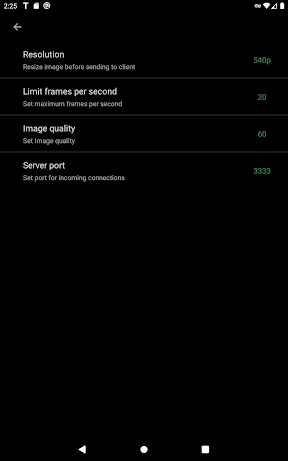
Description
About TeslaMirror App Features – Your Digital Companion for the Tesla Experience
TeslaMirror is a dedicated third-party application designed to enhance the ownership experience for Tesla drivers. By seamlessly connecting with the vehicle's onboard systems through secure APIs, it extends functionality beyond the official Tesla app, offering deeper insights, greater convenience, and personalized control. It serves as a powerful digital companion, transforming how users interact with their vehicles, access data, and manage their electric driving lifestyle from their smartphones.
Chapter 1: Function
TeslaMirror operates by establishing a secure connection to the user's Tesla vehicle. Its core functions revolve around advanced vehicle monitoring, data analytics, and remote command execution. Users can view real-time and historical data on driving efficiency, battery health, and energy consumption in detailed graphs. The app provides comprehensive status checks, including precise tire pressure readings, cabin temperature zones, and detailed charging statistics and projections. Beyond monitoring, it enables sophisticated remote commands such as preconditioning the cabin to an exact temperature, remotely starting the vehicle, controlling windows and trunk, and scheduling charging sessions based on utility rates. It also aggregates trip logs, calculating energy costs and efficiency scores per journey.
Chapter 2: Value
The primary value of TeslaMirror lies in its empowerment of the owner through data transparency and enhanced remote convenience. Unlike the official app, it often surfaces granular vehicle data, offering unparalleled insights into battery degradation trends, phantom drain analysis, and the impact of driving behavior on range. This transforms ownership from mere usage to informed stewardship, helping users optimize battery longevity and overall vehicle health. Its automation and scheduling capabilities provide tangible advantages, such as reducing energy costs by scheduling charging during off-peak hours automatically or ensuring the cabin is perfectly conditioned at departure time without daily manual input. For the tech-savvy owner, this data-driven approach demystifies the vehicle's performance. Furthermore, the app's interface often presents this wealth of information in a more customizable and digestible dashboard format, allowing users to track exactly the metrics they care about most. It adds a layer of personalized utility, filling gaps and extending possibilities, thereby deepening the integration of the Tesla into the user's daily digital ecosystem and smart home routines.
Chapter 3: Scenarios
TeslaMirror is ideally suited for Tesla owners who are enthusiastic about data, efficiency, and maximizing their vehicle's potential. Its primary user groups include daily commuters who wish to meticulously track energy costs and optimize charging schedules for savings, and long-distance travelers who benefit from detailed trip logging and advanced preconditioning settings for comfort and range preservation. Tech enthusiasts and early adopters will appreciate the deep analytics and ability to monitor subtle vehicle metrics. Fleet managers or families with multiple drivers can use the detailed trip logs to review usage patterns. Practical everyday scenarios involve a user checking the app to see if their vehicle completed its scheduled charging during the cheap overnight rate, remotely venting the windows on a hot summer day before walking to the car, or analyzing a week's driving data to understand how a recent change in route affected overall efficiency. It is the go-to tool for owners who want more command and insight than the standard offering provides.
Uninstall Instructions
For step-by-step guidance on how to safely remove this application from your device, please refer to our 《Uninstall Instructions》 document.
Pros
- real-time vehicle data overlay on windshield via HUD
- integrates navigation and speed data without phone mount
- minimalist UI reduces distraction while driving
- low-latency Bluetooth sync with Tesla's API
- customizable data widgets for tire pressure
- range
Cons
- requires specific Tesla model and year compatibility
- HUD projection visibility fades in direct sunlight
- dependent on Tesla's third-party API stability
- initial calibration needs precise windshield angle
- no offline mode if vehicle connectivity drops
Frequently Asked Questions
What is TeslaMirror and what does it do?
TeslaMirror is a companion mobile application designed for Tesla vehicle owners. Its core function is to mirror and extend key vehicle information and controls from the Tesla to your smartphone. It provides real-time data like battery status, location, and allows for basic remote commands such as pre-conditioning the cabin. It acts as a secondary, convenient interface for monitoring your vehicle.
Is TeslaMirror free to use, and are there in-app purchases?
TeslaMirror is a free application to download and use for its basic monitoring features. However, access to advanced remote control functions or historical data analytics may require a premium subscription, which is managed through in-app purchases. The app may display advertisements. Specific pricing tiers for premium features are detailed within the app's subscription settings.
What devices and systems is TeslaMirror compatible with?
TeslaMirror is currently available for iOS and Android smartphones. It requires a stable internet connection and pairs with your Tesla vehicle via your official Tesla account credentials. The app is optimized for recent OS versions. It is specifically designed for Tesla owners and does not support other vehicle brands. Compatibility with specific Tesla models is listed on the app's official download page.
How does TeslaMirror differ from the official Tesla app?
TeslaMirror is a third-party application that supplements the official Tesla app. Its unique features often include different data visualization layouts, customizable alerts, and potentially longer data history. However, it relies on the Tesla API and may not support all real-time commands or have the same security level as the official app. Critical safety functions should always be performed through the official Tesla channels.
What should I do if the app fails to connect to my vehicle?
First, ensure your phone has internet access and your Tesla vehicle is in a location with cellular connectivity. Verify you are using the correct Tesla account credentials within TeslaMirror. Restarting the app and your phone can often resolve temporary glitches. If problems persist, check the app's support section for server status or contact TeslaMirror's customer support via the email provided in the app store listing, as this is not an official Tesla service issue.
App Info
Technical Info
Recommended For You

Floor Plan Creator
Art & Design
TeslaMirror
Auto & Vehicles

PrinterShare Premium Key
Business

Mark - AI Logo Generator
Art & Design

Skin Bliss: Skincare Routines
Beauty

Bible Hub
Books & Reference

Dual App - Web Scanner App
Communication

LogMeIn Rescue Customer
Business

Battle Royale Chapter5 Season2
Books & Reference

Handy Art Reference Tool
Comics

Asiacell
Business

Telegram
Communication

SelfComic: Super Saiyan Photo
Comics

Adobe Express: AI Photo, Video
Art & Design

VIN Check Report for Used Cars
Auto & Vehicles

TapRead - Romance Stories
Books & Reference

Legion Workforce Engagement
Business

Perfect Viewer
Comics

AARP SafeTrip™
Auto & Vehicles

Leonardo.Ai - Image Generator
Art & Design