
ScanBizCards Premium
Screenshots



Description
About ScanBizCards Premium Feature
ScanBizCards Premium is a professional-grade mobile application designed to digitize and manage business cards efficiently. It transforms the traditional process of handling physical cards by leveraging advanced optical character recognition technology to instantly capture, read, and organize contact details. The app serves as a powerful digital Rolodex, enabling users to swiftly convert paper-based information into structured, searchable, and actionable digital contacts. By automating data entry and integration, it eliminates manual typing errors and saves significant time, making it an essential tool for professionals, salespeople, and networkers who frequently exchange business cards. The premium version enhances this core experience with advanced features, offering a seamless bridge between physical networking and digital contact management.
Chapter 1: Function
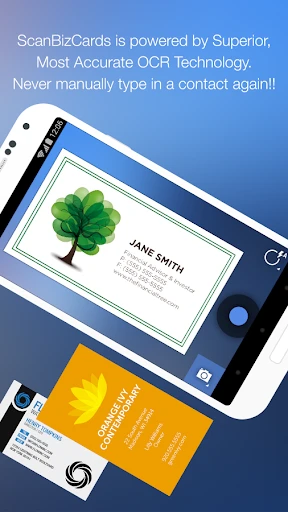
ScanBizCards Premium performs one primary function with high precision: scanning and processing business cards. Upon launching the app, users can capture a card using their device's camera. The built-in OCR engine immediately extracts all textual information, including name, job title, company, phone numbers, email addresses, and social media profiles. The app then automatically populates these details into a new, neatly organized digital contact entry within its system. Beyond mere capture, it offers functions like deduplication, merging entries from the same contact, and allowing for manual edits to correct any OCR inaccuracies. Users can also add notes, set reminders for follow-ups, and categorize contacts with tags. Furthermore, the app supports batch scanning, enabling the processing of multiple cards in quick succession, which streamlines the digitization of entire stacks of cards received at events or meetings.
Chapter 2: Value
The value proposition of ScanBizCards Premium lies in its ability to dramatically enhance productivity and organization in professional networking. Its key advantage is the elimination of tedious manual data entry, which is not only time-consuming but also prone to errors. By automating this process with accurate OCR, the app ensures contact data is captured correctly and instantly. A significant value add is its deep integration capabilities; ScanBizCards Premium can seamlessly sync extracted contacts directly to native address books on iOS and Android, as well as to popular CRM platforms like Salesforce, HubSpot, and Microsoft Outlook. This creates a unified, up-to-date contact ecosystem without double handling. The premium version offers cloud backup and cross-device synchronization, ensuring a user's valuable network is never lost and is accessible from anywhere. Enhanced search functionality allows users to find contacts instantly using any captured detail, from company name to job title. The app also provides tools for nurturing professional relationships, such as follow-up reminders and activity logging. Compared to the free version, Premium offers higher scanning limits, superior OCR accuracy for complex card designs, and the removal of advertisements, delivering a frictionless, professional-grade experience that protects and leverages one's professional network as a tangible asset.
Chapter 3: Scenarios
ScanBizCards Premium is ideally suited for professionals and individuals for whom networking is a critical component of their work or personal growth. The primary target user groups include sales representatives and business development executives who attend numerous conferences, trade shows, and client meetings, accumulating dozens of cards weekly. For them, the app is indispensable for quickly processing leads and integrating them into their sales pipeline. Entrepreneurs and startup founders, who constantly network with potential investors, partners, and mentors, benefit from keeping their contacts meticulously organized and actionable. Recruiters and HR professionals, who collect candidate information at job fairs and networking events, use the app to build and manage talent pools efficiently. Additionally, journalists, researchers, and academics attending seminars can use it to maintain contacts with sources and peers. Everyday use cases involve scanning cards immediately after a meeting to ensure details are captured while the interaction is fresh, using the reminder function to schedule a follow-up email or call, and before a business trip, searching the app's database to quickly find and connect with local contacts in the destination city. It transforms the post-event chore of sorting through a pile of cards into a simple, quick digital workflow.
Uninstall Instructions
For step-by-step guidance on how to safely remove this application from your device, please refer to our 《Uninstall Instructions》 document.
Pros
- extracts contact details with one photo tap
- auto-links contacts to crm and linkedin profiles
- batch scan mode for processing multiple cards swiftly
- preserves original card image for visual reference
- offline functionality ensures data privacy and speed
Cons
- premium subscription required for cloud sync features
- handwritten or non-standard card layouts reduce accuracy
- linkedin integration depends on third-party api stability
- high-volume scans may slow older device performance
- limited value for users not managing large contact networks
Frequently Asked Questions
What is ScanBizCards Premium and what does it do?
ScanBizCards Premium is a business card scanner app for professionals. It uses OCR to instantly digitize contact details from physical cards into your phone's address book. Its core functions include high-accuracy scanning, automatic data extraction, and seamless contact management. Unique features often include de-duplication, cloud sync, and CRM integration, positioning it as a tool to eliminate manual data entry and organize networking contacts efficiently.
Is ScanBizCards Premium free to use, or are there in-app purchases?
The app uses advanced OCR technology for high accuracy, but results can vary based on card design, print quality, lighting, and camera steadiness. It excels with standard, clear-text business cards. For complex layouts or handwritten notes, manual correction may be needed. The Premium version often includes editing tools to verify and correct extracted data before saving to ensure your contact list remains clean and accurate.
What devices and operating systems does this app support?
ScanBizCards typically operates on a freemium model. The basic version may offer limited scans. 'Premium' indicates a paid tier, usually via subscription or one-time purchase, unlocking unlimited scans, advanced features like CRM exports, and cloud backup. Specific pricing is set by the developer and can be found in the app's store listing or within the app itself. No additional hardware is required beyond your device's camera.
How accurate is the card scanning and data extraction?
ScanBizCards Premium is primarily designed for iOS and Android mobile devices. It requires a camera and a relatively modern operating system version (e.g., iOS 13+ or Android 8+). The app is generally adapted for smartphones and tablets. It is suited for business professionals, salespeople, and event attendees. For the most current and specific compatibility requirements, please check the official app store description.
What happens to my scanned data and is it secure?
Your scanned data is stored locally on your device. Premium features may include optional, secure cloud sync (using services like iCloud or Google Drive) for backup and cross-device access. The app's privacy policy details data handling. Typically, the app processes cards offline or on secure servers without sharing your data with third parties for marketing. For specific security protocols, please refer to the developer's official privacy documentation.
App Info
Technical Info
Recommended For You

Gospel Library
Books & Reference

Funny Jokes And Riddles
Comics

BeenVerified Background Search
Communication

Hyundai Digital Key
Auto & Vehicles

Phoenix - Fast & Safe
Communication

Taximeter
Auto & Vehicles

Marathon ARCO Rewards
Auto & Vehicles

Messages: Text SMS
Communication

HD Camera for Android
Beauty

미스터블루 - 웹툰, 만화, 소설앱
Comics

AlfaOBD
Auto & Vehicles

Video Call
Communication

Truecaller: Caller ID Blocker
Communication

AR Drawing Sketch Paint
Art & Design

HerBible--Verses&Prayer
Books & Reference

Messenger - SMS Messages
Communication

Inbox Homescreen
Communication

Flowt Wear
Auto & Vehicles

Uber Eats Orders
Business

StoryFont for Instagram Story
Art & Design