
AlfaOBD
Screenshots
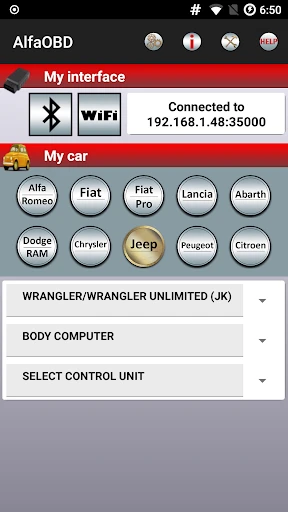
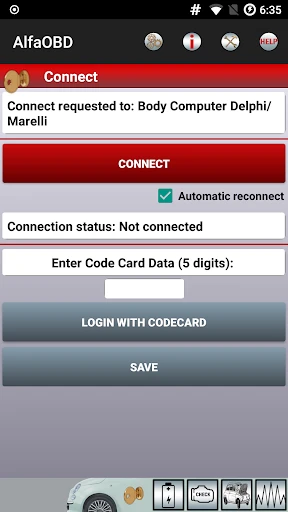
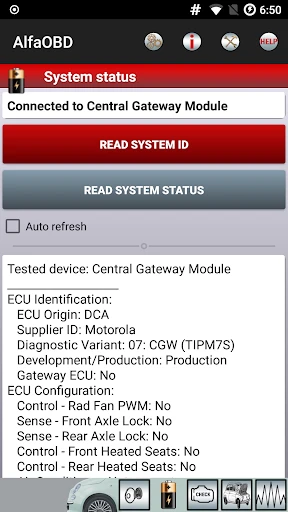

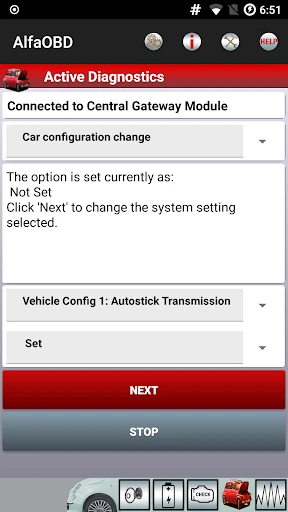
Description
About AlfaOBD Feature – The Professional's Gateway to Advanced Vehicle Configuration
AlfaOBD is a powerful, professional-grade diagnostic and configuration application designed primarily for Chrysler, Dodge, Jeep, Ram, and Fiat (FCA/Stellantis) vehicles, extending to some other brands. Unlike standard OBD2 scanners that read basic engine codes, AlfaOBD provides deep access to the vehicle's various control modules, enabling advanced diagnostics, customization of hidden settings, and programming of new components. It requires specific hardware interfaces to connect to the vehicle's diagnostic port, positioning itself as an essential tool for advanced enthusiasts, installers, and technicians seeking capabilities far beyond consumer-level tools.
Chapter 1: Function
AlfaOBD's core functionality revolves around advanced bidirectional communication with a vehicle's electronic control units (ECUs). The app allows users to read and clear diagnostic trouble codes from all accessible modules, not just the engine. Its primary power lies in active testing and configuration. Users can perform procedures like activating new features, calibrating sensors, and programming keys or modules. A central function is accessing the car's configuration settings, often hidden from standard diagnostics. This includes enabling or disabling specific options, adjusting lighting behaviors, setting tire size for accurate speedometer readings, and configuring settings for added accessories. The app also provides live data monitoring from various sensors and modules, offering a detailed real-time view of vehicle parameters. It supports service functions such as resetting adaptation values, performing actuator tests, and running system checks, making it a comprehensive software tool for in-depth vehicle interfacing.
Chapter 2: Value
The value proposition of AlfaOBD is unparalleled access and customization for compatible vehicles, delivering professional-level capabilities at a fraction of the cost of dealer-grade tools. Its key advantage is the depth of control it grants, allowing users to enable factory-installed but software-disabled features, correct configurations after modifications, and diagnose complex issues across multiple systems. This empowers users to personalize their vehicles and perform advanced repairs without sole reliance on dealerships, leading to significant cost savings and greater vehicle ownership autonomy. For off-road enthusiasts modifying Jeeps or Ram trucks, it is indispensable for tasks like calibrating speedometers after lift kits and tire changes, or activating auxiliary lighting controls. For installers integrating security systems or entertainment units, it allows seamless configuration of the vehicle's CAN bus systems. The app's detailed live data and extensive code library facilitate precise diagnostics, often pinpointing issues that generic scanners miss. While it has a learning curve and requires compatible hardware, its active development community and detailed documentation provide substantial support. Ultimately, AlfaOBD transforms a compatible Android or Windows device into a potent diagnostic computer, offering value through empowerment, customization, and deep diagnostic insight unavailable through conventional means.
Chapter 3: Scenarios
AlfaOBD's primary user groups are automotive enthusiasts, professional installers, and independent technicians specializing in FCA/Stellantis vehicles. Jeep Wrangler and Gladiator owners form a significant user base, frequently utilizing the app to configure settings after installing larger tires, lift kits, or adding auxiliary switches and lights. Ram truck owners use it for similar modifications and to enable features like trailer light checking or security system adjustments. Car audio and security installers rely on it to program the vehicle to recognize new RF hubs for key fobs, integrate aftermarket alarms, or resolve CAN bus integration issues when installing new electronics. Independent repair shops find it valuable for advanced diagnostics beyond engine codes, such as addressing problems with body control modules, air suspension systems, or advanced driver-assistance systems (ADAS). Everyday use cases include programming a new key fob, enabling automatic high-beam headlights or rain-sensing wipers if the hardware is present, disabling annoying chimes, changing the number of turn-signal blinks for lane changes, resetting the oil life indicator after a service, or diagnosing an intermittent electrical fault by monitoring live data from specific modules during a drive.
Uninstall Instructions
For step-by-step guidance on how to safely remove this application from your device, please refer to our 《Uninstall Instructions》 document.
Pros
- enables deep customization of vehicle electronic modules
- accesses manufacturer-level diagnostic data and functions
- performs advanced coding without dealer-specific tools
- supports a wide range of FCA/Stellantis vehicle models
- allows feature activation via simple USB adapter connection
Cons
- requires a specific compatible OBD2 interface adapter
- steep learning curve for non-technical vehicle owners
- interface lacks the polish of consumer-focused apps
- potential risk of voiding factory warranty with modifications
- primarily tailored for FCA brands
- limiting broader use
Frequently Asked Questions
What is AlfaOBD and what does it do?
AlfaOBD is a professional-grade diagnostic and vehicle configuration application for Chrysler, Dodge, Jeep, Ram, and Fiat (FCA/Stellantis) vehicles. Its core function is to interface with a vehicle's computer systems via a compatible OBD2 adapter to read fault codes, display live data, perform advanced diagnostics, and modify vehicle settings. This includes enabling hidden features, calibrating new components, and adjusting module configurations not typically accessible through standard tools.
What equipment do I need to use AlfaOBD?
To use AlfaOBD, you need a Windows PC or an Android device. Crucially, you must have a compatible OBD2 interface adapter that supports the STN or STN1170 family of chipsets, such as the OBDLink MX+ or a similar J2534 passthrough device. The app itself is not free; you must purchase a license. A secure gateway bypass module may also be required for certain programming tasks on newer vehicles to access protected systems.
Is AlfaOBD compatible with my specific vehicle?
AlfaOBD is specifically designed for FCA/Stellantis group vehicles from approximately 2006 onward, including brands like Chrysler, Dodge, Jeep, Ram, and Fiat. Compatibility depends on your vehicle's model, year, and the specific control modules it contains. It is not a generic OBD2 scanner for all car brands. You should consult the official developer resources and vehicle compatibility lists to confirm support for your exact make, model, and year before purchase.
Can AlfaOBD cause damage to my vehicle's computer?
Performing advanced configuration and programming carries inherent risks. Incorrect use of AlfaOBD, such as writing inappropriate values to control modules, can potentially cause malfunctions or render systems inoperable. The app provides powerful low-level access, so it is intended for users with technical knowledge of automotive systems. It is strongly recommended to back up original module configurations before making changes. The developer is not liable for vehicle damage resulting from the use of the application.
Where can I get support for technical issues?
Primary support and detailed technical documentation are provided through the official AlfaOBD website and its associated forums. For issues related to specific vehicle procedures, adapter compatibility, or programming errors, the user community forums are the most active resource. The developer does not typically offer direct customer service via email or phone for detailed technical guidance. There is no formal warranty for the software itself, but updates are periodically released to add features and vehicle support.
App Info
Technical Info
Recommended For You

Alight Mobile
Business

Whitepages - Find People
Communication

Logo Master - Design & Maker
Art & Design

Perfect365 Makeup Photo Editor
Beauty

Pocket Toons
Comics

Temp Mail - Temporary Email
Communication

KJV Bible: Audio+Verse
Books & Reference

FlipArtify - 2D Draw Animation
Art & Design

Quran Majeed – القران الكريم
Books & Reference

Yelp for Business
Business

Face Beauty Makeup Camera-Self
Beauty

VoyceMe: Manga and Webtoons
Comics

Bible: Advent Prayers & Verses
Books & Reference

Paycor Mobile
Business

Fashion Design Sketches Book
Art & Design

Google Chat
Business

aesthetic background
Art & Design

E-PASS Toll App
Business

Simple Drawing - Sketchbook
Art & Design

FAX App: Send Faxes from Phone
Business