
Messages: Text SMS
Screenshots

Description
About Messages: Text SMS Feature
Messages: Text SMS is a streamlined and efficient messaging application designed for Android devices, serving as a reliable alternative to pre-installed SMS clients. It focuses on providing a clean, user-friendly interface for managing all text-based communications, including SMS and MMS. The app prioritizes simplicity and speed, ensuring that sending and receiving messages is a straightforward and hassle-free experience. By consolidating conversations in an organized manner and offering essential customization options, it caters to users who seek a no-frills, effective solution for their daily texting needs without the complexity of additional social features or bloated functionalities.
Chapter 1: Function
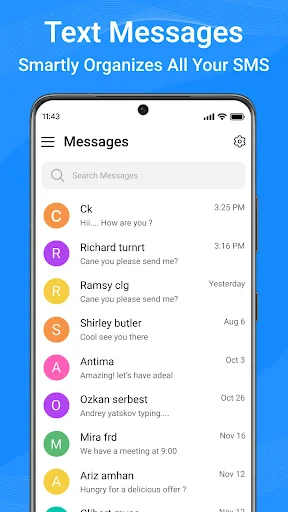
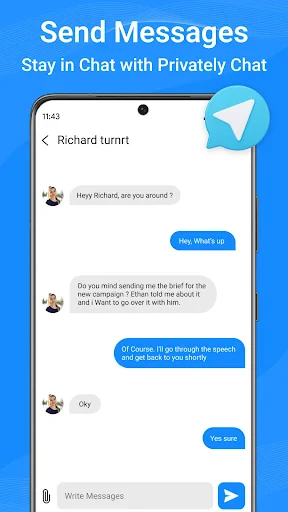
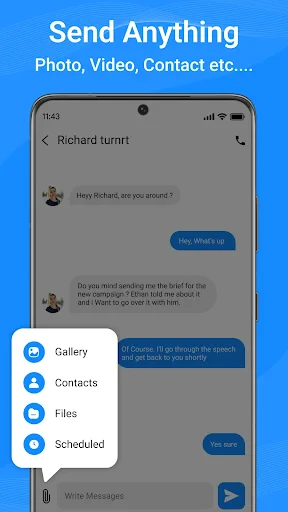
The core function of Messages: Text SMS centers on facilitating basic and group text messaging via SMS and MMS protocols. It allows users to send and receive individual and group messages, supporting multimedia content such as pictures, videos, and audio files. The app organizes conversations into a clear, threaded inbox, enabling easy tracking of discussions. Key operational features include message scheduling, search functionality within conversations, and customizable notification settings for different contacts. It also manages delivery reports and provides options for backing up and restoring message history. The interface is designed for intuitive navigation, with quick access to contacts and a straightforward composition window, ensuring the fundamental act of texting is efficient and uncluttered.
Chapter 2: Value
The primary value proposition of Messages: Text SMS lies in its dedication to simplicity, reliability, and user control. In a market saturated with messaging apps overloaded with features, this app distinguishes itself by excelling at the basics. Its key advantage is a lightweight, fast-performing design that consumes minimal system resources, resulting in quick launch times and smooth operation even on older or budget Android devices. The app offers a clean, ad-free experience in its core version, reducing distractions. It empowers users with practical customization, allowing them to set individual ringtones, LED colors, and vibration patterns for specific contacts, thereby enhancing message management without complexity. Furthermore, its focus on privacy and local data control is a significant advantage; messages are handled through the device's standard cellular network protocols without routing through unnecessary third-party servers, appealing to users cautious about data privacy. By providing a stable, straightforward, and efficient texting tool, it delivers undeniable value for anyone seeking a dependable daily communication utility that simply works.
Chapter 3: Scenarios
The primary target users for Messages: Text SMS are individuals who prioritize straightforward, reliable text communication over advanced social features. This includes users with basic or older Android smartphones who need a responsive app that doesn't strain device performance. It is also ideal for professionals or anyone who prefers a clean, organized inbox for managing work-related or important personal SMS, such as verification codes, appointment reminders, and logistics updates. Furthermore, it serves users in areas with limited or expensive mobile data, as SMS relies on cellular networks rather than internet connectivity. Everyday use cases involve sending quick personal or family updates, coordinating plans within group chats, receiving crucial alerts from banks or services, and sharing moments via picture messages. It is the go-to tool for all standard cellular-based texting needs, ensuring users stay connected in the most fundamental and widespread way.
Uninstall Instructions
For step-by-step guidance on how to safely remove this application from your device, please refer to our 《Uninstall Instructions》 document.
Pros
- merges all messaging threads into a single unified inbox
- scheduled messaging works directly from the native SMS database
- lightweight app with negligible impact on device battery life
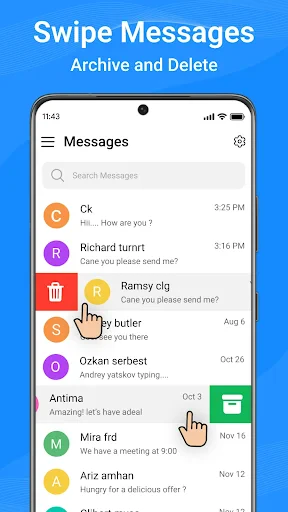
- one-tap archiving for bulk management of promotional messages
- no internet connection required for any core SMS functions
Cons
- lacks advanced AI-powered spam filtering found in competitors
- group messaging features are limited to basic MMS standards
- no cloud backup option
- reliant on local device storage
- customization of notifications per contact is not supported
- interface does not adapt themes for different SMS categories
Frequently Asked Questions
What is the core function of Messages: Text SMS?
Messages: Text SMS is a dedicated SMS messaging app. Its core function is to replace your device's default SMS application, providing a clean and organized interface for sending, receiving, and managing your traditional text (SMS) and multimedia (MMS) messages. It focuses on reliable delivery and basic conversation management without integrating third-party chat services.
Is Messages: Text SMS free to use?
The app is typically free to download and use for standard SMS/MMS messaging. However, it may contain advertisements. Some advanced features, such as enhanced customization themes, scheduled messaging, or the removal of ads, might be offered through optional in-app purchases. Your carrier's standard messaging rates apply for sending texts.
What unique features does this SMS app offer?
Unique features often include extensive visual customization options for chat bubbles and backgrounds, message scheduling, SMS backup and restore functionality, and enhanced privacy features like private box locking for specific conversations. It operates as a standalone client for your device's native SMS/MMS capabilities, adding a layer of personalization and control.
Does it require special permissions or equipment?
Yes. To function as your primary SMS app, it requires permission to access your SMS and MMS messages, contacts for easy addressing, and phone state to manage messages correctly. No additional hardware is needed. Granting SMS access is mandatory for core functionality, and denying it will prevent the app from sending or receiving texts.
How does it handle common SMS issues like failed sends?
The app relies on your device's cellular network connection for message transmission. Failed sends are usually due to network issues, incorrect recipient numbers, or carrier restrictions. The app may display a failure notification. Standard troubleshooting involves checking signal strength, ensuring the number is valid, and verifying your SMS plan has not expired or reached its limit.
App Info
Technical Info
Recommended For You

Blink Charging Mobile App
Auto & Vehicles

KJV Daily Bible - Verse+Audio
Books & Reference

Hush: Android Auto Audio Fix
Auto & Vehicles

AR Drawing - Sketchar App
Art & Design

Security Camera Mod Minecraft
Books & Reference

Tattoo Maker - Tattoo Design
Art & Design

2ndLine - Second Phone Number
Communication

Wonder Beauties
Beauty

AI Outfits: Try on Clothes
Art & Design

Samsung Internet Browser
Communication

Chevron
Auto & Vehicles

kungfu city fighting game
Comics

Spark Driver
Business

AR Drawing: Sketch, Art, Paint
Art & Design

Video AI - AI Hug & Kiss Maker
Art & Design

Picture Editor
Beauty

Phone by Grice
Communication

FedEx Mobile
Business

Workday
Business

JusTalk - Video Chat & Calls
Communication