
Gospel Library
Screenshots
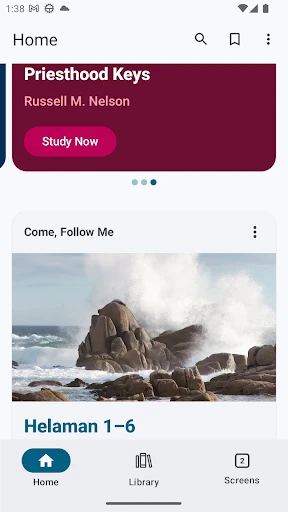
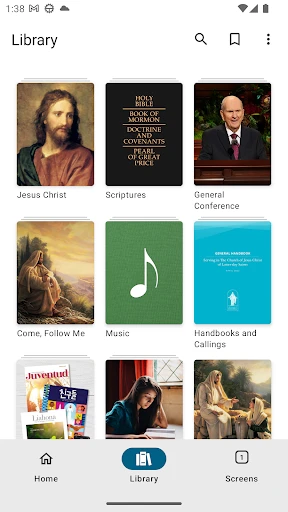
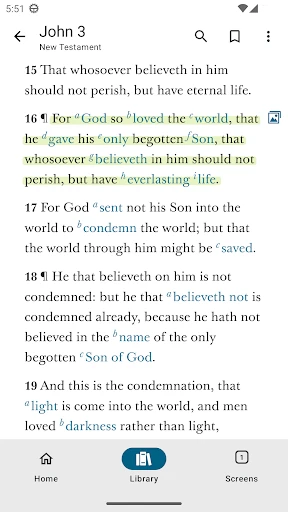
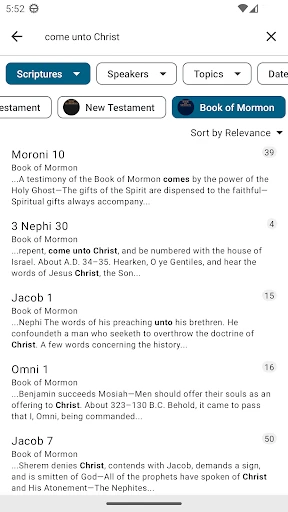
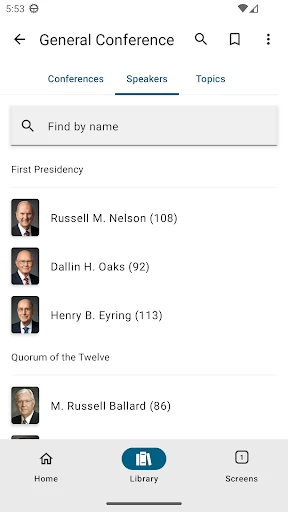
Description
About Gospel Library Features – Your Digital Companion for Spiritual Study
Gospel Library is a comprehensive, free mobile application developed by The Church of Jesus Christ of Latter-day Saints. It serves as a central digital repository for the Church's scriptures, gospel study manuals, magazines, music, and teaching resources. Available on both iOS and Android platforms, the app is designed to facilitate personal and family gospel study, offering powerful search, annotation, and synchronization tools. It supports multiple languages and provides content in various formats, including text, audio, and video, making it an essential tool for members and anyone interested in studying Latter-day Saint teachings.
Chapter 1: Function
Gospel Library's core functionality centers on providing immediate access to a vast, curated collection of spiritual content. Users can read the standard works of scripture, including the Bible, Book of Mormon, Doctrine and Covenants, and Pearl of Great Price, alongside official Church magazines like the Ensign and study manuals for Sunday classes. The app features robust search capabilities across its entire library, enabling users to find specific verses, topics, or quotes quickly. Key functional tools include the ability to highlight text in multiple colors, add personal notes and tags, create bookmarks, and link related passages together. It also offers audio versions of scriptures for listening, adjustable text sizes and themes for comfortable reading, and integrated media such as videos and music. All personal annotations and progress sync seamlessly across devices via a user account, ensuring a continuous study experience.
Chapter 2: Value
The primary value proposition of Gospel Library lies in its role as an authoritative, all-in-one digital study platform that deepens spiritual learning and connection. Its foremost advantage is the convenience of having a complete, portable gospel library that is constantly updated with the latest Church publications and content, all at no cost. This eliminates the need to carry multiple physical books and ensures users have access to the most current teachings and resources. The app's sophisticated study tools significantly enhance comprehension and retention. The ability to highlight, annotate, and cross-reference creates a personalized, interactive study journal. The synchronization feature is a critical value add, allowing users to seamlessly switch between a phone, tablet, or computer without losing their place or notes, fostering consistent study habits whether at home, commuting, or traveling. Furthermore, the inclusion of audio resources supports diverse learning styles and makes scripture study accessible during activities like driving or exercising. By integrating official manuals, conference talks, and multimedia, the app provides crucial context and authoritative interpretation, guiding users in their study and helping them prepare lessons and talks more effectively. It ultimately serves not just as a reading tool, but as a dynamic partner in fostering personal revelation and spiritual growth.
Chapter 3: Scenarios
Gospel Library is primarily targeted at members of The Church of Jesus Christ of Latter-day Saints of all ages, from youth to adults, as well as investigators and scholars of its teachings. Key everyday use cases are abundant. For personal daily study, individuals use the app to follow curated reading plans, listen to scriptures during a morning routine, or delve into a specific gospel topic using the search function. In family settings, parents utilize the app to lead scripture study with children, displaying verses on a shared screen or playing audio versions for younger listeners. Church teachers and leaders heavily rely on the app to prepare lessons for Sunday School, Relief Society, or Elders Quorum, quickly pulling together relevant scriptures, quotes from general conference talks, and supplemental media to create engaging lessons. Missionaries use it to study, share specific passages with people they meet, and access language resources in their mission area. Students in seminary and institute programs use its annotation tools for coursework. The scenarios extend to personal moments of seeking comfort or guidance, where a user might search for content on a particular challenge like patience or faith. In essence, Gospel Library integrates into the spiritual daily life of its users, supporting learning, teaching, and worship in virtually any context.
Uninstall Instructions
For step-by-step guidance on how to safely remove this application from your device, please refer to our 《Uninstall Instructions》 document.
Pros
- offline access to scriptures and church manuals
- syncs notes and highlights across all devices
- includes official study guides and audio versions
- search function works within downloaded content
- curated collections for topical study plans
Cons
- large storage needed for full multimedia libraries
- interface prioritizes text over modern visual design
- advanced features require church account login
- limited social or community annotation features
- updates can reset personal bookmark placements
Frequently Asked Questions
What is Gospel Library and what does it do?
Gospel Library is a free religious app that provides official scriptures, teachings, and study resources for The Church of Jesus Christ of Latter-day Saints. Its core function is to offer digital access to the Bible, Book of Mormon, Doctrine and Covenants, and Pearl of Great Price, along with church magazines, manuals, and conference talks. It enables users to read, search, highlight, take notes, and create cross-references across its extensive library. The app is designed for personal scripture study and gospel learning.
Is Gospel Library completely free to use?
Yes, Gospel Library is completely free to download and use. There are no in-app purchases, subscriptions, or hidden fees required to access its core library of scriptures and church publications. All content provided by The Church of Jesus Christ of Latter-day Saints is available without charge. The app does not display advertisements. An internet connection is needed primarily for downloading content updates or streaming audio/video, but most materials can be stored offline for free.
What devices and operating systems support Gospel Library?
Gospel Library is widely adapted for iOS (iPhone/iPad), Android devices, and Kindle Fire. It also has desktop versions for Windows and macOS. The app supports multiple languages and is optimized for various screen sizes. It synchronizes user data (notes, highlights, bookmarks) across all logged-in devices via a free Church Account. System requirements are generally aligned with current OS versions, and the app receives regular updates for compatibility and performance improvements.
How does the note-taking and synchronization feature work?
The app allows users to add highlights, tags, notes, and bookmarks directly to any verse or content. These personal annotations are saved locally and can be synchronized to the cloud by signing in with a free Church Account. Once synced, all annotations automatically appear across every device where the user is logged into the app. This ensures a seamless study experience. The sync process requires an internet connection and is managed from the app's settings. Data privacy is maintained per the Church's privacy policy.
Can I use Gospel Library without an internet connection?
Yes, Gospel Library functions fully offline after you download desired content. You must first use an internet connection to download scriptures, manuals, or other media to your device. Once downloaded, all reading, note-taking, highlighting, and accessing of that content can be done without an internet connection. Synchronization of notes and downloading new content, however, requires an active internet connection. It is recommended to download necessary materials via Wi-Fi before going offline.
App Info
Technical Info
Recommended For You

RSA Authenticator (SecurID)
Communication

Forex Trading for Beginners
Books & Reference

Picify: AI Art Editor
Art & Design

Pratilipi Novel
Books & Reference

Beauty Calculator Pretty Scale
Beauty

Public Storage
Business

Face scan - How old do I look
Beauty

NDI HX Camera: Easy Streaming
Communication

Bible Hub
Books & Reference

Carrier Services
Communication

Salesforce Authenticator
Business

Paycor Mobile
Business

Chrome Dev
Communication

CarGurus: Used & New Cars
Auto & Vehicles

Bimma EWD - Wiring Diagrams
Auto & Vehicles

NIV Bible
Books & Reference

Member Tools
Books & Reference

Manga UP!
Comics

telebirr
Business

PDF Reader: Edit & Convert PDF
Business