
Uber Eats Orders
Screenshots


Description
About Uber Eats Orders Feature - Delivering Convenience to Your Doorstep
Uber Eats Orders is the dedicated ordering platform within the broader Uber Eats ecosystem, designed to connect users with a vast network of local restaurants and grocery stores for on-demand delivery and pickup. It leverages the sophisticated logistics technology of Uber to facilitate a seamless transaction from browsing menus to tracking the arrival of your order. The app serves as a digital gateway to countless culinary options, offering a streamlined solution for satisfying food cravings and essential grocery needs without leaving home.
Chapter 1: Function
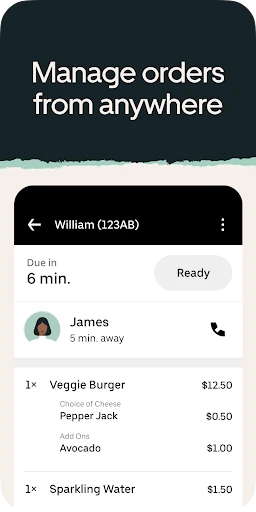
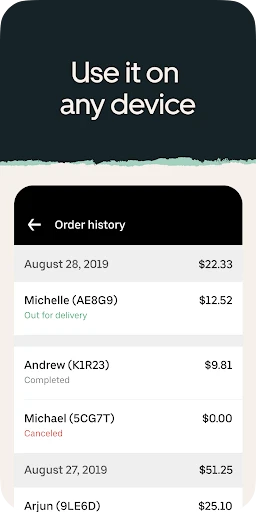
The core function of the Uber Eats Orders app is to facilitate end-to-end food and grocery ordering and delivery. Users begin by entering their delivery address to see available local restaurants and stores. They can then browse detailed menus, apply filters for cuisine, dietary preferences, or delivery time, and compile their order. The app integrates a secure payment system, allowing users to pay via card, digital wallets, or cash where available. Once an order is placed, its real-time status is tracked on a map, showing preparation progress and the courier's route for live estimated delivery updates. Additional functionalities include order history review, favorite item saving, and direct customer support for any issues.
Chapter 2: Value
The primary value proposition of Uber Eats Orders lies in its unparalleled convenience, extensive choice, and reliable service. It saves users significant time and effort by bringing a world of dining and shopping options directly to them, which is particularly valuable for busy professionals, families, or individuals with mobility constraints. A key advantage is the vast and diverse partner network, encompassing everything from high-end restaurants to local favorites and convenience stores, often featuring exclusive in-app offers. The app's sophisticated matching and routing algorithms, inherited from Uber's ride-hailing expertise, aim to optimize delivery efficiency, providing accurate time estimates and reducing wait times. Furthermore, features like upfront pricing, transparent fee breakdowns, and user ratings for both restaurants and couriers foster trust and informed decision-making. The seamless integration with the broader Uber platform allows for a unified experience, and the constant introduction of new features, like group ordering or scheduled deliveries, enhances its utility, making it more than just a food delivery tool but a comprehensive on-demand logistics solution for daily sustenance needs.
Chapter 3: Scenarios
Uber Eats Orders primarily targets urban and suburban dwellers with busy lifestyles who prioritize time-saving solutions. Key user groups include working professionals who have limited time for meal preparation, students managing academic schedules, and families seeking convenient dinner solutions or last-minute grocery items. It is also invaluable for social gatherings, allowing hosts to order food for groups, and for individuals hosting guests or working late who need sustenance delivered. Everyday use cases are varied: ordering a quick lunch during a work-from-home day, arranging a family dinner when no one can cook, satisfying late-night cravings, procuring emergency ingredients for a recipe, or discovering new local restaurants from the comfort of one's sofa. The service is also a practical tool for those feeling unwell or under weather conditions that make going out undesirable, ensuring access to meals and essentials safely and reliably.
Uninstall Instructions
For step-by-step guidance on how to safely remove this application from your device, please refer to our 《Uninstall Instructions》 document.
Pros
- real-time order tracking with delivery partner's live location
- wide restaurant selection includes local-only eateries
- scheduled deliveries available up to a week in advance
- in-app group ordering simplifies shared meal coordination
- allergy filters and dietary preference tags for menu items
Cons
- delivery fees surge significantly during peak demand hours
- menu prices often higher than direct restaurant pricing
- limited functionality in suburban or low-density areas
- customer support relies primarily on in-app chat bots
- requires precise location permissions for full functionality
Frequently Asked Questions
What is Uber Eats and what does it do?
Uber Eats is a food delivery and takeout app. It connects users with local restaurants, allowing them to browse menus, place orders, and have meals delivered to their doorstep. The app provides real-time tracking for both order preparation and courier delivery. Its core function is to facilitate convenient meal ordering from a wide variety of eateries.
Is Uber Eats free to use, and what are the costs?
Downloading and using the Uber Eats app is free. However, users pay for the food ordered, a delivery fee, and any applicable service fee or tip for the delivery person. The final cost is displayed before order confirmation. Some restaurants may have a minimum order requirement. Optional Uber Eats membership programs may offer reduced fees.
What devices and systems does Uber Eats support?
Uber Eats is available for smartphones and tablets. It supports both iOS and Android operating systems. Users can download it from the Apple App Store or Google Play Store. The service is also accessible via a web browser on computers. It requires a stable internet connection and is available in many cities and countries worldwide.
How does the real-time order tracking work?
After placing an order, the app provides a live map tracking the courier's location from the restaurant to your delivery address. You receive status updates for order confirmation, preparation, pickup, and estimated delivery time. This feature uses GPS technology. It allows users to see the progress without needing to contact the restaurant or driver directly.
What should I do if there's an issue with my order?
For any problems like missing items, incorrect orders, or delivery issues, use the 'Help' section within the Uber Eats app. You can select the specific order and describe the problem to request a refund or credit. Support is handled in-app, and resolution is typically based on the reported issue. For immediate delivery-related problems, you can also contact the courier through the app.
App Info
Technical Info
Recommended For You

Al Quran Sharif for Muslim
Books & Reference

CDisplayEx Comic Reader Lite
Comics

Picky - Beauty Community
Beauty

Booksy Biz: For Businesses
Beauty

PAeDocket
Books & Reference

Microsoft Edge: AI browser
Communication

AAWireless for Android Auto™
Auto & Vehicles

SMS Auto Reply - Autoresponder
Communication

Reolink
Communication

All Email Login
Communication

Blink Beauty Cam: Photo Makeup
Beauty

Penny Puss 2.0
Business

Color by Number for Adults
Art & Design

PSA | Card Grading Service
Books & Reference

Thunderbird: Free Your Inbox
Communication

Beauty Camera Selfie Makeup
Beauty

Sketchbook
Art & Design

Dynamic Drive
Auto & Vehicles

MyFrontier
Communication

eBird by Cornell Lab
Books & Reference