
Solo: Your Gig Business App
Screenshots

Description
About Solo: Your Gig Business App Features – Streamlining Independent Work
Solo: Your Gig Business App is a comprehensive mobile application designed specifically for freelancers, independent contractors, and solo entrepreneurs. It serves as an all-in-one toolkit to manage the administrative and financial aspects of gig work. By integrating essential business functions into a single platform, Solo aims to empower individuals who work for themselves, allowing them to focus more on their craft and less on the logistical overhead. The app provides a streamlined experience for tracking projects, invoicing clients, managing expenses, and understanding profitability, effectively acting as a personal business manager in your pocket.
Chapter 1: Function
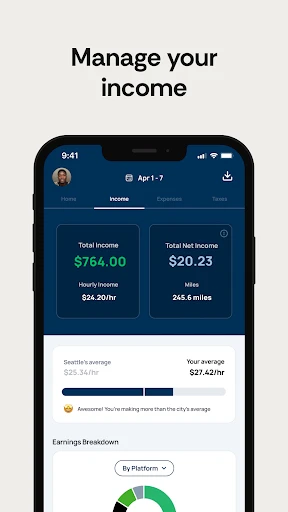
Solo's core functionality centers on simplifying the operational tasks of running a solo business. The app enables users to create and send professional invoices directly to clients, with options for customization and automated payment reminders. It features robust time tracking tools, allowing users to monitor hours spent on different projects with precision. Expense management is another key function, permitting users to log business costs by capturing receipts and categorizing outlays. Furthermore, Solo offers project and client management capabilities, helping users organize their workload. Financial overview dashboards consolidate income, expenses, and tax estimates, giving a clear, real-time snapshot of business health. These integrated tools work seamlessly to cover the fundamental needs of independent business administration.
Chapter 2: Value
The primary value proposition of Solo lies in its ability to consolidate fragmented business processes into one intuitive interface, saving users significant time and reducing administrative stress. For independent workers who often juggle multiple clients and projects, the app's centralized dashboard provides immediate clarity on cash flow and project status, which is crucial for making informed business decisions. Its automated invoicing and reminder system enhances cash flow by promoting timely payments, while accurate expense tracking ensures users can maximize tax deductions. Compared to using separate apps for time tracking, invoicing, and accounting, Solo offers a cohesive and cost-effective solution. The app's design prioritizes user experience, making complex financial management accessible even to those without a business background. By handling the backend paperwork efficiently, Solo empowers gig workers to achieve greater professionalism, financial control, and ultimately, higher profitability from their independent ventures. It transforms a smartphone from a communication tool into a powerful business command center.
Chapter 3: Scenarios
Solo is ideally suited for a diverse range of self-employed individuals across various sectors. Freelance writers, graphic designers, photographers, and consultants can use it to track billable hours per project and invoice their clients effortlessly. Tradespeople like electricians, plumbers, or handymen benefit from managing job estimates, logging material expenses on-site, and sending invoices immediately after work completion. Personal trainers, tutors, and wellness coaches can utilize the app to schedule sessions, track payments from multiple students or clients, and monitor their business expenses. Furthermore, ride-share drivers, delivery couriers, and other platform-based gig workers can use Solo to meticulously track their mileage, fuel costs, and other vehicle-related expenses separate from their platform earnings, which is vital for accurate income reporting. In everyday use, a user might quickly log a coffee meeting with a potential client as a business expense, generate an invoice for a completed project during their commute, and then review the week's projected earnings—all within a few minutes on the same app.
Uninstall Instructions
For step-by-step guidance on how to safely remove this application from your device, please refer to our 《Uninstall Instructions》 document.
Pros
- automates contract and invoice generation for gig workers
- centralizes client communication and project tracking in one feed
- calculates real-time tax withholdings per gig payment
- offers direct bank transfers without platform commission fees
- provides industry-specific contract templates for freelancers
Cons
- requires manual entry for cash or offline payment tracking
- tax calculation feature limited to a few countries initially
- no built-in proposal or portfolio display for client pitching
- bank transfer speed depends on user's local institution
- client management lacks CRM-style tagging or segmentation
Frequently Asked Questions
What is Solo and what can I do with it?
Solo is a business management app designed for freelancers and independent service providers (gig workers). Its core function is to help you manage client bookings, payments, scheduling, and invoicing in one place. It positions itself as an all-in-one tool to streamline administrative tasks for solopreneurs, allowing you to focus more on delivering your service rather than managing paperwork.
Is Solo free to use, or are there in-app purchases?
Solo integrates with major online payment processors (like Stripe or PayPal) to allow you to send invoices and accept payments directly within the app. You can create and customize invoices, track their status (sent, viewed, paid), and receive notifications for completed transactions. The app keeps a record of all financial exchanges for your business accounting.
What devices and systems is the Solo app compatible with?
Solo operates on a freemium model. You can download and use a basic version of the app for free, which includes core features like appointment scheduling and client management. For advanced functionalities such as customized invoices, automated payment reminders, and detailed business analytics, a subscription-based premium plan is available as an in-app purchase.
Can I use Solo offline or sync data across devices?
Solo is a mobile-first application available for both iOS and Android devices. It requires a relatively recent version of each operating system for optimal performance. The app is designed for individual gig workers and is not currently adapted for managing large teams or enterprise-level operations. It does not require any additional specialized hardware to function.
How does Solo handle client payments and invoicing?
Solo requires an internet connection for most core functions, such as syncing client data, processing payments, and sending communications. Some view-only features may be accessible offline. Your data is stored in the cloud and syncs automatically across devices when you log into your account on different smartphones, ensuring your business information is up-to-date.
App Info
Technical Info
Recommended For You

GIF Sticker & WAsticker
Communication

Calibre Sync
Books & Reference

Flyers, Poster Maker, Design
Business

Proton Mail: Encrypted Email
Communication

Figma: view. comment. mirror.
Art & Design

Snagajob - Jobs Hiring Now
Business

Krita
Art & Design

Genius Scan - PDF Scanner
Business

Messages - Text SMS App
Communication

Conversations (Jabber / XMPP)
Communication

myAudi
Auto & Vehicles

Adobe Capture: Illustrator,Ps
Art & Design

My Straight Talk: Mobile App
Communication

Zoom Workplace
Business

VSD Viewer for Visio Drawings
Business

Resume - Intelligent CV maker
Business

Inbox Homescreen
Communication

Face scan - How old do I look
Beauty

SmartWatch & BT Sync Watch App
Communication

Truecaller: Caller ID Blocker
Communication