
AI Art Generator: Photo, Draw
Screenshots

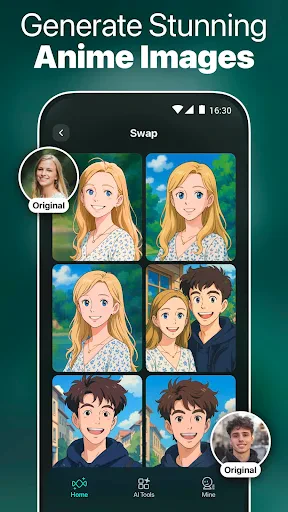


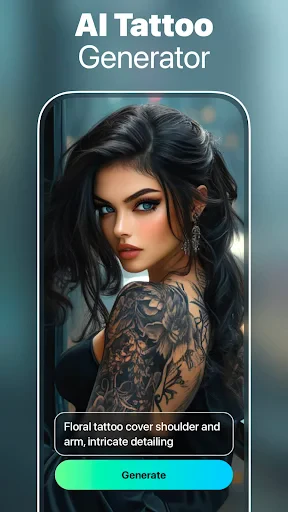
Description
About AI Art Generator: Photo, Draw Features
AI Art Generator: Photo, Draw is a mobile application that leverages advanced artificial intelligence to transform text descriptions and existing photos into unique artworks. It serves as a creative studio in your pocket, enabling users to generate images in various artistic styles without requiring professional drawing skills. The app democratizes digital art creation, making it accessible for anyone to visualize ideas, reimagine photographs, and produce stunning graphics for personal or professional use.
Chapter 1: Function
The app's core functionality revolves around two primary input methods: text-to-image and image-to-image generation. Users can input detailed text prompts, describing scenes, objects, styles, and moods, which the AI then interprets to generate original images. Alternatively, users can upload a photo, which the app can redraw in styles ranging from oil painting and anime to cyberpunk and surrealism. Additional key functions include style libraries offering filters like Van Gogh or Picasso, resolution customization for output quality, and editing tools for basic adjustments. The process is streamlined: input a prompt or photo, select an art style, and generate multiple variations within seconds, allowing for iterative refinement of the final artwork.
Chapter 2: Value
The primary value proposition of AI Art Generator: Photo, Draw lies in its empowerment of universal creativity. It eliminates the technical barrier to art creation, allowing individuals with no formal training to produce high-quality, original visuals. This provides significant advantages for content creators, marketers, and social media enthusiasts who need rapid, cost-effective graphics. The app's key advantages include its speed and efficiency, generating complex images in moments that would take a human artist hours. It offers an extensive exploration of styles, enabling users to experiment with aesthetics that would be difficult to replicate manually. Furthermore, it acts as a powerful brainstorming tool, visualizing concepts for stories, designs, or projects instantly. Compared to other generators, its mobile-first design prioritizes user-friendliness and on-the-go creation. The ability to personalize and transform personal photos adds unique emotional value, creating novel avatars or gift art. Ultimately, it serves not just as a tool, but as a collaborative creative partner that expands the user's imaginative possibilities and streamlines visual content production.
Chapter 3: Scenarios
The app caters to a diverse range of user groups. First, hobbyists and art enthusiasts use it for personal entertainment, creating wallpapers, social media posts, or reimagining family photos as fantasy portraits. Second, content creators, bloggers, and small business owners utilize it to generate engaging visuals for articles, marketing materials, and advertisements, saving on graphic design resources. Third, writers and storytellers employ it to visualize characters, settings, and scenes, aiding in creative development and presentation. Fourth, educators and students find it valuable for creating illustrative materials for projects and presentations, making abstract concepts tangible. Everyday use cases include designing a unique T-shirt graphic, generating concept art for a home decor idea, creating a personalized birthday card with a friend's photo styled as a Renaissance painting, or quickly producing multiple visual options for a client pitch. It is particularly valuable in scenarios requiring rapid ideation and visualization where traditional methods are too slow or costly.
Uninstall Instructions
For step-by-step guidance on how to safely remove this application from your device, please refer to our 《Uninstall Instructions》 document.
Pros
- generates high-quality images from text in under 10 seconds
- offers a unique 'redraw' feature for iterative style refinement
- one-tap upscaling enhances image resolution without watermarks
- supports generating art from uploaded photos as a base
- offline mode allows for basic generation without internet
Cons
- advanced style models require a paid subscription to access
- offline generation is limited to lower-resolution outputs
- hand and text rendering often contains noticeable artifacts
- free tier includes a daily generation limit of 5 images
- photo-based generation struggles with complex prompts
Frequently Asked Questions
What is AI Art Generator: Photo, Draw?
AI Art Generator: Photo, Draw is a mobile application that uses artificial intelligence to create digital artwork. Its core function is to transform your photos, sketches, or text prompts into various artistic styles, such as paintings, drawings, or digital illustrations. It positions itself as a tool for both casual creativity and artistic exploration, requiring no professional drawing skills.
Is AI Art Generator free to use?
The app typically follows a freemium model. It is free to download and offers basic generation features. However, access to higher-quality outputs, faster processing, advanced art styles, or the removal of watermarks usually requires in-app purchases or a subscription. Some features may also be gated behind watching ads.
What devices and systems does this app support?
The app is primarily designed for mobile devices. It is available for both iOS and Android operating systems. Specific version requirements, such as iOS 13.0+ or Android 8.0+, apply. It generally does not require additional external hardware and is adapted for use by a wide range of user groups interested in casual art creation.
How does the AI generate art from a photo?
You upload or take a photo within the app. Then, you select an artistic style or filter from the app's library, which is powered by AI models like neural style transfer or diffusion models. The AI analyzes the content of your photo and re-renders it according to the chosen style's characteristics, outputting a new image that blends your photo with the artistic elements.
Can I use the AI-generated artwork commercially?
The app's Terms of Service govern commercial usage. Typically, you may own the artwork you generate for personal use. However, commercial use (like selling prints or using in products) often requires explicit permission, a specific commercial license, or is restricted. It is crucial to review the app's official license agreement within its settings or website for definitive, legally binding information.
App Info
Technical Info
Recommended For You

Zoom Workplace for Intune
Business

Passport Photo: ID Photo Print
Art & Design
NavRadio+
Auto & Vehicles

King James Bible Study KJV
Books & Reference

СL Theme Line
Auto & Vehicles

All Email Login
Communication
Beauty Camera -AI Photo Editor
Beauty

Dual App - Web Scanner App
Communication

DayComics
Comics

FolderSync Pro
Communication

Beauty Makeup Editor & Camera
Beauty

KJV Daily Bible - Verse+Audio
Books & Reference

Fresha for business
Beauty

Canva: AI Photo & Video Editor
Art & Design

Readict -One Click Away Novels
Books & Reference

My SafeLink
Communication

Upwork for Freelancers
Business

봄툰
Comics

USPS MOBILE®
Business

Bible App by Olive Tree
Books & Reference