
iSharing: GPS Location Tracker
Screenshots


Description
About iSharing GPS Location Tracker Features
iSharing is a real-time location sharing and tracking application designed for families and close circles. It enables users to stay connected with loved ones by providing precise location data, movement alerts, and safety check-ins on an interactive map. The app prioritizes user privacy with permission-based sharing, making it a trusted tool for enhancing everyday security and peace of mind without being intrusive.
Chapter 1: Function
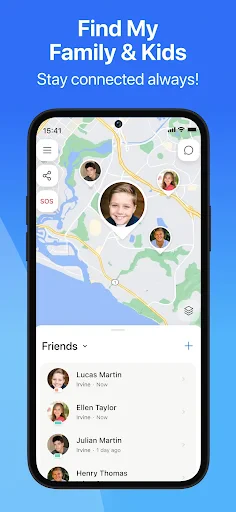
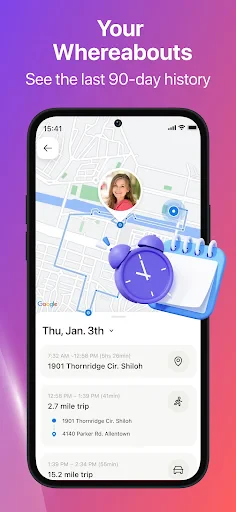
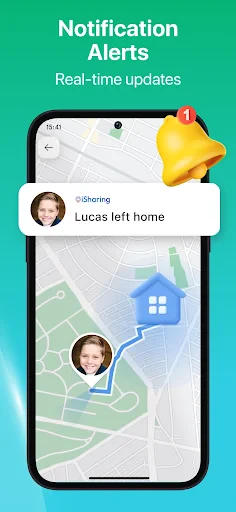
iSharing operates as a comprehensive location-sharing platform. Its core functionality allows users to create private groups or circles with family and friends. Once invited and permissions are granted, members can view each other's real-time locations on a detailed map interface. The app provides continuous location updates, including battery status of connected devices. Key features include setting up geofenced safe zones with entry/exit alerts, sending SOS distress signals with location to all circle members, and initiating check-in requests. It also supports location history review, chat functionality within the circle, and low battery notifications for tracked devices. The app functions seamlessly in the background, ensuring reliable tracking even when the screen is off.
Chapter 2: Value
The primary value of iSharing lies in fostering safety, connection, and peace of mind for its users. Its foremost advantage is the creation of a private, secure network where location data is shared only with explicitly chosen contacts, addressing core privacy concerns. The real-time tracking offers unparalleled reassurance for parents monitoring children's commutes, families caring for elderly members, or friends coordinating meetups. The geofencing and alert system automates safety checks, reducing anxiety by providing instant notifications when a loved one arrives at school or leaves work. The integrated SOS feature transforms a smartphone into a personal safety device, enabling immediate help during emergencies. Beyond safety, the app delivers practical convenience, eliminating constant 'where are you?' texts and streamlining coordination for social gatherings or daily logistics. Its user-friendly interface, reliable performance across both iOS and Android platforms, and minimal impact on device battery life compared to similar apps constitute significant technical advantages. Ultimately, iSharing translates GPS technology into tangible emotional value, strengthening bonds through shared awareness and proactive care.
Chapter 3: Scenarios
iSharing is ideally suited for families with children, caregivers, and close-knit friend groups. Parents are primary users, utilizing the app to monitor their children's location during the school run, to ensure they have arrived home safely, or to track teenagers during outings. Families caring for elderly relatives, especially those with conditions like dementia, use it for gentle oversight and quick location recovery if they wander. Cohorts of friends often employ iSharing for convenience and safety during travel, festivals, or hiking trips to keep the group together. Everyday use cases are varied: a parent sets a geofence around a child's soccer field to receive an automatic 'arrived' alert; a family tracks a teen driver's first solo trip across town; a user sends a quick 'Check-in OK?' request to an elderly parent living alone; friends use the real-time map to find each other in a crowded shopping mall or concert venue; and an individual can discreetly trigger an SOS during an uncomfortable ride-share situation, instantly alerting their trusted circle.
Uninstall Instructions
For step-by-step guidance on how to safely remove this application from your device, please refer to our 《Uninstall Instructions》 document.
Pros
- real-time location sharing without draining phone battery
- cross-platform geofencing with custom voice alerts
- history replay shows movement paths in detail
- works via Bluetooth when cellular signal is lost
- dedicated family safety features like SOS shaking
Cons
- requires all users to install the same app
- precise tracking depends on companion's phone signal
- limited location history on free basic version
- Bluetooth range constraints affect offline accuracy
- geofencing alerts sometimes experience slight delays
Frequently Asked Questions
What is iSharing and what does it do?
iSharing is a real-time GPS location sharing and tracking app. Its core function is to allow users to create private groups with family or friends to see each other's live locations on a map, set geofence alerts for arrivals or departures, and send SOS alerts. It is primarily designed for keeping track of loved ones, coordinating meetups, and personal safety.
Is iSharing free to use, or are there in-app purchases?
Location accuracy depends on the device's GPS signal, network conditions, and settings. Typically, it is accurate within a range of 10 to 50 feet under clear GPS conditions. Accuracy may decrease indoors or in areas with poor signal. Users must ensure location permissions are granted and background location access is enabled for optimal performance.
Does iSharing drain phone battery quickly?
iSharing operates on a freemium model. The basic app is free to download and includes core features like real-time location sharing and chat. However, advanced features such as unlimited location history, detailed location reports, ad removal, and extended geofence limits require a subscription (Premium plan) through in-app purchases.
What devices and systems does iSharing support?
iSharing is available for both iOS and Android devices. It requires a smartphone with GPS capabilities and an active internet connection (cellular data or Wi-Fi). The app can track any device with the app installed and logged into the same account. It is not designed to track devices without the app or without user consent.
How accurate is the location tracking in iSharing?
Continuous use of GPS can impact battery life. iSharing offers battery-saving modes that reduce location update frequency when the app is in the background. Users can adjust update intervals and notification settings to balance tracking needs with battery consumption. Ensuring the app is properly configured and the phone's OS is updated can help mitigate excessive drain.
App Info
Technical Info
Recommended For You

Chirp Audiobooks
Books & Reference

Robokiller - Spam Call Blocker
Communication

Skype
Communication

Messenger
Communication

AI Video Generator - Clips AI
Art & Design

Bible Hub
Books & Reference

Visual Voicemail
Business

AR Drawing: Sketch, Art, Paint
Art & Design

Our Daily Bread
Books & Reference

Jooble — Job Search App
Business

کتابراه: کتاب الکترونیک و صوتی
Books & Reference

Power Apps
Business

Booksy Biz: For Businesses
Beauty

Invoice Simple: Invoice Maker
Business

Haircare app for women
Beauty

AI Video - AI Video Generator
Art & Design

Fashion Design Sketches Book
Art & Design

Car Launcher Pro
Auto & Vehicles

My Best Colors
Beauty

AI Dress up-Try Clothes Design
Beauty