
Workforce Tools
Screenshots
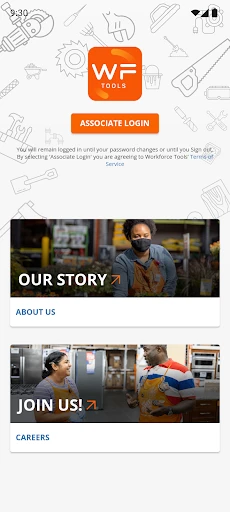
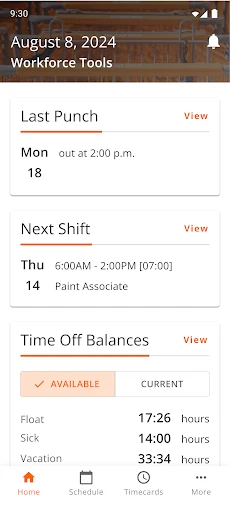
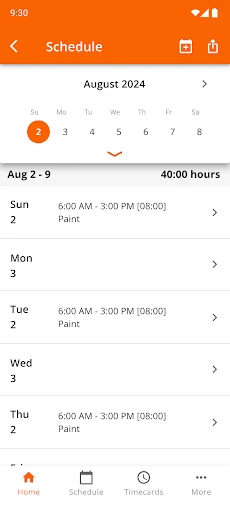
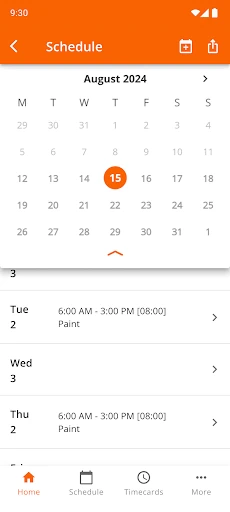
Description
About Workforce Tools Features – Streamlining Team Management and Productivity
Workforce Tools is a comprehensive mobile and web application designed to optimize workforce management, scheduling, and operational communication for businesses of all sizes. It serves as a centralized platform where managers can efficiently coordinate staff, assign tasks, and track work hours, while employees gain clarity on their schedules and responsibilities. By integrating key administrative functions into an intuitive interface, the app bridges the gap between management planning and frontline execution. It is particularly valuable for industries with dynamic staffing needs such as retail, hospitality, healthcare, and field services. Workforce Tools transforms complex scheduling and communication processes into streamlined, transparent, and actionable workflows, ultimately driving organizational efficiency and enhancing team collaboration.
Chapter 1: Function
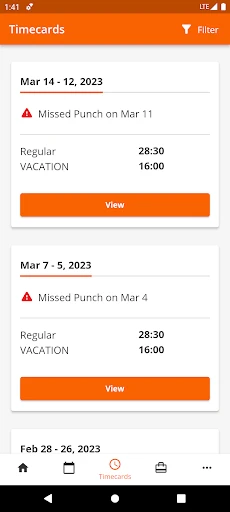
Workforce Tools delivers a robust suite of core functions centered on efficient workforce administration. Its primary feature is an intelligent scheduling system that allows managers to create, publish, and modify shifts with drag-and-drop ease, considering employee availability, roles, and labor regulations. The app includes a time and attendance module where employees can clock in and out digitally, with GPS or photo verification for remote teams, automating timesheet generation and payroll preparation. Integrated team communication is facilitated through in-app messaging and announcement boards, ensuring important updates reach everyone instantly. Task management tools enable the creation and assignment of checklists or projects, with options for status updates and completion confirmation. Furthermore, the platform offers reporting dashboards that provide insights into labor costs, attendance patterns, and schedule adherence, giving managers data-driven oversight of their operations.
Chapter 2: Value
The value proposition of Workforce Tools lies in its ability to significantly reduce administrative overhead while boosting operational transparency and employee engagement. A key advantage is the substantial time savings it offers managers; automating schedule creation and time tracking can reclaim hours previously spent on manual spreadsheets and phone calls, allowing leadership to focus on strategic initiatives. For the organization, it ensures better labor cost control by preventing over-scheduling and minimizing time theft through accurate, verified clock-ins. The app’s real-time communication features reduce misunderstandings and missed messages, fostering a more connected and responsive team environment even for deskless workers. From an employee perspective, the value is empowerment and clarity: they have 24/7 mobile access to their schedules, can easily request shift swaps or time off, and receive clear task directives, which enhances job satisfaction and accountability. The centralized data repository also provides invaluable business intelligence, helping leaders identify trends, forecast staffing needs, and make informed decisions to improve productivity. Ultimately, Workforce Tools translates into tangible business outcomes: reduced labor costs, improved schedule compliance, higher workforce utilization, and a stronger, more aligned organizational culture.
Chapter 3: Scenarios
Workforce Tools primarily targets businesses that manage hourly, shift-based, or mobile workforces. Key user groups include managers and supervisors in the retail sector, who must handle complex rosters for sales associates across multiple locations. In the hospitality industry, restaurant and hotel managers utilize the app to coordinate servers, housekeeping, and front-desk staff amidst fluctuating occupancy and customer traffic. Healthcare administrators find it essential for scheduling nurses, aides, and support staff across different wards and shifts. For field service companies, dispatchers and managers rely on the app to assign jobs to technicians, track their location-based clock-ins, and communicate urgent changes. Common daily use cases involve a retail manager finalizing the weekly schedule and pushing it to all staff phones with one click, a nurse checking her upcoming shifts and requesting a swap directly through the app, a restaurant employee clocking out at the end of a shift and immediately viewing hours worked, and a field service manager generating a report on team productivity and labor costs for the past week to present in an operations meeting.
Uninstall Instructions
For step-by-step guidance on how to safely remove this application from your device, please refer to our 《Uninstall Instructions》 document.
Pros
- integrates time tracking with payroll in one dashboard
- offline mode syncs data automatically when reconnected
- geofencing for automatic shift clock-in/out accuracy
- customizable labor compliance alerts per local regulations
- real-time labor cost forecasting per project or department
Cons
- initial geofence setup requires precise location mapping
- offline mode delays real-time team availability views
- advanced forecasting needs historical data input manually
- multi-region compliance updates may lag policy changes
- complex payroll rules slow processing on basic plans
Frequently Asked Questions
What is Workforce Tools and what does it do?
Workforce Tools is a productivity application designed for team and project management. Its core functions include task assignment, time tracking, progress reporting, and team communication. It positions itself as an all-in-one solution to coordinate remote or hybrid teams, streamline workflows, and enhance productivity by centralizing essential management tools in a single platform.
Is Workforce Tools free to use, or does it have in-app purchases?
Workforce Tools operates on a freemium model. The app offers a free basic version with limited features, suitable for small teams. For advanced functionalities like detailed analytics, custom reporting, and priority support, it provides subscription-based in-app purchases. There are no mandatory additional hardware purchases required to use the core service.
What devices and operating systems does Workforce Tools support?
Workforce Tools is a cross-platform application. It is available for iOS and Android mobile devices via official app stores, and offers a web version accessible from major desktop browsers like Chrome, Safari, and Firefox. It is designed to sync data in real-time across all platforms, ensuring seamless access for team members using different devices.
How does the real-time collaboration feature work in the app?
The real-time collaboration feature allows multiple users to edit task lists, update project timelines, and comment on shared documents simultaneously. Changes are instantly synchronized and visible to all authorized team members. This functionality is built on a cloud-based architecture, requiring a stable internet connection for full synchronization and to prevent conflicts in data updates.
What should I do if my data fails to sync across devices?
If data syncing fails, first ensure your device has an active internet connection. Then, try logging out and back into the app to refresh the session. If the issue persists, check for any pending app updates in your device's store, as updates often contain sync fixes. For unresolved issues, you can contact support through the 'Help' section within the app, providing details about your device and account.
App Info
Technical Info
Recommended For You

Messenger SMS - Text Messages
Communication

Switch Natural
Beauty

USPS MOBILE®
Business

Calibre Sync
Books & Reference

N5_Theme for Car Launcher app
Auto & Vehicles

StoryFont for Instagram Story
Art & Design

Chrome Dev
Communication

Meta Ads Manager
Business

Find a Grave
Books & Reference

Madison Reed App - Hair Color
Beauty

PaperColor
Art & Design

Jotform - Form, Sign & Survey
Business

Trace Drawing-Sketch and Paint
Art & Design

Draw Anime: AR Drawing Sketch
Art & Design
Librera PRO - Book reader
Books & Reference

Spark Driver
Business
HCMToGo
Business

The General® Auto Insurance
Business

Flowt Wear
Auto & Vehicles

Obd Mary – Car Scanner for ELM
Auto & Vehicles