
PaperColor
Screenshots
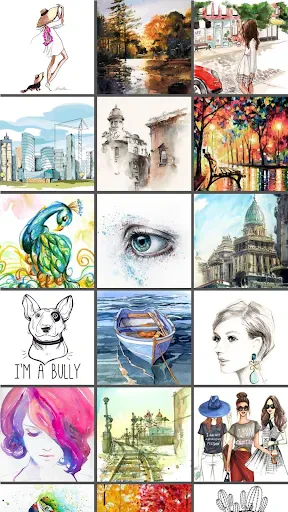

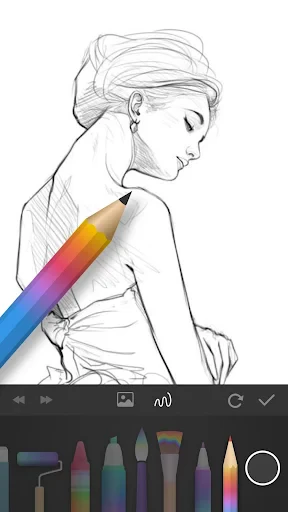


Description
About PaperColor Feature - A Digital Notebook for Focused Writing
PaperColor is a minimalist note-taking and writing application designed to emulate the tactile experience of writing on paper while leveraging the convenience of digital tools. Available on both Android and iOS platforms, it distinguishes itself with a clean, distraction-free interface that combines the familiarity of paper textures and ink styles with practical digital enhancements. The app caters to users seeking a straightforward yet powerful tool for capturing thoughts, sketching ideas, or drafting documents without the complexity of feature-heavy office suites. By focusing on the core act of writing and drawing, PaperColor creates a serene digital environment that promotes concentration and creativity.
Chapter 1: Function
PaperColor's core functionality revolves around simulating a natural writing and drawing experience. It provides users with a blank canvas that can mimic various paper types, such as classic white, yellow ruled, or grid paper. The app offers a selection of digital pens, pencils, and brushes with adjustable thickness and opacity, allowing for precise note-taking or freeform sketching. Users can create multiple notebooks and pages for organizing content. Basic editing tools include an eraser, lasso selection for moving elements, and layers for more complex drawings. The app supports zooming for detailed work and allows exports in common image formats or PDFs. Its functionality is intentionally streamlined, prioritizing intuitive hand-input over advanced text formatting, making it ideal for quick jots, mind maps, and visual notes.
Chapter 2: Value
The primary value proposition of PaperColor lies in its ability to reduce digital friction and foster a state of flow for writers and sketchers. Its key advantage is the deliberate simplicity that eliminates feature bloat, allowing users to start writing or drawing instantly without navigating complex menus. This focused approach enhances productivity and minimizes distractions. The realistic pen and paper simulation offers a satisfying tactile feedback through support for stylus devices, making digital note-taking feel more authentic and engaging than typing on a generic notepad app. Furthermore, PaperColor serves as a unified digital repository, solving the problem of scattered physical notebooks by keeping all notes organized, searchable, and safe in one place, accessible across mobile devices. It adds value by bridging the gap between the organic feel of analog tools and the practicality of digital storage, editing, and sharing. For students, professionals, and creatives, this translates to improved idea capture, more effective brainstorming sessions, and a more enjoyable, focused creative process without the learning curve associated with sophisticated design software.
Chapter 3: Scenarios
PaperColor primarily targets students, creative professionals, and anyone who prefers handwriting or sketching to capture information. For students, it is an ideal tool for taking lecture notes, annotating imported PDFs, or solving problems on digital worksheets, combining the flexibility of paper with the organization of digital folders. Artists and designers use it for quick concept sketches, storyboarding, or drafting layouts thanks to its responsive brushes and layer support. In professional settings, individuals utilize PaperColor during meetings to jot down minutes, diagram processes, or whiteboard ideas in real-time, with the ability to instantly share these visual notes with colleagues. Everyday use cases also include personal journaling, planning to-do lists with checkboxes, learning a language by practicing characters, or simply doodling for relaxation. Its simplicity makes it particularly valuable for users who find traditional note-taking apps too rigid or for those transitioning from physical notebooks to digital alternatives, seeking a familiar yet more powerful experience.
Uninstall Instructions
For step-by-step guidance on how to safely remove this application from your device, please refer to our 《Uninstall Instructions》 document.
Pros
- offers a realistic paper texture and fountain pen simulation
- organizes notes into visually distinct
- customizable notebooks
- supports handwriting search with offline OCR functionality
- provides a minimalist
- distraction-free writing interface
- allows exporting notes as layered PSD files for editing
Cons
- limited text formatting options compared to word processors
- advanced features require a subscription purchase
- large notebooks may experience slight lag on older devices
- cloud sync is not available on the free version
- no real-time collaborative editing for shared notebooks
Frequently Asked Questions
What is PaperColor and what does it do?
PaperColor is a digital drawing and painting application designed to simulate the natural feel of traditional media on mobile devices. Its core function is to provide a realistic canvas and brush experience, primarily for sketching, illustration, and note-taking. The app focuses on offering tools that mimic real-world textures like pencil, ink, and watercolor, positioning itself as a portable, intuitive art studio for artists and hobbyists.
Is PaperColor free to use or does it have in-app purchases?
PaperColor is free to download and use with a basic set of brushes and features. However, it offers in-app purchases to unlock additional premium brush sets, advanced tools, and expanded functionality. The app may also include advertisements in the free version. No additional physical equipment is required to use its core features, though a stylus can enhance the drawing experience.
What devices and operating systems is PaperColor compatible with?
PaperColor is primarily an Android application. It is adapted for smartphones and tablets running the Android operating system. There is no official version for iOS (iPhone/iPad) or desktop operating systems like Windows or macOS. It is designed for general use by artists, students, and anyone interested in digital drawing on Android mobile devices.
How does PaperColor's brush simulation achieve a realistic feel?
PaperColor's realistic feel is achieved through technical characteristics that simulate brush pressure, texture, and ink flow. It utilizes touch and pressure sensitivity (on supported devices) to vary line weight and opacity. The app's brush engines are designed to replicate the grain of paper and the blending properties of mediums like charcoal or watercolor, creating a natural drawing experience distinct from simple vector-based drawing tools.
Can I export my artwork in high resolution from PaperColor?
Yes, PaperColor allows you to export your completed artwork. You can typically save your drawings to your device's gallery in common image formats like PNG or JPEG. The export resolution is generally tied to the canvas dimensions set at the start of your project. For high-resolution prints, it is recommended to begin your artwork on a large canvas size within the app. The app does not have cloud backup of its own, so users should manually manage their file storage and backups.
App Info
Technical Info
Recommended For You

Skin Bliss: Skincare Routines
Beauty

Workday
Business

Face Massage, Skincare: forYou
Beauty

Luvme Hair
Beauty
CDisplayEx Comic Reader Lite
Comics

HD Camera for Android
Beauty

Al Quran MP3 Audio Offline App
Books & Reference

Билеты ПДД 2025 и Экзамен ПДД
Auto & Vehicles

KeyConnect Digital Car Key
Auto & Vehicles

Dreame-Read Romance Stories
Books & Reference

Gmail
Communication

ComiQuest - Comic Reader
Comics

Realtime Charts for Torque Pro
Auto & Vehicles

Freewave: Romance Audiobooks
Books & Reference

iVerify Basic
Business
Nail Art Design : Nails Polish
Beauty

Samsung Internet Browser
Communication

Dual App - Web Scanner App
Communication

밀리의 서재 - 독서와 무제한 친해지리
Books & Reference

Asiacell
Business