
Doodle Art: Magic Drawing App
Screenshots


Description
About Doodle Art: Magic Drawing App Features
Doodle Art: Magic Drawing App is a creative mobile application designed to transform the simple act of doodling into a magical and accessible artistic experience. It caters to users of all skill levels, from beginners seeking a relaxing pastime to seasoned artists looking for a digital sketchpad. The app stands out by offering a vast array of easy-to-use tools, guided tutorials, and interactive coloring features that lower the barrier to creating visually appealing artwork. By blending intuitive design with engaging content, Doodle Art provides a platform where imagination can flow freely, making digital drawing both enjoyable and surprisingly effortless for everyone.
Chapter 1: Function
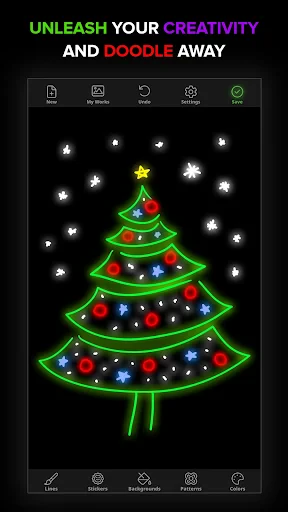
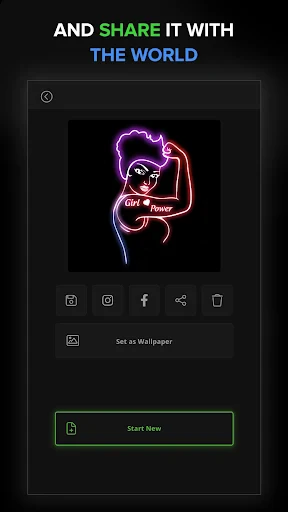
Doodle Art: Magic Drawing App centers on making digital drawing intuitive and fun. Its core function is a versatile drawing canvas equipped with a wide selection of brushes, pens, and markers, each mimicking real textures from pencil sketches to vibrant neon glows. Users can draw freehand or utilize the app's signature feature: step-by-step guided tutorials. These tutorials break down complex illustrations into simple, manageable steps, allowing anyone to recreate beautiful doodles, animals, or patterns. Additionally, the app includes a robust coloring book section with numerous pre-drawn outlines. Advanced features like layers, blending modes, and symmetry tools offer depth for more detailed creations. All artwork can be easily saved, shared, or set as custom wallpapers, completing a seamless creative workflow.
Chapter 2: Value
The primary value of Doodle Art lies in its democratization of art creation, removing the intimidation often associated with drawing. Its key advantage is an exceptionally user-friendly interface that prioritizes discovery and play over technical complexity. The extensive library of guided tutorials serves as an on-demand art class, building user confidence and skill progressively. Unlike many professional-grade apps that can be overwhelming, Doodle Art offers immediate gratification, making it a powerful tool for stress relief and mindfulness. The app's constantly updated content, including new drawing packs and seasonal themes, ensures lasting engagement and fresh inspiration. Furthermore, it operates smoothly on most devices without requiring high-end hardware, making quality digital art accessible to a broad audience. By combining education with entertainment, Doodle Art delivers significant value as both a creative outlet and a therapeutic hobby, fostering a sense of accomplishment with every completed piece.
Chapter 3: Scenarios
Doodle Art: Magic Drawing App primarily targets casual users and art enthusiasts seeking a low-pressure creative outlet. A key user group is parents and children, as the app's guided tutorials provide a perfect shared activity for family bonding and developing a child's fine motor skills and creativity. It is also ideal for adults looking for a digital detox alternative or a meditative practice to unwind after work; the rhythmic act of doodling or coloring can be a form of stress management. Students may use it for visual note-taking or creating personalized decorations for projects. Additionally, social media enthusiasts find value in generating unique, hand-drawn content for their profiles. In everyday use, scenarios include filling short breaks with a relaxing coloring session, following a tutorial to create a custom greeting card, or using the symmetry tool to design intricate mandalas for mindfulness. It transforms idle moments into opportunities for creative expression and personal satisfaction.
Uninstall Instructions
For step-by-step guidance on how to safely remove this application from your device, please refer to our 《Uninstall Instructions》 document.
Pros
- transforms basic doodles into polished digital artwork instantly
- offers unique AI-powered style transfer for casual sketches
- one-tap background removal and layer addition for drawings
- requires minimal artistic skill for satisfying creative results
- exports high-resolution images suitable for sharing platforms
Cons
- limited advanced editing tools for professional illustrators
- style transfer results can be unpredictable on complex doodles
- requires consistent internet for AI processing features
- smaller color palette compared to dedicated drawing apps
- layer management is simplified
- limiting complex compositions
Frequently Asked Questions
What is Doodle Art: Magic Drawing App?
Doodle Art: Magic Drawing App is a creative mobile application in the Art & Design category. Its core function is to transform simple sketches or photos into vibrant, stylized digital artwork. It uses AI-powered filters and effects to magically enhance basic doodles into colorful, detailed illustrations, making digital art creation accessible and fun for casual users.
Is Doodle Art free to use or does it have in-app purchases?
The app is free to download and use with basic features. However, it offers in-app purchases to unlock premium content. This includes access to a wider variety of advanced artistic filters, brushes, patterns, and ad-free experience. No additional physical equipment is required beyond a compatible smartphone or tablet.
What devices and systems is this drawing app compatible with?
Doodle Art: Magic Drawing App is designed for mobile devices. It is primarily available for both iOS and Android operating systems. Specific version requirements, such as iOS 11.0+ or Android 5.0+, apply. It is generally suitable for all age groups interested in casual digital drawing and photo editing.
How does the 'magic' drawing transformation feature work?
The 'magic' feature uses automated image processing algorithms. After you draw a simple line art or select a photo, the app analyzes the shapes and applies pre-set, complex texture and color patterns to fill the spaces. It instantly converts basic inputs into elaborate designs resembling mandalas, stained glass, or patterned artwork with minimal manual effort.
Can I save and share my creations from the app?
Yes, the app allows you to save completed artwork directly to your device's photo gallery. It also provides integrated sharing options to export images to various social media platforms and messaging apps. For after-sales or technical support, users typically need to contact the developer through the support links provided within the app's settings or on its official store page.
App Info
Technical Info
Recommended For You

Camouflage Doors Mod for MCPE
Books & Reference

Bible Study - Verse & Audio
Books & Reference

ESV Bible
Books & Reference

RingCentral
Business

Magnificat Lenten 2025
Books & Reference

WOMBO Dream - AI Art Generator
Art & Design

CVTz50
Auto & Vehicles

GizmoHub
Communication

Pocket Novel
Books & Reference

Grubhub for Drivers
Business
Beauty Plus Princess Camera
Beauty

AutoTempest - Car search
Auto & Vehicles

Dayforce
Business

randstad: jobs for workers
Business

Jobber: Field Service Software
Business

Driver Pulse by Tenstreet
Business

Planity
Beauty

Gospel Library
Books & Reference

Marvel Unlimited
Comics

Uber - Driver: Drive & Deliver
Business