
Upwork for Freelancers
Screenshots

Description
About Upwork for Freelancers Feature – Connecting Talent with Opportunity
Upwork for Freelancers is the official mobile application of the global freelancing platform Upwork, designed specifically for independent professionals. It serves as a powerful, on-the-go hub for freelancers to manage their business, connect with clients, and secure projects across a vast array of fields including writing, design, programming, marketing, and consulting. The app translates the core functionality of the desktop platform into a streamlined mobile experience, enabling freelancers to search for jobs, submit proposals, communicate with clients, track work, and receive payments from anywhere. By putting the freelance marketplace in the palm of their hand, Upwork for Freelancers empowers professionals to be more responsive, agile, and competitive in the dynamic gig economy, turning downtime into productive work time and ensuring they never miss a potential opportunity.
Chapter 1: Function
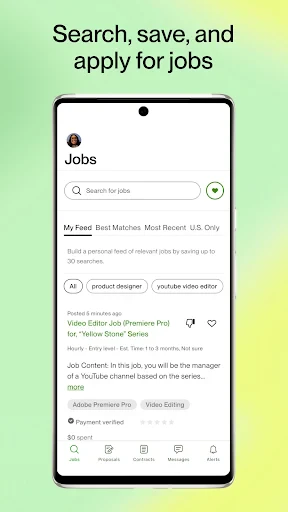
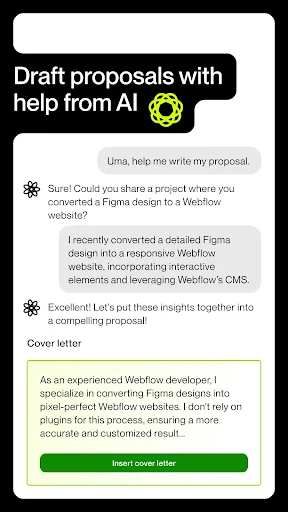
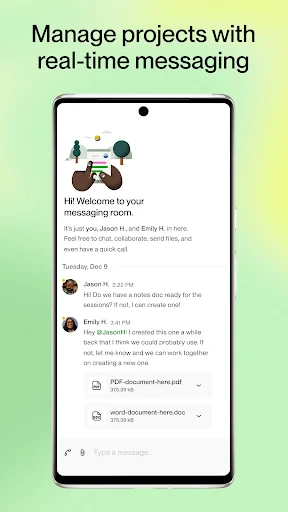
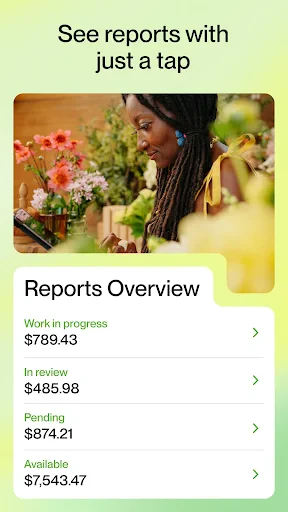
The Upwork for Freelancers app consolidates essential freelance workflow tools into a single, mobile interface. Its core function is to facilitate the end-to-end process of securing and managing freelance work. Users can browse and search for new job postings using filters for category, budget, and client history. The app allows for the creation, submission, and tracking of proposals directly from a smartphone. Once hired, freelancers can manage their contracts, log work hours using the integrated time tracker for hourly projects, and submit milestones for fixed-price contracts. Real-time messaging and notification systems keep communication with clients fluid and immediate. Furthermore, the app provides insights into profile views, interview invitations, and allows for basic profile management. Financial tracking features enable users to monitor earnings, review invoices, and track payment statuses, ensuring full visibility over their business finances from anywhere.
Chapter 2: Value
The primary value proposition of Upwork for Freelancers lies in its empowerment of mobility and efficiency for independent professionals. It transforms idle moments into productive business development time, allowing freelancers to scout for new projects, respond to client messages instantly, and maintain project momentum regardless of location. This immediacy significantly enhances a freelancer's competitiveness and professional responsiveness. A key advantage is the seamless synchronization with the full Upwork ecosystem, ensuring data consistency across devices. The integrated time tracker with activity levels adds transparency and trust for hourly contracts. The app also democratizes access to a global marketplace, breaking geographical barriers and connecting talent with a diverse range of international clients and high-quality projects. By centralizing communication, project management, and financial tracking, it reduces administrative overhead, allowing freelancers to focus more on delivering great work rather than managing logistics. Ultimately, the app provides a structured, secure, and reliable platform that mitigates the common freelancing challenges of finding consistent work, ensuring payment security, and maintaining professional client relationships, thereby fostering sustainable freelance careers.
Chapter 3: Scenarios
The Upwork for Freelancers app is indispensable for a wide spectrum of independent professionals. Full-time freelancers who rely on Upwork as their primary source of income use it to stay constantly connected to the marketplace, ensuring they are always the first to apply to new, relevant postings and can manage ongoing projects without being tethered to a desk. Digital nomads and frequent travelers benefit immensely, as the app allows them to run their business entirely from a smartphone while on the move. Part-time freelancers, such as students or professionals with side hustles, can efficiently manage their gig work during commutes or between other commitments. It is also highly valuable for freelancers in fields requiring quick turnaround or constant client availability, like social media managers, customer service agents, or urgent technical support specialists. Common use cases include reviewing and replying to job invitations while commuting, using the time tracker during a work session at a coffee shop, submitting a deliverable and invoice immediately after completion, and having crucial contract discussions via the messaging system to resolve issues promptly, thereby maintaining client satisfaction and project timelines.
Uninstall Instructions
For step-by-step guidance on how to safely remove this application from your device, please refer to our 《Uninstall Instructions》 document.
Pros
- automatically matches projects to your saved profile skills
- built-in time tracker for verifiable hourly contract billing
- direct payment processing with multiple withdrawal options
- consolidated work diary and earnings reporting for taxes
- proposal templates tailored to specific job categories
Cons
- high service fee per contract unless on rising talent program
- intensive profile setup required for effective algorithm matching
- connects system limits proposal submissions for free plan
- client messaging can be slow due to platform intermediation
- niche skill categories may have fewer targeted job alerts
Frequently Asked Questions
What is Upwork for Freelancers and its core function?
Upwork for Freelancers is a mobile application designed for independent professionals to find and manage freelance work. Its core function is to connect freelancers with clients seeking services across categories like writing, design, programming, and marketing. The app allows users to search for jobs, submit proposals, communicate with clients, track time for hourly contracts, and manage payments—all from a mobile device, serving as an on-the-go extension of the Upwork platform.
Is Upwork for Freelancers free to use?
Downloading and using the Upwork for Freelancers app is free. However, the Upwork platform operates on a service fee structure for freelancers. Upwork charges a sliding fee based on your lifetime billings with each client, starting at 20% for the first $500. There are no in-app purchases, but successful freelancing requires a well-maintained profile and may involve purchasing Connects (platform currency) to submit proposals, which is managed through the app or website.
What devices and systems does the app support?
Upwork for Freelancers is available for both iOS and Android devices. You can download it from the Apple App Store for iPhones and iPads running a compatible version of iOS, and from the Google Play Store for smartphones and tablets running Android. The app is optimized for mobile use and syncs seamlessly with your web-based Upwork account. It does not require any additional specialized hardware to function.
How does the app handle client communication and payments?
The app provides integrated tools for messaging clients directly, facilitating clear communication. For payments, it supports both hourly and fixed-price contracts. Hourly work can be tracked using the app's Work Diary, which records activity and takes periodic screenshots for verification. Payments are processed through Upwork's secured system, and freelancers can view earnings, pending transactions, and withdrawal history within the app. All financial transactions adhere to Upwork's Terms of Service.
What should I do if I encounter technical issues with the app?
For technical issues like crashes, login problems, or feature malfunctions, Upwork provides support through its Help Center accessible within the app or website. You can submit a ticket or search the knowledge base for solutions. For account-specific or payment-related issues, contact Upwork Customer Support directly through your account. Ensure your app is updated to the latest version and your device's operating system meets the minimum requirements, as this resolves many common problems.
App Info
Technical Info
Recommended For You

Recraft
Art & Design

Manga Library - مكتبة المانجا
Comics

Beauty Makeup Editor & Camera
Beauty

FlipArtify - 2D Draw Animation
Art & Design

FunSwap - AI Face Swap
Beauty

AI Dress up-Try Clothes Design
Beauty

pixivコミック - みんなのマンガアプリ
Comics

Logo Maker : Graphic Designer
Business

Text, Call & Phone number
Communication

طاقچه؛ کتاب الکترونیکی و صوتی
Books & Reference

Glam AI
Beauty

Meta Ads Manager
Business

Zello PTT Walkie Talkie
Communication

Talkatone: Texting & Calling
Communication

Tayasui Sketches
Art & Design

Card Maker for PKM (Poke Fan)
Comics

Cheogram (Jabber, Call, Text)
Communication

Freewave: Romance Audiobooks
Books & Reference

Ink AI – Tattoo design maker
Art & Design

Anime AI - Photo Maker
Art & Design