
UPS
Screenshots
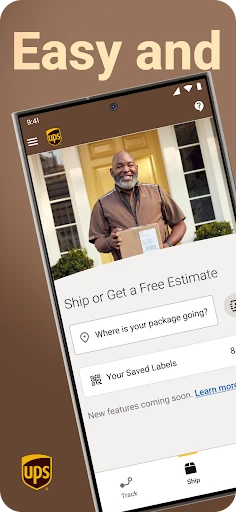


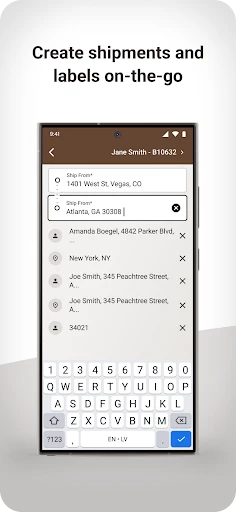

Description
About UPS App Features – Comprehensive Logistics Management at Your Fingertips
The UPS app is an official mobile application developed by United Parcel Service, designed to provide users with a seamless and powerful package shipping, tracking, and management experience. It integrates core logistics services into a portable platform, allowing both individual consumers and business users to handle all shipping-related tasks anytime, anywhere. By simplifying complex logistics processes, the app enhances efficiency and offers greater control over shipments, making it an indispensable tool in modern commerce and daily life.
Chapter 1: Function
The UPS app centralizes key logistics functions into an intuitive interface. Its core capability is real-time package tracking; users can input a tracking number to receive detailed updates on a shipment's location and estimated delivery time. The app facilitates shipping creation, enabling users to calculate rates, print labels, and schedule pickups for various package types and destinations. It provides flexible delivery management options, such as redirecting packages to UPS Access Point locations, authorizing release without a signature, or rescheduling deliveries. Additionally, users can find nearby UPS drop-off points, manage shipping history, and pay for services directly within the app. For business accounts, it supports advanced features like batch tracking and fleet management tools.
Chapter 2: Value
The primary value of the UPS app lies in its ability to save time, increase transparency, and provide unparalleled convenience in logistics management. By digitizing and streamlining processes that traditionally required phone calls or in-person visits, it significantly boosts user productivity. A key advantage is the empowerment it grants users through proactive control; they are no longer passive recipients but active managers of their shipments. The app's real-time tracking offers peace of mind with precise visibility, reducing uncertainty. For businesses, the value extends to operational efficiency—integrating shipping workflows, managing costs through rate comparisons, and maintaining professional service with reliable tools. Its user-friendly design ensures accessibility for users of all technical levels, while robust security protects sensitive shipment and payment information. Compared to using desktop websites or carrier services directly, the app offers a more integrated, on-the-go experience, consolidating notifications and management tasks into a single, always-available hub. This transforms the often cumbersome task of shipping into a simple, efficient, and predictable activity.
Chapter 3: Scenarios
The UPS app serves a diverse range of user groups across personal and professional contexts. Online shoppers frequently use it to track incoming purchases and manage returns, ensuring they never miss a delivery. Small to medium-sized business owners and e-commerce operators rely on it as a daily operational tool to ship products to customers, manage inventory flow, and provide customers with tracking updates. Frequent travelers may use it to schedule pickups for last-minute luggage shipping or to send items ahead. Office administrators in larger corporations utilize the app to coordinate corporate shipping, receive supplies, and manage departmental logistics. In everyday life, individuals sending gifts to family, documents to clients, or items sold on marketplaces find the app indispensable for comparing service options, scheduling pickups from home, and redirecting packages to a secure pickup point if they are not home during delivery. It effectively bridges the gap between global logistics networks and individual needs.
Uninstall Instructions
For step-by-step guidance on how to safely remove this application from your device, please refer to our 《Uninstall Instructions》 document.
Pros
- real-time tracking with predictive delivery windows
- flexible in-transit rerouting and delivery instructions
- digital proof of delivery accessible instantly
- integrated address validation reduces errors
- supports scheduling and management for returns
Cons
- requires account login for most core features
- predictive delivery times can be inaccurate occasionally
- limited functionality in regions with poor connectivity
- interface can be cluttered for infrequent users
- some advanced features require a paid myUPS plan
Frequently Asked Questions
What is the main function of the UPS app?
The UPS app is a logistics and shipping tool that allows users to track packages in real-time, schedule pickups, calculate shipping rates, find nearby drop-off locations, and create shipping labels. Its core positioning is to provide a mobile, on-the-go solution for managing shipments and deliveries directly from a smartphone.
Is the UPS app free to use, and are there in-app purchases?
Yes, the UPS mobile application is free to download and use for its core functions like tracking and finding locations. However, to actually ship a package, you must pay for the postage and any additional services (like insurance or faster delivery) through the app using a credit card or other payment methods. There are no subscription fees or traditional in-app purchases for digital goods.
What devices and operating systems does the UPS app support?
The UPS app is widely adapted for both iOS and Android platforms. It is available for download on smartphones and tablets from the Apple App Store (for iOS devices) and Google Play Store (for Android devices). The app is designed for general consumers and business users who need to manage shipments.
How accurate is the real-time package tracking feature?
The tracking feature provides status updates based on scans performed by UPS throughout the shipping network. While it is highly accurate and reflects the latest available information, there can be occasional delays between a physical scan and the data update in the system. For the most precise location, it relies on the UPS operational scan events.
What should I do if the app shows a delivery exception or problem?
If you encounter a delivery exception (e.g., delay, address issue), the app will display the status and often suggest next steps. For unresolved issues, you should use the 'Help' or 'Support' section within the app to access UPS customer service options, including live chat, phone support, or the ability to file a claim. The app itself cannot manually alter delivery logistics.
App Info
Technical Info
Recommended For You

AI Outfits: Try on Clothes
Art & Design

My Bible - Verse+Audio
Books & Reference

2nd Phone Number - Call & Text
Communication

Whoosh
Auto & Vehicles

Beauty Camera Selfie Makeup
Beauty

Magic Beauty Makeup Camera
Beauty

Duo Mobile
Business

CarParts.com
Auto & Vehicles

Pratilipi Comics
Comics

Auto Sync for Android/Car Play
Auto & Vehicles

Eyecon Caller ID & Spam Block
Communication

Booksy Biz: For Businesses
Beauty

Member Tools
Books & Reference

MyWalmart
Business

SelfComic: Sasuke Ninja Photo
Comics

Vector Ink: SVG, Illustrator
Art & Design

delitoon
Comics

Toyota
Auto & Vehicles

Autowini
Auto & Vehicles

myQQ – Quick Quack
Auto & Vehicles