
Zoom Workplace
Screenshots


Description
About Zoom Workplace Features – Seamless Collaboration Redefined
Zoom Workplace is an integrated, AI-powered collaboration platform that extends far beyond the renowned video conferencing capabilities of Zoom. It consolidates chat, phone, meetings, whiteboarding, and scheduling into a unified workspace, designed to streamline communication and enhance productivity for hybrid and remote teams. By leveraging intelligent features and a cohesive interface, Zoom Workplace aims to break down silos between different modes of work, offering a single, flexible hub where work happens. It represents the evolution of Zoom from a meeting-centric tool to a comprehensive solution for modern work, integrating the various tools teams need daily into one secure and reliable environment.
Chapter 1: Function
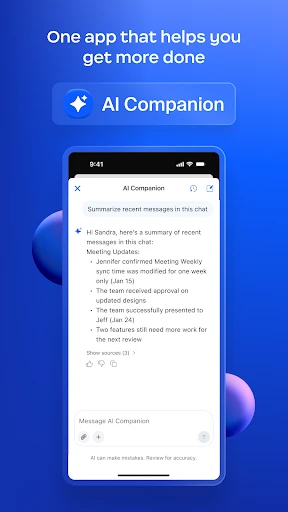
Zoom Workplace functions as an all-in-one collaboration suite. Its core is the reliable, high-quality meeting experience Zoom is known for, supporting video, audio, and webinar hosting. Integrated into this are Team Chat for persistent and channel-based messaging, Mail, and Calendar for scheduling and email management. The platform includes Zoom Phone for cloud telephony and Zoom Whiteboard for interactive brainstorming. A central function is the AI Companion, an integrated digital assistant that can summarize meetings and chats, generate content, and help schedule meetings. The platform also offers Spaces, a customizable tab-based area within chats to organize apps, files, and workflows. All these functions are accessible through a single, unified client, allowing users to switch seamlessly between meetings, chats, and collaborative tasks without toggling between disparate applications.
Chapter 2: Value
The primary value of Zoom Workplace lies in its unification and intelligence. It addresses the common pain point of app fragmentation by bringing essential collaboration tools—meetings, chat, phone, email, calendar, whiteboard—into one secure platform. This reduces context-switching, simplifies IT management, and lowers total cost of ownership. A key advantage is the deeply integrated, included AI Companion, which enhances productivity by automating routine tasks. It can generate meeting summaries, recap missed chat threads, draft message responses, and brainstorm on whiteboards, turning interactions into actionable insights. The platform is designed for flexibility, supporting structured meetings and spontaneous collaboration equally well. Its open platform integrates with popular productivity and business applications like Salesforce, Slack, and Microsoft 365, allowing it to fit into existing workflows. Enterprise-grade security, administrative controls, and reliable global infrastructure underpin the entire experience, ensuring trust and scalability for organizations of all sizes. Ultimately, Zoom Workplace delivers value by making collaboration more fluid, intelligent, and efficient, empowering teams to connect and achieve more from anywhere.
Chapter 3: Scenarios
Zoom Workplace primarily targets hybrid and distributed organizations across various industries, from small businesses to large enterprises. Key user groups include remote teams requiring constant synchronization, project managers coordinating cross-functional tasks, and customer-facing teams needing reliable internal communication and client meeting tools. Everyday use cases are diverse. A project team might use a dedicated Space to centralize project chats, meeting recordings, shared files, and task lists. An employee can start a quick huddle from a chat thread, then seamlessly transition to a Zoom Whiteboard for a brainstorming session. Sales representatives utilize Zoom Phone for client calls and schedule demos directly through the integrated calendar. Managers leverage AI Companion summaries to catch up on meetings they couldn't attend. For training and onboarding, HR departments host interactive webinars and store recorded sessions in accessible team channels. In education, instructors use it for virtual office hours, collaborative student projects, and administrative coordination. Essentially, any scenario requiring communication, coordination, and content sharing among a team is enhanced by the integrated, intelligent nature of Zoom Workplace.
Uninstall Instructions
For step-by-step guidance on how to safely remove this application from your device, please refer to our 《Uninstall Instructions》 document.
Pros
- integrates team chat
- meetings
- and email in one unified interface
- ai-powered meeting summaries automatically capture key decisions
- schedules meetings across different calendar services seamlessly
- persistent workspace reduces context switching between apps
- end-to-end encryption for all collaboration channels
Cons
- requires a zoom workplace license for full team functionality
- cluttered interface when managing multiple large workspaces
- ai companion features limited on certain legacy plans
- initial setup complexity for migrating from separate tools
- mobile app lacks some whiteboard and canvas features
Frequently Asked Questions
What is Zoom Workplace and its core functions?
Zoom Workplace is a unified collaboration platform that integrates team chat, phone, meetings, whiteboard, and AI capabilities. Its core functions include hosting and joining HD video meetings, screen sharing, and real-time messaging. It positions itself as an all-in-one solution for hybrid work, aiming to streamline communication and productivity within organizations.
Is Zoom Workplace free to use, and what are the costs?
Zoom Workplace offers a free Basic plan for unlimited one-on-one meetings and group meetings up to 40 minutes. Paid plans start at $14.99 per month per license, offering longer meeting durations, more participants, and advanced features like cloud recording and admin controls. In-app purchases are not typical; subscriptions are billed directly.
What devices and systems does Zoom Workplace support?
Zoom Workplace supports a wide range of devices and systems. It is available on Windows, macOS, Linux, iOS, and Android. It can be accessed via web browsers, desktop applications, and mobile apps. It also integrates with room systems and hardware like Zoom Rooms for conference rooms, ensuring broad compatibility for different user environments.
How does Zoom AI Companion work and is it free?
Zoom AI Companion is an AI assistant integrated into Zoom Workplace. It can summarize meetings, generate chat responses, and organize ideas. For eligible paid Zoom users, AI Companion is included at no additional cost on certain plans. It operates within Zoom's applications, using meeting content to provide insights, with privacy and security measures in place.
What should I do if I encounter audio or video issues?
If you experience audio or video problems, first check your internet connection and device permissions. Ensure the Zoom app is updated. Use the in-meeting 'Test Speaker and Microphone' option. For persistent issues, visit Zoom's official support website for detailed troubleshooting guides or contact their support team. They provide extensive online resources and ticket-based support.
App Info
Technical Info
Recommended For You

OBD2 Car Scanner - ELM Torque
Auto & Vehicles

Blink Beauty Cam: Photo Makeup
Beauty

NovelBar-Your Reading Haven
Books & Reference

Comicle Manga: Manhwa & Manga
Comics

Taximeter
Auto & Vehicles

Messages
Communication

Personal stickers StickerMaker
Communication

CastChat - Match & Voice Chat
Communication

Skincare and Face Care Routine
Beauty

Our Daily Bread
Books & Reference

AnyDesk Remote Desktop
Business

Job Hai - Search Job, Vacancy
Business

Marvel Unlimited
Comics

Anime tv - Anime Tv Online HD
Comics

FamilySearch Tree
Books & Reference

ThinkDiag+
Auto & Vehicles

NovelFlow
Books & Reference

Messenger
Communication

FOREO For You
Beauty

AR Drawing - Sketchar App
Art & Design