
Zoom for Chromebook
Screenshots

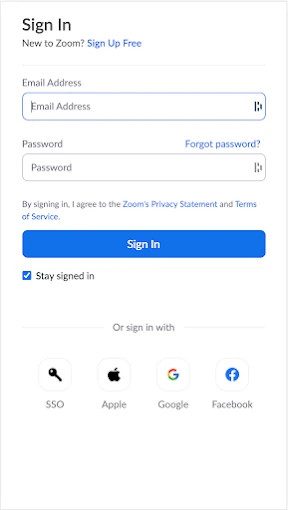



Description
About Zoom for Chromebook Feature - Seamless Video Conferencing Optimized for Chrome OS
Zoom for Chromebook is a dedicated application designed to bring the full-featured Zoom video conferencing experience to devices running Chrome OS. It is optimized to leverage the unique architecture of Chromebooks, providing a stable, secure, and efficient platform for virtual meetings, webinars, and collaboration. This app ensures that users on these lightweight, cloud-centric laptops can participate fully in the Zoom ecosystem without compromise, offering a native feel that integrates smoothly with the Chrome OS environment for both education and business contexts.
Chapter 1: Function
Zoom for Chromebook delivers the core functionalities of the Zoom platform in an application tailored for Chrome OS. It enables users to host, schedule, and join high-quality video and audio meetings with ease. Key features include screen sharing from the Chromebook desktop or specific windows, interactive virtual whiteboarding, real-time text chat in meetings, and breakout room support for dividing participants into smaller discussion groups. The app facilitates meeting recording to the cloud, allowing for later playback and sharing. Participants can join via a simple meeting link or ID without requiring a full app installation. Hosts maintain control with robust meeting management tools, including participant mute controls, waiting rooms, and screen sharing permissions. The interface is streamlined for the Chromebook's form factor, ensuring reliable performance on various hardware specifications.
Chapter 2: Value
The primary value of Zoom for Chromebook lies in its deep optimization for the Chrome OS platform, which translates to significant advantages in performance, security, and user experience. Unlike using the web client, the dedicated app offers a more reliable and feature-complete environment, reducing browser-based compatibility issues and resource contention. It is engineered for efficiency, ensuring smooth video and audio even on entry-level Chromebooks, which is crucial for the education sector where these devices are prevalent. Security is enhanced through seamless integration with Chrome OS's built-in security model, including sandboxing and automatic updates. For organizations, it supports centralized deployment and management via the Google Admin console, simplifying IT administration. The app provides full access to Zoom's collaboration toolkit, such as co-annotation on shared screens and integrated scheduling, making it a powerful tool not just for attendance but for active participation. Its value proposition centers on delivering a consistent, professional-grade Zoom experience that feels native to the Chromebook, thereby removing technical barriers and enabling users to focus entirely on their meetings and collaborative work. This optimization ensures that Chromebook users are not second-class citizens in the video conferencing landscape but have a first-rate tool designed specifically for their device ecosystem.
Chapter 3: Scenarios
Zoom for Chromebook is ideally suited for key user groups whose primary computing device is a Chromebook. The foremost scenario is in K-12 and higher education. Students and teachers use the app for virtual classes, lecture participation, study group sessions, and one-on-one tutoring, leveraging features like breakout rooms for collaborative projects. The second major scenario is within modern, cloud-first businesses and remote teams. Employees relying on Chromebooks as corporate devices use the app for daily stand-up meetings, client presentations, project collaboration, and company-wide webinars. Its efficiency on managed devices makes it a staple for frontline workers and distributed teams. Furthermore, individual users, such as freelancers and family members, find it invaluable for connecting with clients, attending virtual events, or socializing with friends and family. The app shines in any situation requiring a quick, dependable, and full-featured meeting join experience directly from a Chromebook, without the need for external hardware or complex setup. Its everyday use cases span formal professional engagements, interactive learning environments, and informal personal connections, solidifying the Chromebook as a competent hub for modern communication.
Uninstall Instructions
For step-by-step guidance on how to safely remove this application from your device, please refer to our 《Uninstall Instructions》 document.
Pros
- optimized for chromebook's simplified system and security
- seamless integration with chrome os shelf and notifications
- low system resource usage for education and enterprise environments
- one-click join via google calendar or classroom
- native support for chromebook's touchscreen and stylus input
Cons
- lacks some advanced host controls from windows/mac versions
- limited virtual background options without green screen
- no local recording option
- cloud recording only
- occasional audio routing issues with chromebook bluetooth
- requires managed chromebook for full admin policy deployment
Frequently Asked Questions
What is Zoom for Chromebook and its core function?
Zoom for Chromebook is a video conferencing app specifically optimized for ChromeOS devices. Its core function is to host and join secure, high-quality video meetings, webinars, and calls directly from a Chromebook. It provides essential features like screen sharing, virtual backgrounds, and chat, positioning itself as a dedicated solution for education, business, and personal communication on this platform.
Is Zoom for Chromebook free to use?
Yes, the basic version of Zoom for Chromebook is free. It allows hosting up to 100 participants in meetings with a 40-minute time limit for group sessions. For longer durations, more participants, or advanced features like cloud recording, paid subscriptions (Pro, Business, Enterprise) are required. The app itself does not have additional in-app purchases for core features beyond these subscription plans.
What devices and systems does this app support?
This app is specifically designed for Chromebooks running ChromeOS. It is optimized for the hardware and system capabilities of these devices. It is not a general Android app; it is the native Zoom PWA (Progressive Web App) or packaged app for ChromeOS. It may not support all features available on the Windows or macOS versions, depending on ChromeOS system limitations.
How does it handle common issues like audio/video setup?
The app integrates with Chromebook's system settings for cameras and microphones. Before joining a meeting, a test tool checks your audio and video. Common issues like no sound often require checking the Chromebook's sound settings or the in-meeting audio menu to select the correct output. For persistent problems, Zoom's support site provides Chromebook-specific troubleshooting guides for permissions and hardware conflicts.
What are the key limitations on a Chromebook?
Key limitations include the inability to use virtual backgrounds without a green screen on most Chromebooks, no local recording to the device (only cloud recording for paid accounts), and limited annotation hosts during screen sharing. Some advanced admin controls and meeting features (like certain breakout room controls) may be simplified or unavailable compared to the desktop client versions for other operating systems.
App Info
Technical Info
Recommended For You

Face Beauty Makeup Camera-Self
Beauty

Lezhin Comics - Daily Releases
Comics

inCarDoc Pro | OBD2
Auto & Vehicles

JOB TODAY: Hire & Find Jobs
Business

GettingOut Visits
Communication

JusTalk - Video Chat & Calls
Communication

Kling AI: AI Image&Video Maker
Art & Design

Clipboard
Business

Pixelcut AI Photo Editor
Art & Design

King James Bible - KJV Offline
Books & Reference

PixShift: BackGround Changer
Art & Design

TapRead - Romance Stories
Books & Reference

ReShot : AI Photo Generator
Art & Design

LibriVox Audio Books
Books & Reference

Duo Call - Dual Global Calling
Communication

AI Clothes Try-On: DressTry
Beauty

Дром Авто
Auto & Vehicles

YouVersion Bible App + Audio
Books & Reference

Psiphon: Fast and Secure VPN
Communication

Christmas Wallpaper
Art & Design