Blink Beauty Cam: Photo Makeup
Screenshots

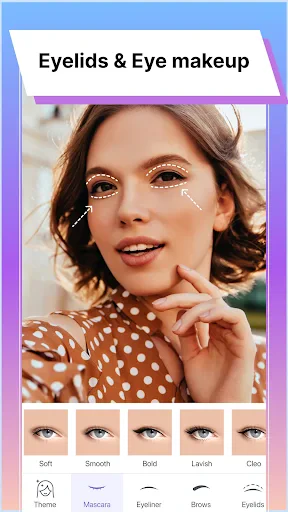
Description
About Blink Beauty Cam: Photo Makeup Features – Your AI-Powered Portrait Enhancement Studio
Blink Beauty Cam: Photo Makeup is a specialized mobile application designed for one-click intelligent portrait beautification. It leverages advanced artificial intelligence and augmented reality technologies to automatically detect facial features and apply sophisticated makeup effects, skin retouching, and stylistic filters to photos. The app positions itself as a virtual makeup artist and photo editor, allowing users to achieve professional-grade portrait enhancements without any complex manual editing skills. It caters to the growing demand for instant, high-quality visual presentation on social media and in personal digital galleries.
Chapter 1: Function
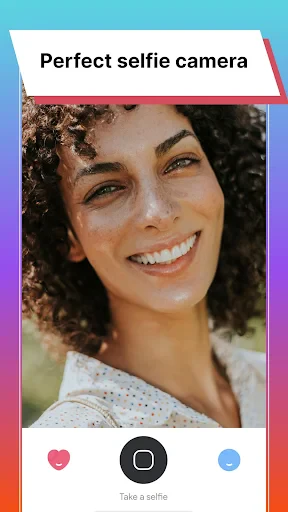
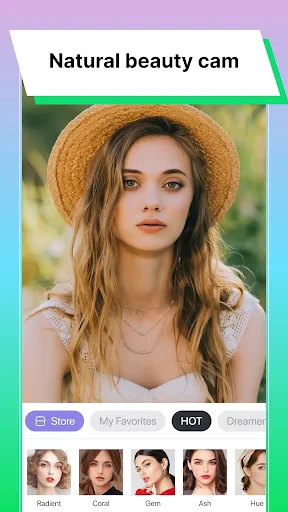
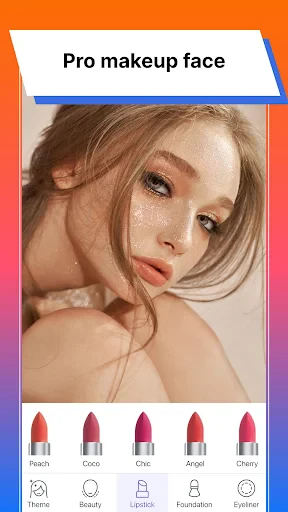
Blink Beauty Cam: Photo Makeup operates primarily as an automated photo beautification tool. Its core function revolves around AI face detection, which instantly analyzes a uploaded or real-time captured portrait. Following detection, the app offers a suite of automated enhancements. This includes applying virtual makeup such as foundation, lipstick, eyeshadow, blush, and eyeliner with various color and style options. Simultaneously, it performs skin retouching by smoothing textures, removing blemishes, brightening the complexion, and refining facial contours. Beyond makeup, the app provides a library of filters and lighting effects to alter the photo's overall mood and aesthetic. Additional features often found in such apps include hair color change tools, accessory addition like virtual glasses or hats, and basic photo editing capabilities such as cropping and adjusting brightness. The entire process is designed for speed and simplicity, delivering a transformed image in seconds.
Chapter 2: Value
The primary value proposition of Blink Beauty Cam lies in its democratization of professional portrait editing. It eliminates the steep learning curve associated with traditional software like Photoshop, making high-level beautification accessible to anyone with a smartphone. Its key advantage is the intelligent, context-aware application of effects. Unlike simple filters, the AI ensures makeup aligns precisely with facial anatomy—eyeshadow on lids, lipstick within lip lines—creating a natural and convincing result. This precision saves significant time and effort compared to manual editing. For social media enthusiasts and content creators, the app provides immense value by enabling the consistent production of flattering, polished images that can enhance personal branding and engagement online. It also serves as a risk-free virtual try-on tool for testing makeup looks before actual purchase, bridging the gap between digital experimentation and real-world application. The app’s constant updates with new trends in makeup and filters ensure its offerings remain current. Furthermore, by providing instant gratification and boosting confidence through enhanced self-images, it delivers significant emotional and psychological value to users seeking to present their best selves digitally. In a competitive market, its focus on specialized, AI-driven portrait enhancement rather than generic photo editing gives it a distinct and valuable niche.
Chapter 3: Scenarios
The app's primary target users are individuals active on social media platforms such as Instagram, TikTok, WeChat Moments, and dating apps, who regularly share personal photos and seek to maintain an appealing online presence. This includes influencers, bloggers, and casual users alike. A key scenario involves preparing a profile picture for social networks, professional sites like LinkedIn, or dating profiles, where a polished first impression is crucial. Another common use case is for users to enhance casual selfies or group photos before sharing them with friends and family, ensuring everyone looks their best. It is also practically used as a virtual makeup mirror, allowing users to experiment with bold or everyday makeup styles without physically applying products, which is ideal for planning looks for special events, parties, or video calls. Furthermore, photography enthusiasts and amateur models may use the app for quick pre-editing before employing more advanced tools, or to visualize concepts. In everyday life, it serves as a confidence-boosting tool, enabling users to creatively alter their appearance for fun and to express different facets of their personality through digital artistry.
Uninstall Instructions
For step-by-step guidance on how to safely remove this application from your device, please refer to our 《Uninstall Instructions》 document.
Pros
- applies virtual makeup with real-time facial tracking
- offers high-definition beauty filters for portrait photos
- one-tap makeup transfer from reference images
- lightweight app with fast processing on mid-range phones
- includes niche styles like holographic and graphic liner
Cons
- requires consistent lighting for accurate makeup application
- makeup textures can appear artificial on video calls
- limited customization for individual facial features
- advanced styles need in-app purchases to unlock
- struggles with makeup alignment on profiles or angles
Frequently Asked Questions
What is Blink Beauty Cam and what does it do?
Blink Beauty Cam: Photo Makeup is a photo editing application focused on AI-powered beauty enhancement and virtual makeup. Its core function is to retouch portraits by automatically smoothing skin, reshaping facial features, and applying digital cosmetics like lipstick and eyeshadow. It positions itself as a tool for quick, professional-looking beauty edits without the need for complex software. Basic usage involves taking a photo or uploading one, then using its automated tools or manual sliders for adjustments.
Is Blink Beauty Cam free to use?
The app is free to download and offers basic editing features at no cost. However, it operates on a freemium model, meaning advanced filters, premium makeup styles, high-resolution exports, and the removal of watermarks or ads typically require in-app purchases or a subscription. Specific pricing for these premium features is set within the app's store listing and may vary.
What devices and systems is this app compatible with?
Blink Beauty Cam is primarily designed for mobile devices. It is available for iOS on the Apple App Store and for Android on Google Play. The app is optimized for smartphones and may not be officially available for tablets or desktop operating systems. For the most accurate and current information on supported versions (e.g., iOS 13.0 and up, Android 8.0 and up), please refer to the official app store listing.
How does the AI beauty feature work?
The AI beauty feature analyzes facial landmarks in your photo to apply enhancements automatically. It typically detects skin areas to even out tone and texture, identifies eyes to brighten them, and locates the mouth to add color. These are non-destructive, adjustable edits. The technology is designed for realistic beautification, but results can vary based on photo quality and lighting. It does not perform advanced Photoshop-level manipulations.
Can edited photos be shared directly to social media?
Yes, the app includes direct sharing functionality. After editing, you can export your photo and share it to major social platforms like Instagram, Facebook, or Snapchat from within the app. Please note that sharing high-resolution images or videos without a watermark may be a premium feature. The app requires permission to access your device's photo library and camera to function fully.
App Info
Technical Info
Recommended For You

Hair Color Changer: Change you
Beauty

Toonsutra: Webtoon & Comics
Comics

MyNISSAN®
Auto & Vehicles
Tattoo Simulator Tattoo Maker
Art & Design

RateByFresh
Beauty

Paychex Flex
Business

Fashion Design Sketches Book
Art & Design

Readict -One Click Away Novels
Books & Reference

Virtual Hair Style Changer
Beauty

AR Drawing - Sketchar App
Art & Design

NovelBar-Your Reading Haven
Books & Reference

Perfect365 Makeup Photo Editor
Beauty
Unicorn Stickers & Emoji Packs
Beauty

Picify: AI Art Editor
Art & Design

AR Draw Sketch: Trace & Paint
Art & Design

Car Scanner ELM OBD2
Auto & Vehicles

Mirror Study Bible
Books & Reference

AI Logo Generator, Logo Maker
Art & Design

Email - Fast and Smart Mail
Communication

Burner: Second Phone Number
Communication