
Google Chat
Screenshots



Description
About Google Chat Feature - A Modern Hub for Team Collaboration
Google Chat is a secure and intelligent communication and collaboration application developed by Google, designed for teams and organizations. Integrated within the Google Workspace ecosystem, it transforms traditional workplace messaging into a structured and powerful collaborative hub. Moving beyond simple instant messaging, Google Chat facilitates organized conversations in dedicated spaces, integrates deeply with key productivity tools like Google Drive, Docs, Sheets, and Meet, and employs Google's search and AI capabilities to enhance information retrieval and workflow automation. It serves as a central platform where direct messages and team projects converge, aiming to reduce email overload, streamline project coordination, and foster a more connected and efficient working environment for businesses of all sizes.
Chapter 1: Function
Google Chat's core functionality revolves around two primary modes: direct messaging and collaborative spaces. The direct messaging feature allows for one-on-one or small group conversations with familiar chat capabilities, including file sharing and emoji reactions. The more powerful function lies in its 'Spaces,' which are dedicated, persistent rooms for team projects or topics. Within Spaces, users can organize discussions into threaded conversations, ensuring topics remain focused and searchable. Seamless integration is a key functional pillar; users can collaboratively create and edit Google Docs, Sheets, and Slides directly within a chat window, schedule Google Calendar events, and launch Google Meet video conferences instantly. The app also supports task management through the ability to assign action items and create custom bots and automated workflows using Google's tools, connecting various services to post updates or fetch information without leaving the chat interface.
Chapter 2: Value
The primary value proposition of Google Chat lies in its ability to unify communication, collaboration, and content creation within the trusted and integrated Google Workspace environment. Its key advantage is the reduction of context-switching and app fragmentation. By bringing conversations, files, meetings, and tasks into a single, searchable platform, it significantly boosts team productivity and transparency. The structured nature of Spaces, with threaded conversations, prevents important messages from being lost in chaotic group chats, making project history easily accessible. Deep integration with Google Drive ensures that files shared in chat are always the latest version and accessible with appropriate permissions, eliminating the confusion of multiple file versions. Security and compliance are inherent advantages, as it benefits from Google's robust enterprise-grade security infrastructure, data loss prevention, and Vault for archiving, meeting the needs of regulated industries. Furthermore, the potential of Google's AI, such as through features like smart compose and future integrations with Duet AI, promises to automate summaries and assist in information synthesis, offering a forward-looking intelligent collaborative experience that grows more valuable with use.
Chapter 3: Scenarios
Google Chat is primarily targeted at teams and organizations already invested in or considering the Google Workspace ecosystem. It is ideal for businesses, educational institutions, and non-profit groups that require structured, secure, and efficient internal collaboration. Key user groups include project teams working on complex, multi-phase initiatives where maintaining organized discussions, shared documents, and a clear record of decisions is critical. Remote and hybrid teams benefit immensely, as the app provides a virtual headquarters for daily stand-ups, asynchronous communication across time zones, and instant face-to-face connection via integrated Meet. Departmental groups, such as marketing, engineering, or HR, can use Spaces as a central hub for ongoing operations, announcements, and resource sharing. It also serves executive and administrative assistants for coordinating schedules and logistics, and IT departments for providing support and announcements. Everyday use cases range from quickly resolving queries via direct message, co-authoring a project proposal in a Doc within a Space, to launching an impromptu video call to clarify a complex issue, all without ever switching to a different application.
Uninstall Instructions
For step-by-step guidance on how to safely remove this application from your device, please refer to our 《Uninstall Instructions》 document.
Pros
- seamless integration with google workspace apps
- creates dedicated rooms for persistent topic-based chat
- inline threading keeps side conversations organized
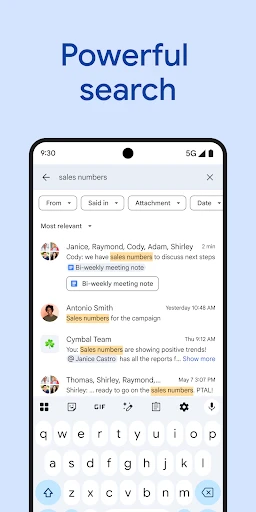
- powerful search within chats and shared files
- supports collaborative document editing in chat
Cons
- room-centric model can feel rigid for casual chats
- initial setup for teams requires administrative configuration
- file sharing heavily favors google drive ecosystem
- notification management across rooms can be complex
- limited bot ecosystem compared to some competitors
Frequently Asked Questions
What is Google Chat and what are its core functions?
Google Chat is a messaging and collaboration app from Google, designed for teams and workplaces. Its core functions include direct messaging, creating persistent group conversations (called Spaces) for projects, and seamless integration with Google Workspace tools like Drive, Docs, and Meet. It positions itself as a hub for team communication, file sharing, and collaborative work, aiming to reduce email reliance and centralize project discussions.
Is Google Chat free to use, or does it require a subscription?
Google Chat is not a standalone, universally free consumer app. It is a core service included with Google Workspace subscriptions (Business Starter, Business Standard, etc.) for organizations. Individuals with free personal Google accounts can access a version of Chat primarily through Gmail's interface, but the full, dedicated app experience with advanced team features is tied to Workspace plans. There are no in-app purchases within the app itself.
What devices and systems does Google Chat support?
Google Chat is widely accessible. It offers dedicated apps for Android and iOS mobile devices. On desktop, it is available as a web application accessible through major browsers like Chrome, Safari, and Edge. It does not require any additional specialized hardware. The service is deeply integrated into the Gmail website and app for personal accounts and is a central part of the Google Workspace ecosystem for business users.
How does Google Chat differ from other messaging apps like Slack?
Google Chat's unique feature is its deep, native integration with Google Workspace. Unlike standalone apps, Chat allows you to collaboratively preview, comment on, and share Drive files, Docs, Sheets, and Slides directly within a conversation. It also features threaded replies in Spaces for organized discussions and one-click transition to Google Meet video calls. Its positioning is as an integrated component of a broader productivity suite rather than a separate tool.
Can I use Google Chat for personal conversations with friends?
While possible, Google Chat is not optimized for general social messaging. Its design focuses on workplace and project-based collaboration. For personal use, features like Spaces are geared towards task-oriented groups. Most personal Google account users find direct messaging through the Gmail interface, but the dedicated Chat app experience and advanced features are primarily intended for organized team communication within a Google Workspace environment.
App Info
Technical Info
Recommended For You

aesthetic background
Art & Design

AutoExpreso Móvil
Auto & Vehicles

Joyread
Books & Reference

Meta Ads Manager
Business

Trace Drawing-Sketch and Paint
Art & Design

Staples - Deals & Shopping
Business

Biblia Católica en español
Books & Reference

clickworker
Business

ReadEra – book reader pdf epub
Books & Reference

Perfect365 Makeup Photo Editor
Beauty

hoopla Digital
Books & Reference

Manga Library - مكتبة المانجا
Comics

Kelley Blue Book: We Know Cars
Auto & Vehicles

Car Engine Sounds - Gas Pedal
Auto & Vehicles

FAX App: Send Faxes from Phone
Business

How To Draw Comics
Comics

Easy hairstyles step by step
Beauty

Messages: Text SMS
Communication

Blink Beauty Cam: Photo Makeup
Beauty

Find a Grave
Books & Reference