FAX App: Send Faxes from Phone
Screenshots


Description
About FAX App: Send Faxes from Phone Feature
FAX App: Send Faxes from Phone is a modern mobile application designed to digitize and streamline the traditional faxing process. It transforms your smartphone into a portable fax machine, allowing users to send and receive fax documents directly from their mobile devices. By leveraging internet connectivity, the app eliminates the need for physical fax machines, dedicated phone lines, and paper, offering a convenient, eco-friendly, and cost-effective solution for both personal and professional communication needs. It bridges the gap between legacy document transmission methods and contemporary digital workflows, making faxing accessible anytime and anywhere.
Chapter 1: Function
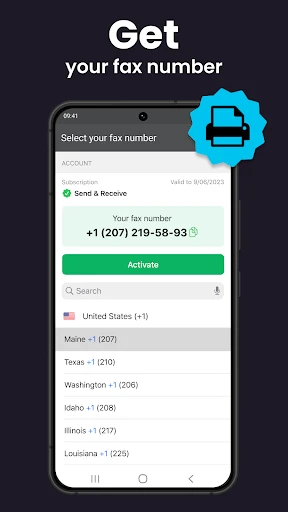
The core functionality of FAX App centers on enabling seamless document transmission via fax from a mobile phone. Users can send faxes by uploading documents directly from their device's storage, cloud services like Google Drive or Dropbox, or by capturing new documents using the phone's camera to scan physical papers. The app supports a wide range of file formats including PDF, Word, Excel, and image files, converting them for fax transmission. Key features include the ability to create custom cover pages, manage a digital contact book for frequent recipients, and view a detailed history of sent and received faxes. For receiving, the app typically provides a dedicated virtual fax number, and incoming faxes are delivered as digital files within the app, which can be viewed, saved, or shared further. The process is designed to be intuitive, guiding the user from document selection and recipient number entry to final transmission with clear confirmation.
Chapter 2: Value
The primary value proposition of FAX App lies in its ability to modernize a critical yet outdated business function, delivering significant advantages in convenience, cost, and efficiency. Its foremost advantage is accessibility; it liberates users from the constraints of office hardware, enabling faxing from any location with internet access. This is particularly valuable for remote workers, travelers, and small businesses without dedicated office equipment. Financially, it eliminates the substantial upfront investment in a fax machine and ongoing costs for paper, ink, and maintenance, operating instead on a transparent credit-based or subscription model. The app enhances productivity by integrating faxing into digital workflows. Documents can be faxed directly after creation or scanning, bypassing the need to print and manually feed pages. The digital log and file storage provide superior organization and searchability compared to physical fax records, aiding in compliance and record-keeping. Furthermore, it offers enhanced reliability and security compared to traditional fax lines, with encrypted transmissions and guaranteed delivery confirmations. By providing a virtual fax number, it also protects personal or business landline numbers from being publicly associated with fax communications, adding a layer of privacy. Overall, it transforms faxing from a cumbersome, resource-intensive task into a swift, integrated, and manageable digital operation.
Chapter 3: Scenarios
The app serves a diverse range of user groups whose needs intersect with legacy systems requiring fax communication. A primary target is small business owners and freelancers in industries like legal, real estate, healthcare, and finance, where faxing remains a standard for transmitting signed contracts, official forms, or sensitive documents due to its legal recognition and perceived security. These users benefit from a professional fax capability without overhead. Remote and mobile professionals, including sales personnel and consultants, can instantly send documents from client sites or while traveling. Individuals dealing with government agencies, insurance claims, or medical offices that still require fax submissions find the app invaluable for personal administrative tasks. Educational institutions and non-profits with occasional fax needs also benefit from avoiding dedicated hardware. Everyday use cases include sending a signed lease agreement to a landlord, submitting insurance paperwork from home, faxing a prescription refill request to a pharmacy, delivering a signed proposal to a client immediately after a meeting, or receiving a confirmation document from a service provider directly to one's phone. In essence, any scenario where a physical document must be formally transmitted to a recipient who only accepts faxes is efficiently solved by this application.
Uninstall Instructions
For step-by-step guidance on how to safely remove this application from your device, please refer to our 《Uninstall Instructions》 document.
Pros
- sends faxes directly from mobile without hardware
- integrates cloud storage for document access and faxing
- maintains a searchable digital log of all fax activity
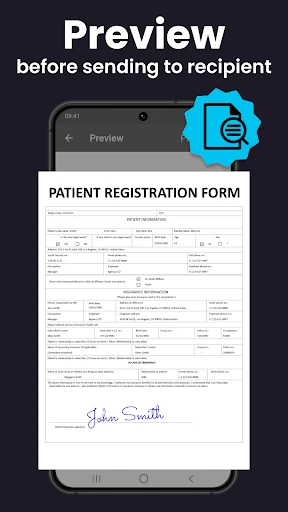
- supports electronic signatures on documents before faxing
- offers local phone number selection for recipient familiarity
Cons
- requires per-page or subscription fee after free tier
- fax success depends on recipient's legacy machine status
- limited editing tools for documents within the app itself
- international faxing rates are significantly higher
- no option to schedule faxes for later sending times
Frequently Asked Questions
What is FAX App and what does it do?
FAX App: Send Faxes from Phone is a mobile application that allows users to send and receive fax documents directly from their smartphone. Its core function is to digitize the traditional fax process, enabling you to send faxes to any fax number worldwide using your phone's data connection. It eliminates the need for a physical fax machine or landline.
Is FAX App free to use, or are there in-app purchases?
The app typically operates on a freemium model. Downloading and basic account setup are free. However, sending faxes usually requires purchasing credits or a subscription plan. The app may offer a limited number of free pages for new users. Specific pricing details for credit packs or subscriptions are available within the app's purchase section.
What devices and systems is FAX App compatible with?
FAX App is designed for mobile devices. It is primarily available for both iOS (iPhone/iPad) and Android smartphones and tablets. It requires an active internet connection (Wi-Fi or cellular data) to function. There is no need for any additional hardware like a fax machine or a dedicated phone line.
How do I send a fax using this app?
To send a fax, open the app and select the option to send a new fax. You can upload documents from your phone's storage, cloud services (like Google Drive or iCloud), or create them using the phone's scanner via camera. Then, enter the recipient's fax number, add a cover page if needed, and send it using your purchased credits or subscription allowance.
What happens if my fax fails to send?
If a fax fails, the app usually provides a status notification or error log. Common reasons include an incorrect fax number, poor internet connection, or an unsupported file format. You can typically retry sending the failed fax from the app's history or outbox. For persistent issues, you should contact the app's customer support via the help section within the app.
App Info
Technical Info
Recommended For You

EPUB Reader for all books
Books & Reference

Face Swap Magic: AI Avatars
Art & Design

Link Messenger
Communication

Holy Bible, KJV Bible + Audio
Books & Reference

Car Key Smart Remote Connect
Auto & Vehicles

Booktime
Books & Reference

AI Image Generator - Dali
Art & Design

Zello PTT Walkie Talkie
Communication

Chumba Casino Real Money ayuda
Comics

Animagic: Anime Art Generator
Art & Design

Alpha Manga: Read Isekai Manga
Comics

Messenger: Text Messages
Communication

imo video calls and chat HD
Communication

e.l.f. Cosmetics and Skincare
Beauty

Job Hai - Search Job, Vacancy
Business

Hairstyles for short hair
Beauty

Skin Bliss: Skincare Routines
Beauty

Wonolo
Business

Edmunds - Shop Cars For Sale
Auto & Vehicles

Chirp Audiobooks
Books & Reference