
ReadEra – book reader pdf epub
Screenshots
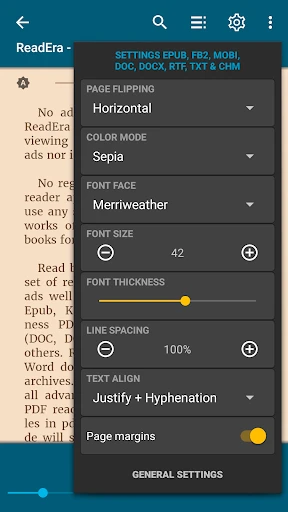
Description
About ReadEra – book reader pdf epub Feature
ReadEra is a comprehensive and sophisticated ebook reader application designed for Android and iOS devices. It distinguishes itself by offering a premium reading experience without the burden of advertisements or mandatory in-app purchases. The app supports a wide array of document formats, including EPUB, PDF, MOBI, DJVU, FB2, and Microsoft Word files, positioning it as a versatile library management tool. Its core philosophy revolves around providing a distraction-free environment for reading, coupled with powerful organizational features and deep customization options for text and layout. ReadEra operates fully offline for imported documents, respects user privacy, and seamlessly integrates with cloud storage services, making it a favored choice for avid readers and professionals who handle digital texts.
Chapter 1: Function
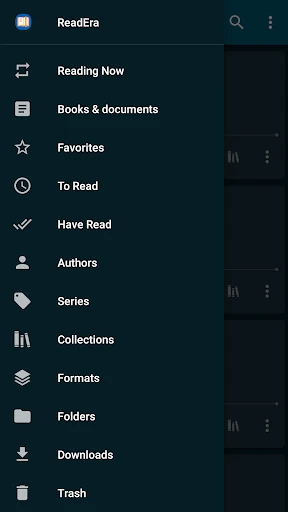
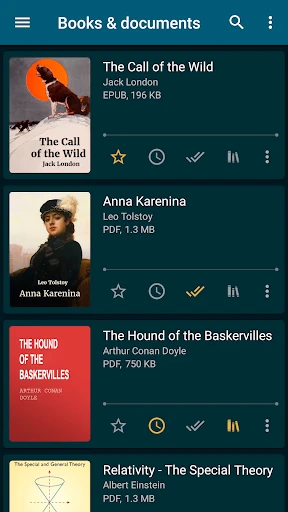
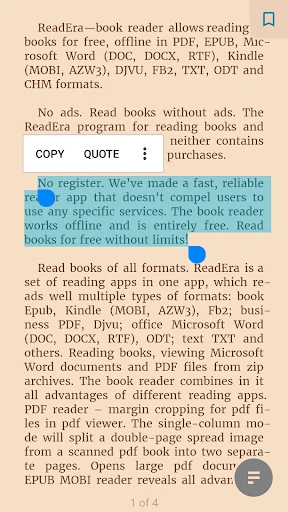
ReadEra's functionality is centered on robust document management and an enhanced reading interface. Upon installation, the app automatically scans the device for supported formats and organizes them into a personal library, allowing manual categorization by author, title, or custom bookshelves. The reading engine is highly adaptable: for EPUB and other reflowable formats, it offers extensive font, size, margin, background color, and line spacing adjustments. For PDF and DJVU files, it provides fit-to-width, scrolling, and zoom controls while maintaining document integrity. Key features include a precise text search within books, hyperlink support, night mode, pinch-to-zoom, and maintaining progress across multiple books via bookmarks and notes. It also includes a built-in dictionary for instant word lookups and a text-to-speech function for auditory reading, all within a clean, intuitive interface.
Chapter 2: Value
The primary value proposition of ReadEra lies in its commitment to an uninterrupted, user-centric reading experience, entirely free of cost. Unlike many competitors, it delivers a full suite of advanced features—such as cloud integration, bookshelf organization, and cross-format support—without ads, subscriptions, or paywalls. This creates immense value for users seeking a reliable, high-quality reader without recurring expenses. Its key advantages are multifaceted. First, its format compatibility is exceptional, eliminating the need for multiple dedicated readers. Second, the organizational system is powerful yet simple, turning a scattered collection into a manageable digital library. Third, the depth of customization allows users to tailor the visual reading experience to their precise comfort, reducing eye strain. Fourth, its offline functionality and privacy policy, which does not collect personal data, ensure accessibility and security. Finally, the seamless sync of reading progress and bookmarks across devices via Google Drive or Dropbox adds a layer of convenience for users who switch between a phone and a tablet. This combination of power, privacy, and price (free) establishes ReadEra as a superior utility in the digital reading space.
Chapter 3: Scenarios
ReadEra caters to a diverse spectrum of users across various everyday scenarios. The primary target group includes avid book enthusiasts who consume large volumes of fiction and non-fiction in digital format and desire a unified, ad-free library for all their EPUB and PDF collections. Students and academics form another core user base; they benefit from the app's robust PDF handling for textbooks and research papers, utilizing annotation, search, and bookmarking features for efficient study. Professionals who need to review reports, manuals, or Word documents on the go find its format support and clean interface invaluable. Furthermore, casual readers appreciate the ability to adjust text for comfort during long commutes or in low-light conditions using the night mode. The app is also ideal for individuals learning a language, leveraging the built-in dictionary and text-to-speech for assistance. In essence, any scenario that involves focused reading of personal document collections—from leisurely novel reading at home to referencing a work manual on a business trip—is where ReadEra excels, providing a consistent and customizable platform across all use cases.
Uninstall Instructions
For step-by-step guidance on how to safely remove this application from your device, please refer to our 《Uninstall Instructions》 document.
Pros
- handles complex epub formatting without conversion
- creates a unified library from pdf
- epub
- and mobi files
- chapter navigation and bookmarks work across all formats
- no ads or mandatory account registration required
- extracts and saves annotations into a separate text file
Cons
- cloud sync limited to user-managed folder systems
- no built-in bookstore or content ecosystem
- audiobook support is not a primary feature
- advanced typography controls are relatively basic
- interface design prioritizes function over visual polish
Frequently Asked Questions
What is ReadEra and what does it do?
ReadEra is a free e-book reader app for Android and iOS. It allows you to read books in various formats, including EPUB, PDF, MOBI, and others, without requiring an internet connection. Its core functions are library management, customizable reading settings, and document viewing. It positions itself as an ad-free reading environment for personal documents and purchased e-books.
Is ReadEra completely free to use?
Yes, the ReadEra app is free to download and use. It does not contain in-app purchases or subscription fees for its core reading and library features. The app is supported by optional donations and does not show ads while you are reading. There are no charges for accessing its primary functionality of reading and organizing your documents.
What devices and file types does ReadEra support?
ReadEra is available for Android devices, iOS devices, and Amazon Kindle Fire. It supports a wide range of e-book and document formats, including EPUB, PDF, MOBI, DJVU, FB2, RTF, and Microsoft Word (DOC, DOCX). The app can read books from your device's storage and does not require specific cloud services, though it can access files from Google Drive and other storage apps.
How does ReadEra handle book organization and notes?
ReadEra automatically organizes imported files by author and title in its library. It allows users to create custom bookshelves for further categorization. The app supports highlighting text, adding bookmarks, and making notes within books. These annotations are saved within the app and can be managed or exported. The technical implementation is local to your device for privacy.
Can I sync my reading progress across devices?
ReadEra does not have a built-in automatic sync service for reading progress, bookmarks, or library across different devices. Your progress and annotations are stored locally on each device. To sync manually, you would need to load the same book file on each device and manage your progress independently. The app focuses on being a capable offline reader rather than a cloud-synced ecosystem.
App Info
Technical Info
Recommended For You

CDisplayEx Comic Reader
Comics

Sephora: Buy Makeup & Skincare
Beauty

Lezhin Comics -การ์ตูนและนิยาย
Comics

FX File Explorer: Plus License
Business

IAA Buyer Salvage Auctions
Business

Animagic: Anime Art Generator
Art & Design

League of Comic Geeks
Comics

Torque Pro (OBD 2 & Car)
Communication

Al QURAN - القرآن الكريم
Books & Reference

Manga UP!
Comics

Textra SMS
Communication

EVgo - Fast EV Charging
Auto & Vehicles

scan my tesla
Auto & Vehicles

WhatsApp Messenger
Communication
DAT One
Business

Pixilart - Make Pixel Art
Art & Design

Paylocity
Business

Cvent Events
Business

PayPal Business
Business

Color Wheel
Art & Design