
How To Draw Comics
Screenshots


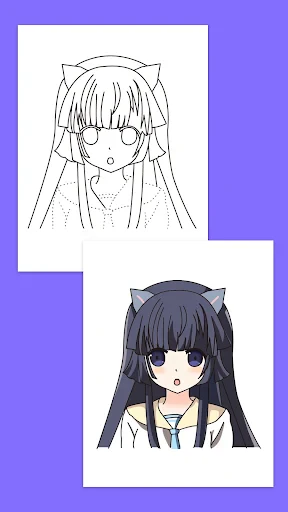
Description
About How To Draw Comics Feature – A Structured Guide to Visual Storytelling
How To Draw Comics is a dedicated mobile application designed to demystify the process of creating comic books and graphic narratives. It serves as an all-in-one digital mentor, offering step-by-step tutorials, practical tools, and structured lessons that guide users from fundamental sketching to crafting complete comic panels. Catering to both enthusiastic beginners and intermediate artists seeking to hone their craft, the app breaks down the complexities of character design, perspective, inking, and storytelling into manageable, learnable segments. By providing a portable, accessible platform for learning and practice, it transforms the ambitious dream of creating one's own comics into an achievable, structured journey.
Chapter 1: Function
The core functionality of How To Draw Comics centers on progressive, hands-on education. The app features an extensive library of step-by-step drawing tutorials that cover essential elements like human anatomy, facial expressions, dynamic poses, and background perspectives. Each lesson typically breaks down complex illustrations into simple lines and shapes, allowing users to follow along in real-time. Beyond tutorials, the app includes practical drawing tools such as adjustable layers, basic brushes, and a color palette for users to practice directly within the application. It often structures its curriculum into chapters, starting with basic shapes and construction lines, advancing to full character design, and culminating in the composition of multi-panel pages with speech bubbles and narrative flow. This functional approach ensures users build skills sequentially, reinforcing fundamentals before tackling more advanced comic art techniques.
Chapter 2: Value
The primary value proposition of How To Draw Comics lies in its ability to systematize an often-intimidating creative process, offering unparalleled accessibility and structured learning. Its key advantage is the consolidation of specialized knowledge—traditionally found in scattered books or costly courses—into a single, affordable, and on-demand platform. For the self-taught artist, this eliminates guesswork and provides a clear path from novice to competent creator. The app's value is further amplified by its practical utility; it's not merely a passive video repository but an interactive sketchpad with guided exercises, enabling immediate application of lessons. This reinforces muscle memory and conceptual understanding more effectively than observation alone. Additionally, the app caters to the unique conventions of the comic medium, teaching users not just how to draw, but how to tell stories visually through panel sequencing, pacing, and dialogue integration. This focus on narrative craft, combined with technical art instruction, offers holistic value that generic drawing apps cannot match. By empowering users to create complete works, it fosters a sense of accomplishment and creative confidence, turning abstract artistic aspirations into tangible, shareable comic pages.
Chapter 3: Scenarios
The app primarily targets aspiring comic artists and hobbyists with a passion for visual storytelling but limited formal training. Key user groups include teenagers and young adults exploring their artistic style, fans of manga, superhero comics, or webtoons who wish to create their own stories, and educators seeking structured drawing materials for students. Everyday use cases are varied and integrated into daily life. A beginner might use the app during a commute, following a 10-minute tutorial on drawing hands. A more dedicated user may set aside an evening to work through a chapter on perspective to correctly sketch a cityscape for their action scene. Another common scenario involves an individual with a story idea using the app's lessons on panel layout and speech bubbles to script and sketch their first draft directly on their tablet. The app serves as a constant reference library—when an artist struggles with drawing a specific object or emotion, they can quickly search for a targeted tutorial. It effectively supports the iterative process of comic creation, from initial character concept sketches to the final stages of assembling a coherent page, making it a versatile companion throughout the creative journey.
Uninstall Instructions
For step-by-step guidance on how to safely remove this application from your device, please refer to our 《Uninstall Instructions》 document.
Pros
- step-by-step lessons tailored for comic art styles
- includes specialized tools for creating dynamic panels
- offline access to all drawing tutorials and guides
- focus on anatomy and poses relevant to character design
- lightweight app with minimal lag during reference viewing
Cons
- limited advanced tools for digital inking or coloring
- no community feature to share artwork for feedback
- requires manual saving as auto-save is not default
- less effective for non-comic artistic styles
- updates infrequently with new character tutorials
Frequently Asked Questions
What is How To Draw Comics and what does it do?
How To Draw Comics is a digital art tutorial application focused on teaching users the fundamentals and techniques of comic book illustration. Its core function is to provide step-by-step guided lessons, from basic sketching to advanced inking and shading. The app positions itself as an educational tool for beginners and hobbyists, offering structured tutorials on character design, perspective, and panel layout. It does not require prior artistic training.
Is How To Draw Comics free to use or does it have in-app purchases?
The app operates on a freemium model. It is free to download and install, offering access to a limited selection of basic tutorials and tools. To unlock the full library of advanced lessons, specialized brushes, and premium features like video courses, users must subscribe to a premium plan or make one-time purchases within the app. The specific pricing details are available on the app's store page.
What devices and systems is this app compatible with?
How To Draw Comics is primarily designed for tablets and smartphones. It is available for iOS on the App Store and for Android on Google Play. The app is optimized for devices with touchscreens and stylus support (like the Apple Pencil or S-Pen) to provide a natural drawing experience. It requires a recent version of the respective operating systems; specific version requirements are listed on the app's download page.
How does the app teach the unique skill of comic drawing?
The app breaks down comic creation into manageable techniques using interactive, layer-based tutorials. Unique features include tracing guides for anatomy and poses, a built-in perspective grid tool for dynamic backgrounds, and specific lessons on comic elements like speech bubbles and motion lines. It emphasizes learning by doing, allowing users to draw directly over instructional templates within the app's drawing workspace.
Can I export and print my artwork from the app?
Yes, the app allows you to export your completed artwork. Common export formats include PNG and JPEG, suitable for sharing digitally or printing. For printing, it is recommended to create your artwork at a high canvas resolution within the app. The app itself does not handle physical printing services; you must use your device's sharing options to send files to a printer or a professional printing service.
App Info
Technical Info
Recommended For You

WhenToWork Employee Scheduling
Business

MessengerX App
Books & Reference

Filter for Selfie
Beauty

Skincare and Face Care Routine
Beauty

Infinite Design
Art & Design

RateByFresh
Beauty

Bookshelf-Your virtual library
Books & Reference

SpanishDictionary.com Learning
Books & Reference

Mirror App - Makeup Mirror
Beauty

PrinterShare Mobile Print
Business

O'Reilly Pro
Business

PENUP – Drawing-sharing SNS
Art & Design

5 Calls: Contact Your Congress
Books & Reference

Penny Puss 2.0
Business
All Document Reader:PDF Viewer
Business

Drawing Desk: Learn to Draw
Art & Design

BeautifyX - AI Makeover Studio
Beauty

Messages: Text Message, SMS
Communication

Flowbird Parking
Auto & Vehicles

Sunoco: Pay fast & save
Auto & Vehicles