Barnes & Noble NOOK
Screenshots

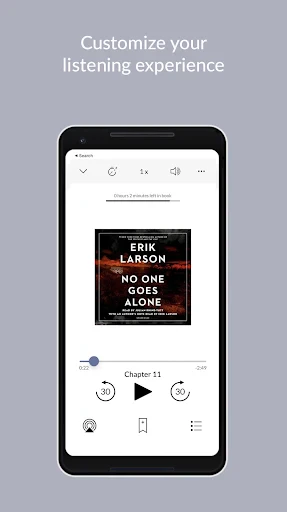
Description
About Barnes & Noble NOOK App Features
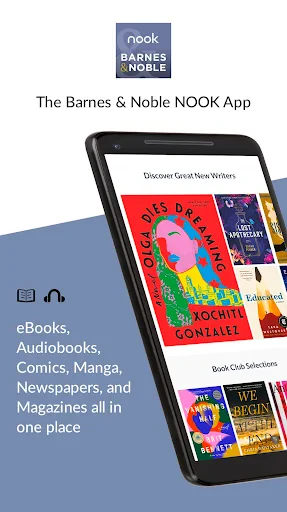
The Barnes & Noble NOOK app is a comprehensive digital reading platform that brings the vast library and reading experience of the NOOK ecosystem to smartphones and tablets. It serves as a portable gateway for users to access eBooks, magazines, and newspapers purchased from Barnes & Noble. The app transcends device limitations, allowing seamless synchronization of reading progress, bookmarks, and notes across multiple devices. With a user-friendly interface designed to mimic the comfort of reading a physical book, it offers customizable settings for text, layout, and lighting. The NOOK app effectively bridges the gap between the renowned Barnes & Noble bookstore and the modern, on-the-go reader, providing a legitimate and feature-rich alternative to other digital reading platforms.
Chapter 1: Function
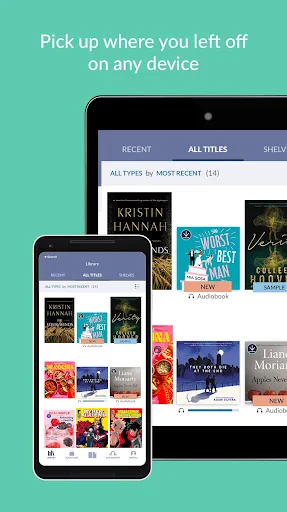
The core function of the Barnes & Noble NOOK app is to serve as a dedicated e-reader and digital library management tool. Upon logging in with a Barnes & Noble account, users gain instant access to their entire purchased digital content library. The app features a robust reading engine that supports adjustable font styles, sizes, margins, and background colors, including a night mode for reduced eye strain. It enables smooth navigation through table of contents, addition of bookmarks, and highlighting of text passages. Users can also look up word definitions within the app using integrated dictionaries. Furthermore, the app facilitates the organization of books into custom shelves, provides personalized reading recommendations, and allows for the sampling of eBooks before purchase. Its seamless sync function ensures that your last read page is always available, whether switching from a phone to a tablet.
Chapter 2: Value
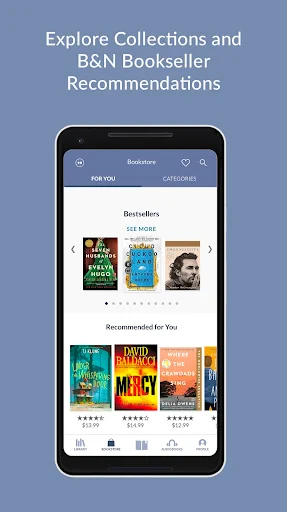
The primary value proposition of the Barnes & Noble NOOK app lies in its deep integration with a trusted bookseller and its commitment to a pure, immersive reading experience. Unlike generic e-reader apps, it offers direct access to the curated Barnes & Noble bookstore, featuring bestsellers, exclusive NOOK books, and a vast selection of titles often aligned with physical store promotions. A key advantage is the robust cross-platform synchronization; your library and reading position are consistently updated across the NOOK app, NOOK e-reader devices, and even some third-party partners. The app respects user ownership by utilizing the industry-standard EPUB format without digital rights management (DRM) encryption for many titles, giving customers more control over their purchases. It also provides unique value through features like “Readouts,” offering behind-the-scenes insights into books and authors, and “ArticleView” for a clean, reformatted reading of magazine articles. For existing Barnes & Noble customers, the app consolidates their digital and physical shopping experience, allowing easy management of wish lists and memberships. Its ad-free, focused environment stands in contrast to apps cluttered with unrelated services, prioritizing the reader's engagement with the text above all else.
Chapter 3: Scenarios
The NOOK app is ideally suited for several key user groups. First, it serves existing Barnes & Noble customers and NOOK device owners who seek a complementary mobile reading solution, enabling them to continue reading on their phone when their dedicated e-reader is not at hand. Second, it appeals to avid readers who prefer purchasing from a specific, established bookstore brand and value having a permanent, DRM-free library. Students and academics can benefit from its annotation tools and dictionary for studying digital textbooks or research materials. Commuters and travelers find immense value in carrying an entire library on their mobile device for entertainment during transit. Furthermore, the app is perfect for magazine and periodical enthusiasts who want a consolidated, readable format for their subscriptions. In everyday use, a professional might read a few pages of a business book on their phone during a lunch break, later picking up exactly where they left off on their home tablet. A fiction lover can sample a novel on the app before deciding to buy the physical hardcover in-store, illustrating the seamless ecosystem Barnes & Noble aims to create between digital and physical realms.
Uninstall Instructions
For step-by-step guidance on how to safely remove this application from your device, please refer to our 《Uninstall Instructions》 document.
Pros
- seamlessly syncs reading progress across nook and mobile apps
- offers exclusive nook bookstore deals and bn member perks
- supports epub and pdf with adjustable typography and margins
- features 'article mode' to cleanly reformat web content for reading
- integrates local library borrowing via built-in overdrive support
Cons
- requires barnes & noble account for full functionality access
- limited global availability for bookstore and certain features
- occasional sync delays between devices on complex layouts
- fewer social sharing options compared to mainstream platforms
- no native support for audiobooks within the core reading app
Frequently Asked Questions
What is the Barnes & Noble NOOK app?
The Barnes & Noble NOOK app is a free e-reading application. It allows you to purchase, borrow, and read eBooks, magazines, and comics from the Barnes & Noble digital store. The app serves as a companion to NOOK eReaders but functions independently, enabling reading across multiple devices. Its core positioning is as a digital bookstore and library platform for your smartphone or tablet.
Is the NOOK app free to use, and what are the costs?
The NOOK app itself is free to download and install. You can also read free samples of books at no cost. However, to access full eBooks, magazines, and comics, you must purchase them individually from the in-app NOOK Store. There is no subscription fee for the core app functionality. Costs are solely for the digital content you choose to buy.
On which devices can I use the NOOK reading app?
The NOOK app is available for iOS (iPhone/iPad), Android phones and tablets, and Windows PCs and tablets. It is not available for Kindle Fire devices. The app syncs your library, bookmarks, and reading progress across all your compatible devices when signed into your Barnes & Noble account. It does not require a physical NOOK eReader to function.
How does the NOOK app sync my library and reading progress?
The app uses your Barnes & Noble account to automatically sync your purchased content and reading position. When you open a book on a different device after signing in, it will prompt you to jump to your last read page. This requires a consistent internet connection for syncing to occur. Your entire digital library is cloud-based and accessible from any authorized device under your account.
Can I read my NOOK books without an internet connection?
Yes, you can read downloaded NOOK books offline. Once you purchase and download a book to your device within the app, an internet connection is not required to read it. However, you need an internet connection to initially browse, purchase, and download new books, sync your progress, or access features like borrowing from public libraries that require validation.
App Info
Technical Info
Recommended For You

Ecosia - Safe Internet Browser
Communication

Print Photo - Print to Size
Art & Design

Messages: SMS Messaging
Communication

Blue Yonder Workforce
Business

Genius: AI Photo Generator
Art & Design

FamilySearch Tree
Books & Reference

Solo: Your Gig Business App
Business

dēzl™
Auto & Vehicles

Wattpad - Read & Write Stories
Books & Reference

Groundwire: VoIP SIP Softphone
Communication
Handy Art Reference Tool
Comics

Dynamic Drive
Auto & Vehicles

Toomics - Read Premium Comics
Comics

Билеты ПДД 2025 и Экзамен ПДД
Auto & Vehicles
King James Bible (KJV)
Books & Reference

Marvel Unlimited
Comics

Draw Anime: AR Drawing Sketch
Art & Design

Rhinoplasty App: Nose Editor
Beauty

Telegram
Communication

OBD Scanner ELM327: GaragePro
Auto & Vehicles