
Torque Pro (OBD 2 & Car)
Screenshots




Description
About Torque Pro (OBD 2 & Car) Features – Your Professional Automotive Diagnostic Companion
Torque Pro (OBD 2 & Car) is a powerful and comprehensive automotive diagnostic application designed for vehicle owners and enthusiasts. By connecting to a standard OBD-II adapter plugged into your car's diagnostic port, the app transforms your Android device into a sophisticated, real-time vehicle monitoring and analysis tool. It goes beyond basic code reading, offering deep insights into engine performance, sensor data, and overall vehicle health. Serving as a bridge between modern vehicle electronics and user curiosity, Torque Pro empowers drivers with professional-grade information previously accessible only to mechanics, promoting informed maintenance and a deeper understanding of one's automobile.
Chapter 1: Function
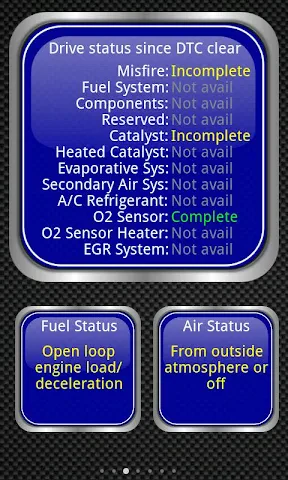
Torque Pro's core functionality revolves around interfacing with a vehicle's On-Board Diagnostics (OBD-II) system. Once paired with a compatible Bluetooth or Wi-Fi OBD-II adapter, the app establishes a real-time data link. Its primary functions include reading and clearing diagnostic trouble codes (DTCs), which are essential for identifying engine, transmission, and emissions system issues. Beyond code handling, the app displays real-time gauges and graphs for hundreds of parameters such as engine RPM, coolant temperature, vehicle speed, throttle position, and oxygen sensor voltages. Users can create fully customizable dashboards with various gauge styles. It also features trip logging with GPS tracking, recording vehicle sensor data alongside location and speed for later analysis. Additional functions include 0-60 mph performance testing, horsepower and torque estimation, and emission test readiness status checks, providing a holistic view of vehicle dynamics and compliance.
Chapter 2: Value
The value proposition of Torque Pro lies in its unparalleled depth, customization, and cost-effectiveness for vehicle diagnostics. Its key advantage is delivering professional-level data access at a fraction of the cost of dedicated scan tools. For DIY mechanics and car enthusiasts, this demystifies vehicle maintenance, enabling proactive issue identification before they lead to costly repairs. The app's extensive customization is a major strength; users are not confined to preset layouts but can design dashboards tailored to their specific monitoring needs, whether for daily driving, performance tuning, or fuel economy tracking. The logging and replay feature adds immense analytical value, allowing users to record data streams and review them later to diagnose intermittent problems or analyze performance trends over time. Furthermore, its support for a vast array of manufacturer-specific PID (Parameter ID) formulas, often through community plugins, means it can access advanced data on many car makes and models beyond generic OBD-II parameters. This transforms a smartphone into a versatile, portable, and powerful diagnostic powerhouse, fostering vehicle literacy, promoting preventative maintenance, and ultimately saving users significant time and money while enhancing their connection to and understanding of their vehicle's inner workings.
Chapter 3: Scenarios
Torque Pro primarily targets vehicle owners who possess technical curiosity and a desire for self-sufficiency, ranging from everyday drivers to hardcore automotive enthusiasts. The first key user group is the DIY car owner or hobbyist mechanic who performs their own basic maintenance and troubleshooting. They use the app to read check engine lights, monitor sensor values after a repair, or log data to diagnose elusive issues like intermittent misfires. The second major group is performance enthusiasts and tuners. They utilize the real-time gauges and performance metrics to monitor engine vitals during spirited drives, log data before and after modifications to quantify gains, and ensure engine parameters remain within safe limits. A third significant scenario is for used car buyers or sellers; the app can be used for a pre-purchase inspection to check for hidden fault codes or verify emission readiness. Finally, hypermilers and eco-conscious drivers use it to monitor real-time fuel economy metrics, adopting driving habits that maximize efficiency. In everyday use, a commuter might have a dashboard showing coolant temp and instant MPG, while a road-tripper could log a long journey to monitor engine load and fuel trim. Essentially, any situation where understanding the vehicle's real-time status or historical performance data is beneficial falls within Torque Pro's practical application.
Uninstall Instructions
For step-by-step guidance on how to safely remove this application from your device, please refer to our 《Uninstall Instructions》 document.
Pros
- displays real-time engine data via customizable dashboards
- logs detailed vehicle sensor data for performance analysis
- supports reading and clearing manufacturer-specific diagnostic codes
- allows creating custom profiles for multiple vehicles
- integrates with external GPS and video for data overlays
Cons
- requires a compatible OBD2 Bluetooth adapter for connection
- advanced features demand automotive technical knowledge
- interface is highly technical and not user-friendly for beginners
- some vehicle-specific parameters need manual PID configuration
- real-time data streaming can significantly drain phone battery
Frequently Asked Questions
What is Torque Pro and what does it do?
Torque Pro is a paid Android app that functions as an advanced vehicle diagnostics and performance monitoring tool. It connects to your car's OBD-II port via a compatible Bluetooth adapter. The app reads real-time sensor data, displays customizable dashboards, logs trips, and can read and clear diagnostic trouble codes (DTCs). Its core positioning is as a professional-grade tool for car enthusiasts and DIY mechanics to understand their vehicle's performance and health.
What equipment do I need to use Torque Pro?
To use Torque Pro, you need an Android device and a separate, compatible OBD2 Bluetooth adapter (ELM327 type is common). The app itself is a paid, one-time purchase with no subscription. The required adapter is not included and must be bought separately. You will also need to grant the app Bluetooth and location permissions for device pairing and functionality.
Is Torque Pro compatible with my car and phone?
Torque Pro is compatible with most gasoline vehicles manufactured after 1996 and diesel vehicles after 2004 that have a standard OBD-II port. The app requires an Android device running version 4.0.3 or higher. It is not officially available for iOS. Compatibility for specific vehicle parameters depends on the protocols supported by both your car's ECU and your purchased Bluetooth adapter.
Can Torque Pro diagnose all car problems?
No, Torque Pro has functional limitations. It excels at reading real-time sensor data and generic OBD2 trouble codes, but it cannot perform proprietary manufacturer-specific diagnostics, coding, or advanced procedures like key programming. Some vehicle modules or parameters may not be accessible. It is a powerful monitoring tool but not a replacement for professional, manufacturer-specific diagnostic scanners in all scenarios.
The app cannot connect to my OBD adapter. What should I do?
First, ensure your Bluetooth adapter is plugged into the OBD-II port firmly and your car's ignition is on. Check your phone's Bluetooth settings to pair with the adapter first. Within Torque Pro, go to 'Settings -> OBD2 Adapter Settings' to select the correct device. Common fixes include restarting the app/phone, trying a different adapter, or checking for known compatibility issues with your specific adapter model on developer forums.
App Info
Technical Info
Recommended For You

NovelBar-Your Reading Haven
Books & Reference

Blend Photo Editor & Effect
Art & Design

@Voice Aloud Reader (TTS)
Books & Reference

Fresha for business
Beauty

FantacyStory: novels, fictions
Books & Reference

Bookmory - reading tracker
Books & Reference

eBird by Cornell Lab
Books & Reference

Oxford Dictionary & Thesaurus
Books & Reference

FAB Adblocker Browser:Adblock
Communication

GIF Sticker & WAsticker
Communication

Manga Library - مكتبة المانجا
Comics

Messages: Text SMS
Communication

Novellair-Your Book Nook
Books & Reference

Flowbird Parking
Auto & Vehicles

Daily Bible: Holy Bible KJV
Books & Reference

Nail Art Design : Nails Polish
Beauty

Bible (King James Version)
Books & Reference

Quran Majeed – القران الكريم
Books & Reference

Invoice Simple: Invoice Maker
Business
Car Engine Sounds - Gas Pedal
Auto & Vehicles