
CamCard-Digital business card
Screenshots



Description
About CamCard Digital Business Card Feature
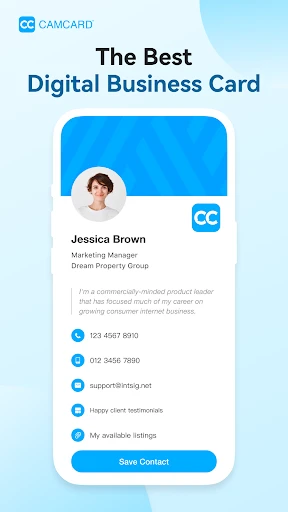
CamCard is a leading digital business card management application designed to revolutionize the way professionals network and manage contacts. By leveraging advanced optical character recognition technology, it seamlessly converts physical business cards into digital contacts with a simple scan. The app serves as a centralized, intelligent address book, eliminating the clutter of paper cards and streamlining contact organization. It transcends being a mere scanner, evolving into a comprehensive tool for contact management, networking, and professional relationship building. Catering to modern business needs, CamCard enhances efficiency, ensures data accuracy, and fosters more connected professional interactions in a digital-first world.
Chapter 1: Function
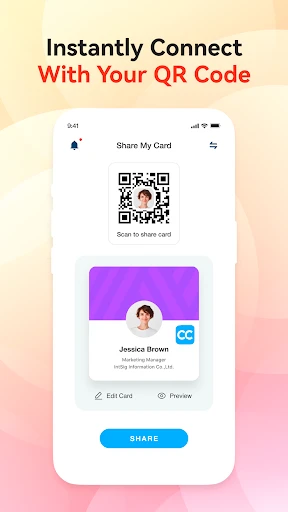
The core functionality of CamCard centers on digitizing and managing business card information with remarkable efficiency. Its primary feature is the one-tap scan: users simply photograph a physical business card with their smartphone camera. The app's powerful OCR engine then instantly recognizes and extracts all textual details, including name, job title, company, phone number, email address, and website. This extracted data is automatically populated into a neatly organized digital contact profile within the app. Beyond scanning, CamCard functions as a robust contact manager. It allows users to enrich profiles with notes, reminders for follow-ups, and tags for categorization. The app also facilitates easy sharing of one's own digital card via QR code, email, or messaging apps. Furthermore, it offers seamless synchronization with device-native address books and cloud services, ensuring contacts are backed up and accessible across all devices, thus preventing data loss.
Chapter 2: Value
CamCard's primary value proposition lies in its ability to save significant time, reduce manual error, and enhance professional networking effectiveness. By automating the tedious process of manually inputting contact details, it eliminates a common administrative burden, allowing professionals to focus on meaningful interactions rather than data entry. The accuracy of its OCR technology ensures that contact information is captured correctly, mitigating the risks of typos or lost cards. A key advantage is the creation of a searchable, always-accessible digital Rolodex. Users can instantly find any contact using keywords, company names, or tags, a feature impossible with a stack of physical cards. The app adds strategic value through its relationship management tools. Setting reminders for follow-up calls or meetings helps users nurture professional connections proactively. The eco-friendly aspect of reducing paper waste also resonates with environmentally conscious organizations. For businesses and sales teams, CamCard offers team plan features, allowing for the centralized sharing of company contacts and client information, thereby improving collaboration. Its cross-platform compatibility and cloud sync ensure that a user's professional network is securely backed up and available on smartphone, tablet, or computer, making it an indispensable tool for the mobile professional. Ultimately, CamCard transforms a fragmented, analog process into a streamlined, intelligent system for connection management.
Chapter 3: Scenarios
CamCard is ideally suited for professionals and individuals for whom networking is a frequent and critical activity. Sales representatives and business development executives are primary users, as they constantly exchange cards at conferences, meetings, and client visits. For them, CamCard instantly digitizes leads, enabling immediate follow-up and efficient pipeline management. Marketing professionals and event attendees also benefit greatly, as they can quickly capture dozens of contacts at trade shows or seminars without worrying about sorting through piles of cards later. Recruiters and HR professionals use it to efficiently manage candidate and industry contact information. Entrepreneurs and startup founders, who often network to build partnerships and seek investors, find it invaluable for organizing their growing ecosystem of contacts. Furthermore, journalists and researchers who interview numerous subjects can use it to maintain accurate records of their sources. In everyday use, a scenario involves a professional returning from a networking event, using CamCard to scan all collected cards within minutes, tagging them with the event name, and setting reminders to connect on LinkedIn or send an email the next day. Another common scenario is during a one-on-one meeting, where instead of exchanging paper, users simply scan each other's QR codes from within the app, ensuring instant and accurate contact sharing.
Uninstall Instructions
For step-by-step guidance on how to safely remove this application from your device, please refer to our 《Uninstall Instructions》 document.
Pros
- accurately parses business cards via phone camera
- auto-syncs contacts to major CRM platforms
- supports offline recognition without network
- creates shareable digital cards with analytics
- batch scan mode for processing multiple cards
Cons
- requires manual correction for complex card designs
- advanced CRM sync limited to paid plans
- offline mode lacks real-time duplicate checking
- analytics features need frequent manual updates
- high-resolution scans consume significant storage
Frequently Asked Questions
What is CamCard and what does it do?
CamCard is a business card management app that digitizes physical cards. Its core function is to scan business cards using your phone's camera, automatically extract contact information, and save it as digital contacts. It eliminates manual data entry and helps organize professional networks. The app also allows you to create and share your own digital business card.
Is CamCard free to use or are there in-app purchases?
CamCard operates on a freemium model. The basic version is free and includes core scanning and saving features for a limited number of cards. For unlimited scans, advanced organization tools, CRM integrations, and bulk card management, a paid subscription is required. Subscription plans are offered monthly or annually.
What devices and systems is CamCard compatible with?
CamCard is primarily available for iOS and Android smartphones and tablets. It requires a device with a functioning camera for scanning. The app also offers synchronization across devices via cloud services. For optimal OCR accuracy, a stable internet connection is recommended during scanning, though some functions work offline.
How accurate is the card scanning and data extraction?
CamCard's OCR technology is generally accurate for standard, clear-printed business cards in supported languages. Accuracy can decrease with poor lighting, unusual fonts, complex layouts, or damaged cards. Users should review and manually correct any extracted data. The app may struggle with handwritten cards or highly decorative designs.
Can I export my contacts from CamCard to other apps?
Yes, CamCard allows you to export your saved contacts. You can typically sync digitized contacts directly to your device's native address book (Contacts on iOS or Android). The app also supports exporting contact data in standard formats like vCard (VCF), which can be imported into email clients, CRM software, or other contact management systems.
App Info
Technical Info
Recommended For You

Remodel AI - Home Renovation
Art & Design

Car Scanner ELM OBD2
Auto & Vehicles

Reolink
Communication

DreamPic - AI Image Generator
Art & Design

Messenger: Text Messages
Communication

Avigilon Alta Open
Business

SALLY BEAUTY
Beauty

Ancestry: Family History & DNA
Books & Reference

Al Quran Kareem: القران الكريم
Books & Reference

Numero: Travel eSIM & Numbers
Communication

Moon+ Reader
Books & Reference

Doodle Master - Glow Art
Art & Design

Freewave: Romance Audiobooks
Books & Reference

Bookmory - reading tracker
Books & Reference

FedEx Mobile
Business

WebComics - Webtoon & Manga
Comics

Key Collector Comics
Comics

JobStack for Work | Job Search
Business

Daily Bible Study: Audio, Plan
Books & Reference

Dreame-Read Romance Stories
Books & Reference