
RSA Authenticator (SecurID)
Screenshots
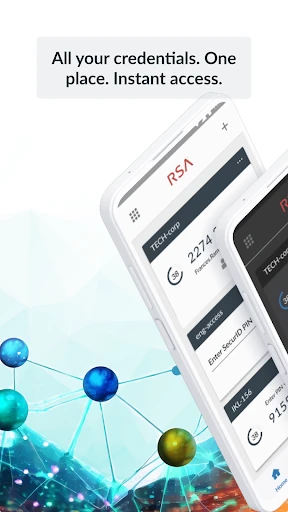

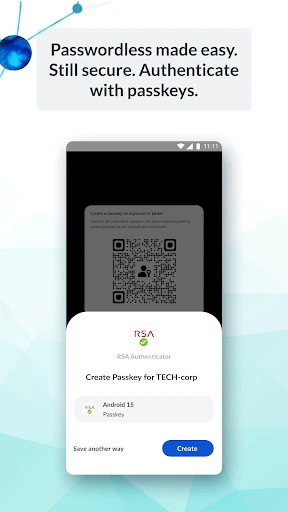


Description
About RSA Authenticator (SecurID) Feature
RSA Authenticator, the mobile companion to the RSA SecurID system, is a robust application designed to provide secure, multi-factor authentication for accessing corporate networks, cloud applications, and sensitive data. It transforms a user's smartphone into a convenient, trusted device for generating one-time passcodes (OTPs) or approving push notifications, thereby adding a critical layer of security beyond just a username and password. As a core component of one of the world's most trusted access solutions, it enables organizations to enforce strong authentication policies seamlessly, balancing stringent security requirements with a streamlined user experience for employees and partners.
Chapter 1: Function
The core function of the RSA Authenticator app is to generate time-based, one-time passcodes (TOTP) for secure login. After initial setup, which typically involves scanning a QR code provided by an organization's IT administrator, the app creates a unique, six-digit code that refreshes every 60 seconds. This code serves as the second factor of authentication. Alternatively, the app supports a modern, passwordless 'push' authentication method. When a user attempts to log in, a notification is sent directly to their registered device via the app. The user simply reviews the login details (such as location and time) and taps 'Approve' or 'Deny' within the app, granting or blocking access instantly. The app also allows for the management of multiple token accounts from different organizations within a single interface.
Chapter 2: Value
The primary value proposition of RSA Authenticator lies in its enterprise-grade security and reliability, backed by RSA's long-standing reputation in the cybersecurity industry. It significantly reduces the risk of account takeover and data breaches caused by stolen or weak passwords by requiring possession of the registered mobile device. For organizations, its key advantage is seamless integration with a vast ecosystem of protected resources, including VPNs, cloud platforms like AWS and Microsoft 365, and countless custom applications, all managed centrally via the RSA SecurID Suite. This centralized management allows IT teams to enforce policies, monitor access attempts, and respond to threats effectively. For end-users, the app offers considerable convenience compared to traditional hardware tokens; it eliminates the need to carry a separate device, leverages the smartphone they already have, and simplifies the process through intuitive push notifications. The app's design prioritizes reliability, ensuring codes are available even offline, a critical feature for users who may not always have network connectivity. This combination of ironclad security, administrative control, and user-friendly experience makes it an indispensable tool for modern, security-conscious enterprises.
Chapter 3: Scenarios
The primary target users of RSA Authenticator are employees, contractors, and partners of medium to large enterprises across sectors like finance, healthcare, government, and technology, where protecting sensitive information is paramount. Typical use cases begin each workday: an employee working remotely initiates a connection to the corporate VPN; after entering their username and password, they are prompted for a second factor. They open the RSA Authenticator app on their phone, retrieve the current six-digit code, and enter it to gain secure network access. Throughout the day, they might need to access internal HR portals, financial systems, or development environments. For these logins, they may receive a push notification—a faster, more secure method where they just tap 'Approve' after verifying the request details. IT administrators themselves rely on the system to securely access network management consoles. The app is equally vital for third-party consultants needing temporary access to specific project resources, as their credentials can be issued and revoked centrally without compromising the main corporate infrastructure. In every scenario, the app acts as a personal, digital key, ensuring that access is granted only to the legitimate holder of the registered device.
Uninstall Instructions
For step-by-step guidance on how to safely remove this application from your device, please refer to our 《Uninstall Instructions》 document.
Pros
- generates offline codes without network dependency
- supports both time-based and push notification authentication
- enterprise-grade security with rsa securid algorithm
- simplifies login with automated token filling on mobile
- centralized management for multiple corporate accounts
Cons
- requires specific corporate provisioning for initial setup
- lacks biometric login option within the app itself
- push notifications may delay on unstable connections
- no personal account support or consumer-focused features
- interface prioritizes function over modern visual design
Frequently Asked Questions
What is RSA Authenticator and what does it do?
RSA Authenticator (SecurID) is a mobile security app that generates time-based one-time passcodes for two-factor authentication. It is primarily used to securely access corporate networks, VPNs, and cloud applications protected by RSA SecurID technology. The app provides a soft token on your device, eliminating the need for a separate physical hardware token. It enhances login security by requiring both your password and this dynamically generated code.
Is RSA Authenticator free to use?
The RSA Authenticator app itself is free to download and install. However, its usage is contingent upon your organization's licensing and deployment of the RSA SecurID product suite. You cannot use the app independently; it must be provisioned and activated by your company's IT or security administrator. There are no in-app purchases or subscriptions for individual end-users within the app.
What devices and systems are supported?
RSA Authenticator is available for iOS on the Apple App Store and for Android on Google Play. It is compatible with a wide range of smartphones and tablets running recent versions of these operating systems. The app is designed for employees and personnel whose organizations use RSA's authentication infrastructure. It does not typically support personal use for securing individual consumer accounts like email or social media.
How do I set up the app for the first time?
Initial setup requires action from your organization's administrator. Typically, you will receive an activation email or a QR code from your IT department. Open the app, scan the provided QR code or enter the activation code manually. This links the app to your identity in the corporate system. The app will then begin generating synchronized passcodes. You do not create a personal account; setup is entirely driven by your organization's security policies.
What should I do if the generated code is not accepted?
First, ensure the time on your device is set to automatic network time, as code generation relies on accurate time synchronization. If the issue persists, contact your organization's IT helpdesk or security support team. They can verify your token's status, re-synchronize it, or re-provision a new one. Do not uninstall the app without consulting support, as this may break the link and require a full re-activation process.
App Info
Technical Info
Recommended For You

Cvent Events
Business

Picrew PFP & OC Maker
Art & Design

aesthetic background
Art & Design

Find a Grave
Books & Reference

Anime tv - Anime Tv Online HD
Comics

Lyft Driver
Business

Flashlight : SMS & Call Alert
Communication
NetShare - no-root-tethering
Communication

Circuit Color
Books & Reference

Avatar Maker - Avatar Creator
Comics

Amazon Flex
Business

StyleSeat: Book Hair & Beauty
Beauty

kungfu city fighting game
Comics

Google Voice
Communication

WhatsApp Business
Communication

Azar: 1 on 1 Video Chat Online
Communication

Toyota
Auto & Vehicles

SMS Auto Reply - Autoresponder
Communication

Floor Plan Creator
Art & Design

YACReader Remote
Comics