
AT&T Visual Voicemail
Screenshots


Description
About AT&T Visual Voicemail Feature – An Overview
AT&T Visual Voicemail is a dedicated application that transforms traditional voicemail management for AT&T wireless subscribers. It moves beyond the sequential, audio-only playback of standard voicemail systems by presenting messages in a visual, list-based format directly on the user's smartphone screen. This app allows users to see details like caller information, message duration, and receipt time without dialing into a voicemail inbox. It integrates seamlessly with the user's AT&T mobile service, providing a modern and efficient way to handle voice messages. By converting audio into a manageable visual interface, the app significantly streamlines communication, saving time and enhancing productivity for individuals and professionals alike who rely on voicemail as a key communication channel.
Chapter 1: Function
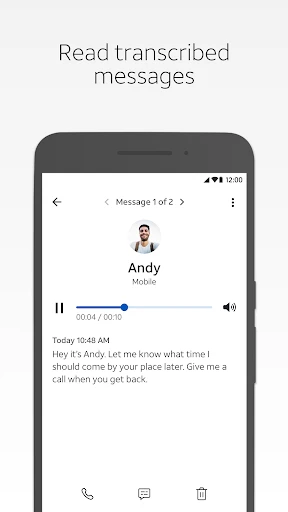
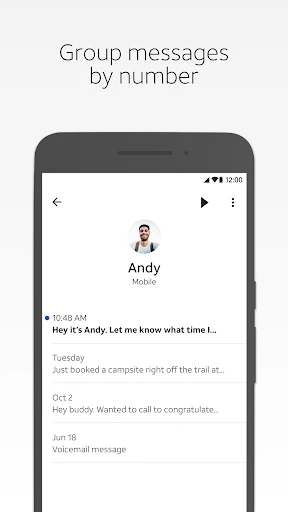
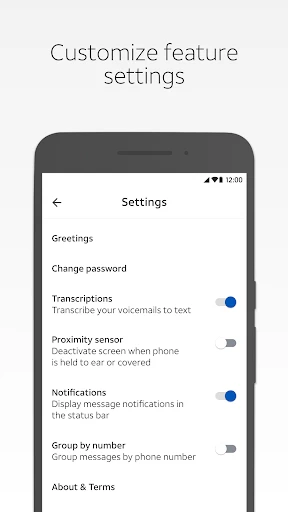
The core function of AT&T Visual Voicemail is to provide a visual interface for managing voicemails. Upon installation and setup with an eligible AT&T line, the app accesses the user's voicemail box and downloads messages to the device. It displays them as a scrollable list, showing the caller's name or number, the date and time of the message, and its length. Users can then select any message from this list to play it immediately, bypassing the need to listen to prior messages or navigate through voice prompts. Additional fundamental functions include the ability to delete messages directly from the list, save important voicemails, and call back the sender with a single tap. The app also typically offers playback controls like pause, skip, and rewind, and may provide transcription services that convert the audio message into readable text, allowing for quick scanning of content without playing the audio.
Chapter 2: Value
The primary value proposition of AT&T Visual Voicemail lies in its profound enhancement of efficiency and user control over communication. Its key advantage is the dramatic time savings it offers; users no longer need to listen to messages in the order they were received or sit through lengthy greetings and instructions. By presenting messages visually, it enables priority-based management—urgent or important messages from specific contacts can be identified and addressed first. The transcription feature, where available, adds immense value by allowing users to read message content in situations where listening to audio is inconvenient or impossible, such as in meetings, loud environments, or quiet libraries. This also aids in accessibility for users with hearing difficulties. Furthermore, the app centralizes voicemail management within a native smartphone interface, reducing dependency on the traditional dial-in system and often offering clearer audio playback through the device's speakers or headphones. It acts as a reliable archive, allowing users to keep and reference saved messages easily. For business professionals, this tool is indispensable for ensuring no critical client information or request is missed or delayed. Overall, AT&T Visual Voicemail modernizes a legacy service, turning a passive, time-consuming task into an active, streamlined component of daily digital communication, thereby increasing personal and professional productivity.
Chapter 3: Scenarios
The primary target users for AT&T Visual Voicemail are AT&T wireless customers who frequently receive voicemails and seek a more efficient management system. This broadly includes busy professionals, sales personnel, field service workers, and small business owners who rely on voice messages for client updates, project coordination, and service inquiries. For these users, quickly triaging messages from clients or managers without dialing in can save crucial minutes multiple times a day. Another key user group comprises individuals with high communication volumes in their personal lives, such as parents coordinating family activities or individuals managing multiple appointments. The app is also highly beneficial for users in environments where audio playback is not feasible; for example, an employee in an open-office setting can read transcribed voicemails discreetly. Travelers who may incur charges or have poor connectivity for dialing into their voicemail can pre-download messages via Wi-Fi. Furthermore, it serves users with accessibility needs, as the visual list and text transcription provide alternative ways to access message content. Everyday use cases include scanning a list of voicemails during a morning commute to prioritize callbacks, reading a transcribed message from a doctor's office while in a meeting to capture appointment details, and archiving a saved voicemail containing important verbal instructions or sentimental value from a loved one.
Uninstall Instructions
For step-by-step guidance on how to safely remove this application from your device, please refer to our 《Uninstall Instructions》 document.
Pros
- transcribes voicemails to text for quick reading
- manages messages directly from the native dialer app
- saves messages locally for offline playback access
- no need to dial into a voicemail inbox
- offers individual message deletion and archival
Cons
- exclusive to at&t postpaid mobile service plans
- requires compatible device and carrier provisioning
- transcription accuracy varies with audio clarity
- storage relies on internal device memory capacity
- visual interface differs across android versions
Frequently Asked Questions
What is AT&T Visual Voicemail?
AT&T Visual Voicemail is a mobile app that provides visual access to your voicemail messages. Instead of calling a mailbox, it displays a list of your voicemails directly on your device, allowing you to play, delete, or manage them in any order. It transcribes messages to text for quick reading. The app is specifically for AT&T wireless customers to manage their cellular voicemail service.
Is AT&T Visual Voicemail free to use?
The AT&T Visual Voicemail app itself is free to download. However, its functionality requires an active AT&T wireless plan that includes voicemail service. Standard data rates may apply for message downloading and transcription. There are no in-app purchases, but certain premium voicemail features might depend on your specific AT&T subscription tier.
What devices and systems support this app?
The app is primarily designed for smartphones. It is available for iOS on the App Store and for Android on Google Play. Compatibility depends on your specific device model, operating system version, and AT&T's network provisioning. It is intended for individual AT&T postpaid and prepaid customers. The app may not be supported on all tablets or non-AT&T devices.
How accurate is the voicemail transcription feature?
The transcription feature uses automated speech-to-text technology. Its accuracy can vary based on call quality, the caller's accent, background noise, and vocabulary. It is designed as a convenient tool for previewing message content but may contain errors. AT&T does not guarantee 100% transcription accuracy. For critical information, it is recommended to listen to the audio message directly.
What should I do if the app fails to show new voicemails?
First, ensure your device has a stable network connection (cellular data or Wi-Fi). Restart the app and your phone. Verify your AT&T cellular service is active. Check if voicemail is properly set up on your line by contacting AT&T support. You can also try uninstalling and reinstalling the app. For persistent issues, official troubleshooting guides are available on the AT&T website or via customer service.
App Info
Technical Info
Recommended For You

Driver Pulse by Tenstreet
Business

ParkMobile: Park. Pay. Go.
Auto & Vehicles

BOMTOON - 正版授權網漫
Comics

CL Theme C1
Auto & Vehicles

Zoom Rooms Controller
Business

Filter for Selfie
Beauty

Drawing Apps: Draw, Sketch Pad
Art & Design

Chat Cloner Secretly View Chat
Communication

AI Art Generator: Photo, Draw
Art & Design

Whoosh
Auto & Vehicles

Thumbnail Maker - Channel art
Art & Design

TapRead - Romance Stories
Books & Reference

FoxEyes - Change Eye Color
Beauty

TruckSmarter Load Board & Fuel
Business

RepairSolutions2
Auto & Vehicles

Speak and Translate Languages
Communication

Quranly
Books & Reference

Carrier Services
Communication

AI Video - AI Video Generator
Art & Design

Proton Mail: Encrypted Email
Communication