NavRadio+
Screenshots



Description
About NavRadio+ Feature – Your Ultimate In-Car Entertainment Upgrade
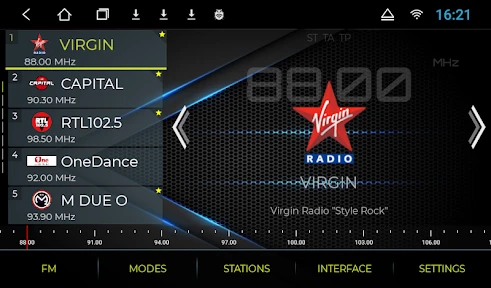
NavRadio+ is a powerful third-party application designed to replace and significantly enhance the native FM/AM radio experience on Android Automotive OS and certain Android head units, most notably in vehicles equipped with hardware from brands like Toyota, Lexus, and others. It integrates seamlessly with the existing car system, offering superior sound quality, advanced station management, and deep integration with navigation interfaces. The app acts as a feature-rich overlay, transforming the basic radio function into a modern, user-centric multimedia hub directly on the car's built-in display.
Chapter 1: Function
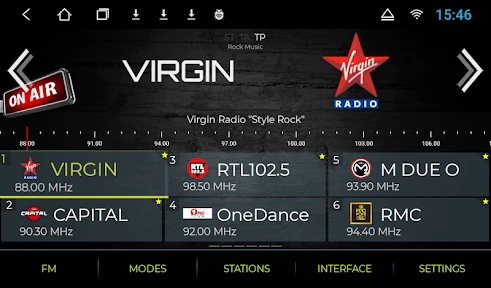
NavRadio+ core functionality centers on providing a superior radio reception and control interface. It taps directly into the vehicle's hardware tuner to access FM and AM bands, but presents the data with far greater control than stock systems. Key functions include a highly customizable station list where users can edit names, assign logos, and set genres. It supports RDS (Radio Data System) information display, showing song titles, artist names, and station tags in real-time. The app offers advanced audio processing features like adjustable equalizer presets and sound normalization to improve clarity. Furthermore, it allows for station-based recording functionality and provides multiple viewing skins and widget options to match different dashboard aesthetics. Its integration means it can run concurrently with navigation apps like Google Maps, often displaying radio information in a small overlay without interrupting map guidance.
Chapter 2: Value
The primary value proposition of NavRadio+ lies in its ability to unlock the full potential of a car's built-in radio hardware, delivering an experience that rivals aftermarket premium audio systems. Its key advantages are multifaceted. First, it offers unparalleled customization and organization, turning a generic station list into a personal, visually identifiable media library. This user-centric design saves time and enhances safety while driving. Second, the emphasis on audio fidelity through software-based enhancements like the equalizer and normalization provides tangible improvements in sound quality, making older radio broadcasts sound richer and clearer. Third, its deep system integration is a major advantage; the app operates as a native part of the head unit's ecosystem. The seamless overlay with navigation apps is a standout feature, eliminating the need to switch screens for basic radio information, thereby significantly reducing driver distraction. Finally, for enthusiasts, the app offers a level of technical control and information (via detailed RDS data) that stock systems typically withhold. Compared to the often basic and locked-down factory radio software, NavRadio+ delivers a professional, feature-packed upgrade without requiring any additional hardware, representing exceptional value for users seeking to modernize their in-car infotainment.
Chapter 3: Scenarios
NavRadio+ is primarily targeted at car owners whose vehicles run Android Automotive OS on their factory head units or who have specific compatible Android-based aftermarket systems, particularly those driving Toyota, Lexus, and some other brands where the app has been extensively tested. The ideal user is tech-savvy and dissatisfied with the limited functionality of the stock radio interface. Daily use cases are abundant. During the daily commute, a user relies on its clear RDS display to identify songs and its seamless Google Maps overlay to navigate traffic while keeping the radio on. For long road trips, the ability to meticulously organize and label found stations by city or genre, and even record interesting segments, becomes invaluable. Audio enthusiasts use its equalizer to tailor radio sound to their car's speaker system, improving the listening experience for news, talk shows, and music alike. Ultimately, it serves anyone who spends considerable time in their car and views the radio as a primary source of information and entertainment, desiring a safer, more organized, and higher-quality interaction with their vehicle's built-in systems.
Uninstall Instructions
For step-by-step guidance on how to safely remove this application from your device, please refer to our 《Uninstall Instructions》 document.
Pros
- offers live audio from global air traffic control
- displays real-time aircraft positions on a map
- supports SDR hardware for enhanced signal reception
- provides detailed technical data for aviation enthusiasts
- functions without internet via direct radio signal
Cons
- requires compatible SDR hardware for core features
- steep learning curve for non-technical users
- signal range and quality depend on local conditions
- interface is information-dense and can be cluttered
- lacks traditional music/podcast streaming content
Frequently Asked Questions
What is NavRadio+ and what does it do?
NavRadio+ is a premium navigation app that provides offline maps and turn-by-turn voice guidance. Its core positioning is as a reliable driving companion, offering detailed maps stored on your device to function without a continuous internet connection. Unique features include lane assistance, speed limit alerts, and the ability to search for points of interest offline. Basic usage involves downloading regional map data first, then selecting a destination for routing.
Is NavRadio+ free to use or does it have in-app purchases?
NavRadio+ is a paid application with a one-time purchase cost. There are no subscription fees or recurring charges. The initial purchase grants full access to all core navigation features and map updates for the purchased regions. Please note that while the app itself has no in-app purchases, downloading extensive map data for multiple countries may consume significant mobile data or storage space.
On which devices and operating systems does NavRadio+ work?
NavRadio+ is primarily designed for Android-based devices, including smartphones and tablets. It is optimized for use in-car, often via mounting solutions, and supports various Android versions (specific minimum version requirements should be checked on the official Google Play Store listing). The app is not currently available for iOS (iPhone/iPad) or desktop operating systems. It is suitable for drivers, travelers, and anyone needing offline navigation capabilities.
How does the offline navigation feature work without internet?
The offline functionality relies on pre-downloaded map data. Before a trip, users must connect to Wi-Fi or cellular data to download and store the map for their desired region onto the device's internal storage or SD card. Once downloaded, the app uses GPS satellite signals (which do not require internet) to determine your location on the stored map and provide visual and voice-guided navigation, including route calculation. Real-time traffic or online searches are unavailable offline.
Can I use NavRadio+ for walking or cycling navigation?
NavRadio+ is primarily optimized for vehicular navigation, focusing on road networks for cars, motorcycles, and trucks. Its routing algorithms, features like lane guidance, and map detail are tailored for drivers. While it may display your position on a map during walking or cycling, it lacks specialized routing modes, pathfinding for trails or bike lanes, and step-counting metrics typically found in dedicated pedestrian or cycling apps. For non-motorized travel, a dedicated app is recommended.
App Info
Technical Info
Recommended For You

BambooHR
Business

Photo App - AI Photo Enhancer
Art & Design

Glassdoor | Jobs & Community
Business

Genius: AI Photo Generator
Art & Design

CL theme 3D Glass
Auto & Vehicles

Jooble — Job Search App
Business

AR Drawing: Sketch, Art, Paint
Art & Design

Tayasui Sketches
Art & Design

FlipaClip: Create 2D Animation
Art & Design

YouMail: Block Spam on Android
Communication

AI Phone: Phone Call Translate
Communication

Boost Mobile
Communication

Fable: Books & TV
Books & Reference

Doodle Art: Magic Drawing App
Art & Design

Mary Kay® Skin Analyzer
Beauty

Bazaart AI Photo Editor Design
Art & Design

Vivaldi Browser - Fast & Safe
Communication

Messenger - Texting App
Communication

Soul EV Spy
Auto & Vehicles

AR Drawing: Sketch, Art, Trace
Art & Design