
Genius: AI Photo Generator
Screenshots


Description
About Genius: AI Photo Generator Feature
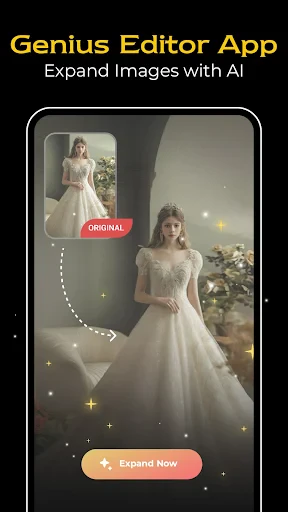
Genius: AI Photo Generator is a mobile application that leverages advanced artificial intelligence to create unique, high-quality images from textual descriptions. By transforming words into visual art, it empowers users to generate portraits, landscapes, abstract art, and various other styles of imagery without requiring any professional design skills or complex software. The app stands at the intersection of creativity and technology, offering an intuitive platform for instant visual expression. It caters to the growing demand for personalized digital content, providing a seamless bridge between imagination and visual reality directly on a user's smartphone.
Chapter 1: Function
The core function of Genius: AI Photo Generator is to interpret text prompts and generate corresponding images using sophisticated AI models. Users simply input a descriptive phrase, such as 'a cyberpunk samurai in neon-lit rain,' and select desired artistic styles or parameters. The app then processes this request on its servers, employing deep learning algorithms to produce a unique, often photorealistic or artistically styled image within seconds. Additional key functions include style customization, allowing users to apply filters reminiscent of famous art movements or specific visual aesthetics. The app also features an in-built gallery to save, manage, and share created artworks. Some versions may offer editing tools to refine generated images or create variations on a theme, putting the power of AI-driven creative exploration directly in the user's hands.
Chapter 2: Value
The primary value proposition of Genius: AI Photo Generator lies in democratizing digital art creation and unlocking personalized visual content. Its key advantage is accessibility; it eliminates the steep learning curve and time investment associated with traditional graphic design or digital painting software. For a minimal cost or through a subscription model, users gain access to powerful AI that would otherwise require significant technical expertise and computational resources. This provides exceptional time efficiency, generating multiple visual concepts in minutes, which is invaluable for brainstorming, prototyping, and content creation. The app fosters creativity by allowing users to experiment freely with ideas that might be difficult or impossible to draw manually, thus serving as both a creative partner and a productivity tool. Furthermore, it offers a high degree of personalization for social media content, unique gifts, or personal projects, ensuring that generated artwork is one-of-a-kind. Compared to basic photo-editing apps, Genius specializes in generation from scratch, offering a proactive solution rather than a reactive editing one. Its continuous updates and improvements to its AI models also promise evolving quality and capabilities, ensuring long-term value for users seeking to stay at the forefront of AI-assisted creativity.
Chapter 3: Scenarios
The primary target users for Genius: AI Photo Generator are diverse, spanning creative enthusiasts, digital content creators, and professionals in need of quick visual assets. Social media influencers and marketers form a key user group, utilizing the app to generate eye-catching, original graphics for posts, stories, and advertisements, helping them maintain a consistent and unique visual brand. Hobbyists and artists use it for inspiration, to overcome creative blocks, or to visualize concepts for traditional artwork. Writers and storytellers may employ it to create character portraits or scene illustrations for their narratives. In everyday use, a small business owner might quickly generate a logo concept or product mock-up. An individual could create a personalized avatar for a gaming profile or a custom piece of art for home decor. Students might use it to create visuals for presentations or projects. The app is particularly valuable in scenarios requiring rapid ideation and visualization, where custom stock photography is needed, or when seeking to produce unique visual content without copyright concerns. It serves as a versatile tool for anyone looking to translate an idea from their mind into a tangible digital image instantly and with minimal effort.
Uninstall Instructions
For step-by-step guidance on how to safely remove this application from your device, please refer to our 《Uninstall Instructions》 document.
Pros
- generates diverse art styles from a single text prompt
- offers high-resolution downloads for commercial use
- intuitive one-tap generation simplifies the creation process
- specialized in consistent character generation across scenes
- offline processing mode enhances user privacy security
Cons
- requires stable internet for full model library access
- premium styles and resolutions require subscription
- character consistency feature has limited customizations
- batch generation consumes significant device battery
- niche artistic styles may have longer processing times
Frequently Asked Questions
What is Genius: AI Photo Generator?
Genius: AI Photo Generator is an AI-powered creative app in the photography & art category. Its core function is to generate unique, high-quality images from text descriptions (prompts) or uploaded photos. It positions itself as a tool for creating digital art, social media content, and visual concepts without requiring professional design skills.
Is Genius AI Photo Generator free to use?
The app typically operates on a freemium model. It offers a limited number of free generations or a trial period. For extensive use, it requires in-app purchases for subscription plans or credit packs to generate more or higher-quality images. There are no ads mentioned, and no additional physical equipment is needed beyond a compatible smartphone.
What devices and systems does this app support?
Genius: AI Photo Generator is primarily a mobile application. It is adapted for iOS and Android smartphones. Specific version requirements (e.g., iOS 14.0+ or Android 8.0+) would be listed on its official app store page. It is designed for general users and creative enthusiasts, not requiring specialized hardware.
How does the AI image generation feature work?
The core feature uses a deep learning model. You input a detailed text prompt describing the desired image (subject, style, colors, etc.). The AI interprets this text and synthesizes a new image accordingly. Some versions may also allow style transfer or editing based on an uploaded reference photo. The technical process happens on cloud servers, requiring an internet connection.
Can I use the generated images for commercial purposes?
The app's Terms of Service or License Agreement governs image usage rights. Typically, users retain rights to images they generate, but the specific terms (including commercial use) vary. Some free tiers may have restrictions. For definitive information on copyright and commercial licensing, please refer to the app's official legal documentation within the app or its website.
App Info
Technical Info
Recommended For You

Jewelry Women Jewellery Photo
Beauty

BUBBLE Comics. Russian heroes.
Comics

Messages - SMS Texting App
Communication

Thumbnail Maker - Channel art
Art & Design

Nomad Sculpt
Art & Design

Infinite Design
Art & Design

Phone Mirror app - True Mirror
Beauty

Color by Number for Adults
Art & Design

Lexus
Auto & Vehicles

StyleKorean
Beauty

My SafeLink
Communication

Marco Polo - Video Messenger
Communication

RepairSolutions2
Auto & Vehicles

Wattpad - Read & Write Stories
Books & Reference

Gocrypto: Crypto Trading
Business

Mangamo Manga & Comics
Comics
WolframAlpha Classic
Books & Reference

Face Beauty Makeup Camera-Self
Beauty

PixAI: AI Anime Art Generator
Art & Design

Zangi Private Messenger
Communication