
Vivaldi Browser - Fast & Safe
Screenshots



Description
About Vivaldi Browser Fast & Safe Feature
Vivaldi Browser is a highly customizable, privacy-focused web browser designed for power users who seek control over their online experience. Built on the Chromium engine, it combines familiar compatibility with a wealth of unique features that prioritize user efficiency, security, and personalization. Unlike mainstream browsers, Vivaldi adapts to its user, offering an interface and toolset that can be tailored extensively, all while maintaining robust default privacy protections to ensure fast and safe browsing.
Chapter 1: Function
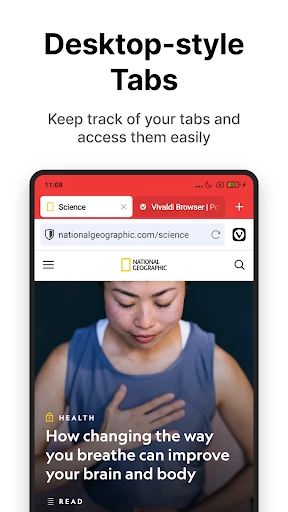
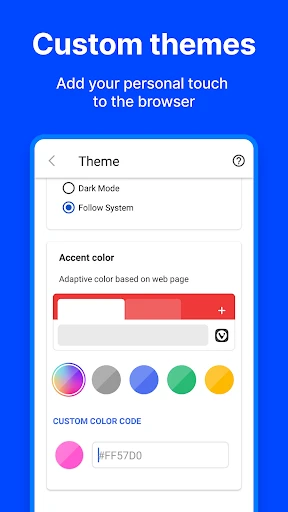
Vivaldi Browser's core functionality revolves around advanced tab management and deep customization. It introduces features like Tab Stacks and Tiling, allowing users to group and view multiple tabs simultaneously within a single window, drastically enhancing multitasking. The browser includes a built-in Notes tool with screenshot capabilities, a fully-featured Mail, Calendar, and Feed Reader client, and an integrated Tracker and Ad Blocker. Its unique Quick Commands feature provides keyboard-driven control over browser actions. Furthermore, Vivaldi offers extensive theming options, letting users modify the interface's color scheme, layout, and even the placement of the address bar and tabs to suit their workflow perfectly.
Chapter 2: Value
Vivaldi Browser's primary value proposition lies in placing user sovereignty at the forefront without compromising on performance. Its key advantage is unparalleled customization; the browser interface is a malleable canvas, allowing users to create a browsing environment that boosts their productivity. Unlike browsers with fixed designs, Vivaldi's adaptability is its core feature. Secondly, it champions privacy by default. It comes equipped with powerful tracking protection and a built-in ad blocker, reducing page load times and enhancing security without requiring extra extensions. The integration of communication tools like Mail and Calendar within the browser creates a streamlined, all-in-one workspace, reducing the need to switch between applications. Built on Chromium, it ensures compatibility with the vast majority of websites and Chrome Web Store extensions, offering the best of both worlds: cutting-edge web standards and a unique, feature-rich shell. For users frustrated with the one-size-fits-all approach of other browsers, Vivaldi delivers a fast, safe, and profoundly personal web experience.
Chapter 3: Scenarios
Vivaldi Browser is ideally suited for researchers, writers, developers, and multi-taskers who spend significant time online and demand efficiency. A student writing a thesis can use Tab Stacks to organize research by topic, take notes directly in the browser with citations, and manage their schedule via the built-in Calendar. Professionals, such as digital marketers, can tile tabs to monitor multiple dashboards and social feeds in real-time while using the integrated email client. Privacy-conscious individuals, including journalists or activists, benefit from the robust default security settings that minimize digital footprints. Furthermore, users who rely on specific workflows, like using mouse gestures for navigation or requiring highly specific interface layouts, will find Vivaldi's customization capabilities transformative. It serves as a centralized hub for users seeking to consolidate web browsing, communication, and task management into a single, powerful, and secure application tailored to their habits.
Uninstall Instructions
For step-by-step guidance on how to safely remove this application from your device, please refer to our 《Uninstall Instructions》 document.
Pros
- combines tab stacking and tiling for complex workflows
- native ad blocker and multiple privacy layers integrated
- highly customizable interface with built-in note-taking
- syncs data across devices with end-to-end encryption
- lightweight on system resources despite feature richness
Cons
- steep learning curve for non-technical users
- slower update cycle than mainstream browser competitors
- some web apps optimized for chrome may misbehave
- default settings require manual configuration for peak efficiency
- limited extension library compared to chromium-based giants
Frequently Asked Questions
What is Vivaldi Browser's core positioning?
Vivaldi Browser is a highly customizable, privacy-focused web browser for desktop and mobile. It positions itself as a powerful alternative for users seeking control over their browsing experience. Core functions include advanced tab management (stacking, tiling), built-in tools like notes, ad blocker, and tracker blocker. It emphasizes user privacy by not collecting personal data and offering extensive customization without requiring sign-in.
Is Vivaldi Browser completely free to use?
Yes, Vivaldi Browser is completely free to download and use. There are no in-app purchases, subscriptions, or premium tiers locking away core features. The company's business model is based on partnerships like built-in search engines and optional, privacy-respecting bookmarks from its partners. All customization options, privacy tools, and productivity features are available at no cost.
What are Vivaldi's key technical features for power users?
Vivaldi offers unique technical features centered on customization and efficiency. Key features include: Command Line control for quick actions, a fully modular interface where every panel (like mail, calendar, notes) can be moved or hidden, and extensive mouse gesture and keyboard shortcut customization. It also supports Chrome extensions while integrating native features like a built-in email client, RSS reader, and translation tool.
How does Vivaldi Browser protect my privacy and security?
Vivaldi has multiple built-in privacy protections. It blocks third-party trackers and ads by default with its tracker and ad blocker. It does not collect user data or require an account for syncing; instead, sync is end-to-end encrypted. The browser also offers a private window with a built-in VPN-like feature (using a proxy) for additional anonymity. Security updates are released regularly based on the Chromium engine.
Can I use Vivaldi across all my devices and systems?
Vivaldi is available on Windows, macOS, Linux, and Android. An iOS version is currently in development. You can sync bookmarks, passwords, history, and notes across your devices using encrypted sync, which requires setting up a private sync passphrase. There is no official information regarding support for specialized equipment. The browser is adaptable for general users but is particularly suited for power users who value customization.
App Info
Technical Info
Recommended For You

Dress Up Royal Princess Doll
Beauty

Nomad Sculpt
Art & Design

Mango: Lector de Manga Español
Comics

Zello PTT Walkie Talkie
Communication

Card Maker for PKM (Poke Fan)
Comics

Holy Bible King James + Audio
Books & Reference

DaVinci - AI Image Generator
Art & Design

Barber Chop
Beauty

Jotform - Form, Sign & Survey
Business

Bitcoin Miner Cloud
Business

Smarty Men Jacket Photo Editor
Beauty

Car Key Smart Remote Connect
Auto & Vehicles

Shipt: Shopper and Driver
Business

Pray Daily - KJV Bible & Verse
Books & Reference

TracFone My Account
Communication

King James Bible - KJV Offline
Books & Reference

OfficeSuite Pro + PDF
Business

Webex
Business

MM-Calendar
Books & Reference

Daily Bible - KJV Holy Bible
Books & Reference