
Tayasui Sketches
Screenshots


Description
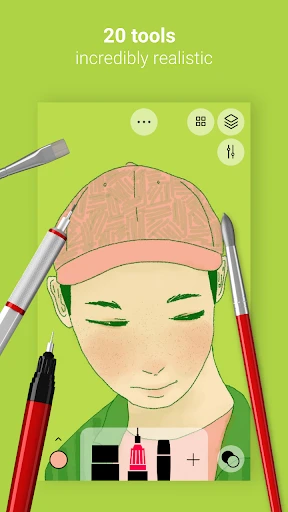
About Tayasui Sketches Feature – Digital Sketchbook for Natural Creation
Tayasui Sketches is a professional-grade digital drawing application renowned for its simulation of real drawing tools and an intuitive, user-friendly interface. It caters to artists, designers, illustrators, and drawing enthusiasts of all levels, offering a pure and distraction-free creative environment. The app stands out for its highly realistic brush engines, fluid drawing experience, and elegant minimalist design, making it a top choice for mobile digital art creation. It supports multiple layers, various export formats, and pressure-sensitive styluses, seamlessly bridging the gap between traditional sketching and digital convenience.
Chapter 1: Function
Tayasui Sketches provides a comprehensive suite of professional drawing tools. Its core functionality revolves around a meticulously crafted brush library, including watercolor brushes that simulate pigment diffusion, realistic pencils with texture and tilt sensitivity, ink pens, markers, and an airbrush tool. The app supports unlimited layers, each with independent blend modes such as multiply and overlay, enabling complex artistic compositions. Users can precisely adjust brush size, opacity, and color through an intuitive slider interface. The color picker offers palettes, spectrum selection, and custom color saving. Completed works can be exported in high-resolution PNG, JPEG, or PSD formats, facilitating further editing on desktop software. Additional features like symmetry drawing, detailed zoom up to 2500%, and background paper texture options further enhance its creative versatility.
Chapter 2: Value
The core value of Tayasui Sketches lies in its perfect balance of professional capability and approachable simplicity. Unlike complex digital art software with steep learning curves, Sketches prioritizes immediacy and tactile pleasure, allowing users to focus on creation itself rather than tool manipulation. Its key advantage is the unparalleled realism of its brush engines; the watercolor and pencil tools are particularly praised for their authentic behavior, mimicking bleeding, blending, and texture in a way that few mobile apps achieve. This provides a deeply satisfying and natural drawing experience. Furthermore, its clean, ad-free interface eliminates distractions, fostering a immersive creative flow. For professionals, it serves as a powerful portable sketchbook for concepts and illustrations. For hobbyists and beginners, its low barrier to entry encourages exploration and skill development without intimidation. The app's continuous updates and refinement, along with its one-time purchase model (with optional Pro upgrade for advanced tools), offer lasting value and respect for the user, establishing it as a trustworthy and high-quality tool in the digital art ecosystem.
Chapter 3: Scenarios
Tayasui Sketches primarily targets a diverse range of users. Professional illustrators and concept artists use it for quick ideation, thumbnail sketches, and even finished artwork on the go, leveraging its portability with iPads and styluses. Graphic and UI/UX designers employ it for wireframing, layout brainstorming, and creating informal visual notes. Students and hobbyists find it an ideal platform for learning drawing fundamentals, practicing techniques, or simply doodling for relaxation. In everyday use, an architect might sketch building concepts during a site visit; a teacher might create visual aids for a lesson; a traveler might document scenes in a digital journal; or a parent might draw alongside their child. It is perfectly suited for moments of spontaneous inspiration, whether during a commute, in a cafe, or in a waiting room, transforming any mobile device into a versatile and powerful creative studio.
Uninstall Instructions
For step-by-step guidance on how to safely remove this application from your device, please refer to our 《Uninstall Instructions》 document.
Pros
- natural brush engine mimics real media textures
- minimalist
- gesture-driven UI reduces creative friction
- layer system with blend modes supports complex artwork
- offers unique symmetry and perspective guide tools
- exports high-resolution files preserving fine details
Cons
- advanced features like animation require separate pro purchase
- limited text tool functionality restricts graphic design use
- no cloud sync across platforms without manual export/import
- steep learning curve for full pro toolset utilization
- lags behind competitors in vector-based drawing capabilities
Frequently Asked Questions
What is Tayasui Sketches and what can I do with it?
Tayasui Sketches is a professional-grade drawing and sketching app designed for digital artists, illustrators, and hobbyists. Its core function is to provide a realistic and intuitive painting experience. It simulates traditional tools like watercolors, ink pens, and markers with natural blending and texture. You can create sketches, detailed illustrations, and paintings using layers, various brushes, and a color mixer. It positions itself as a powerful yet accessible tool for creative expression on mobile devices.
Is Tayasui Sketches free to use or does it have in-app purchases?
The app is free to download and use with a robust set of basic tools. However, it offers optional in-app purchases to unlock the full professional toolkit. This includes additional brush packs, advanced layer functionality, and premium features like perspective guides and custom palettes. The free version is fully functional for casual sketching, while the one-time Pro upgrade removes limitations and expands creative possibilities for serious artists.
What devices and systems is Tayasui Sketches compatible with?
Tayasui Sketches is primarily available for iOS and iPadOS devices, including iPhone and iPad. It is optimized for Apple Pencil, providing pressure and tilt sensitivity for a natural drawing feel. There is also a version available for Android devices. The app is regularly updated to support recent OS versions. It is not currently available for desktop operating systems like Windows or macOS as a native application.
How does the watercolor brush achieve its realistic effect?
The watercolor brush in Tayasui Sketches uses a proprietary simulation algorithm that mimics the behavior of real watercolor paint. It features wet-on-wet blending, where colors bleed and mix on a virtual 'wet' canvas layer. The brush also simulates pigment depletion, meaning the color intensity decreases as you stroke, just like a real brush running out of paint. This technical characteristic creates organic, textured results that are difficult to achieve with standard digital brushes.
Can I export my work in high resolution for printing?
Yes, Tayasui Sketches supports high-resolution export. You can export your artwork in multiple formats, including PNG, JPEG, PSD (with layers preserved for Adobe Photoshop), and its native SKETCHES format. The export resolution is independent of your canvas size, allowing for large, print-ready files. For the best print quality, it is recommended to set a large canvas size at the beginning of your project, such as 300 DPI or higher.
App Info
Technical Info
Recommended For You

Duo Call - Dual Global Calling
Communication

Portable WiFi - Mobile Hotspot
Communication

Дром Авто
Auto & Vehicles

CaptionCall
Communication

Dreame-Read Romance Stories
Books & Reference

Slack
Business

DC UNIVERSE INFINITE
Comics
ReadAnywhere
Books & Reference

FaxCover Pro Create Cover Page
Business

Wehear - Audiobooks & Stories
Books & Reference

Edmunds - Shop Cars For Sale
Auto & Vehicles

Wonder Beauties
Beauty

Virtual Dyno PRO
Auto & Vehicles

PocketBook reader - any books
Books & Reference

Clay Box
Art & Design

Skincare Routine: FeelinMySkin
Beauty

AGAMA Car Launcher
Auto & Vehicles
HD Camera for Android: 4K Cam
Beauty

Christmas Wallpaper
Art & Design

Holy Bible - KJV+Verse
Books & Reference