FillUp - Gas Mileage Log
Screenshots


Description
About FillUp - Gas Mileage Log Feature
FillUp is a dedicated mobile application designed for vehicle owners to effortlessly track fuel consumption, manage refueling expenses, and monitor their vehicle's overall efficiency. It transforms the manual and often forgotten task of logging gas fill-ups into a simple, digital process. By automatically calculating key metrics like miles per gallon (MPG) or liters per 100 kilometers, FillUp provides users with clear insights into their driving habits and vehicle performance. The app serves as a personal fuel economy assistant, helping users save money, maintain their vehicle better, and make more informed decisions related to their transportation costs through organized data and intuitive analysis.
Chapter 1: Function
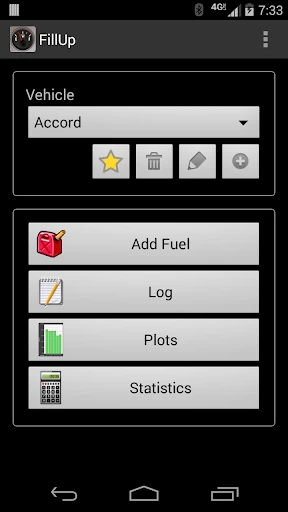
FillUp's core functionality centers on precise and convenient fuel tracking. Upon each refueling, users input basic data: the odometer reading, amount of fuel added, total cost, and optionally fuel grade and station location. The app's primary function is to automatically compute the fuel efficiency for that trip segment, displaying results as MPG or similar metrics. It maintains a comprehensive, chronological log of all fill-ups, creating a detailed history for each vehicle. Users can manage multiple vehicles within the app, switching profiles with ease. Additional functions include generating simple graphs to visualize efficiency trends over time, calculating average fuel costs per period, and setting reminders for future maintenance or refueling based on mileage. The interface is streamlined to make data entry quick, often taking less than a minute per fill-up, ensuring consistency in logging.
Chapter 2: Value
The value proposition of FillUp lies in its ability to convert raw refueling data into actionable financial and mechanical insights, promoting cost savings and proactive vehicle care. Its key advantage is the empowerment of the driver through knowledge. By consistently tracking efficiency, users can immediately detect anomalies such as a sudden drop in MPG, which may serve as an early warning sign for potential vehicle issues like tire under-inflation, faulty oxygen sensors, or the need for an oil change. This can prevent more costly repairs down the line. Financially, the app helps users accurately budget for fuel, understand the true cost per mile of driving, and identify the most economical fueling stations and habits. Compared to manual notes or spreadsheets, FillUp offers superior convenience, accuracy, and long-term data persistence. The visual trend analysis highlights how driving style, fuel type, or seasonal changes impact consumption, encouraging more economical driving behavior. For individuals or fleets aiming to control expenses and optimize vehicle health, FillUp provides a simple yet powerful tool for data-driven decision-making, ultimately paying for itself through the savings and preventative maintenance it enables.
Chapter 3: Scenarios
FillUp primarily targets cost-conscious individual vehicle owners, commuters with long daily drives, and managers of small vehicle fleets. For the everyday commuter, the app is used right after leaving the gas station; a quick two-minute entry helps them monitor how traffic patterns or air conditioner usage affects their weekly fuel budget. A family managing two or more cars can use FillUp to compare the efficiency of different vehicles, allocating the more economical car for longer trips. Road trip enthusiasts utilize it to track fuel costs across their journey, creating an accurate travel expense report. Small business owners with delivery vehicles or sales personnel on the road employ FillUp to track fuel expenses for reimbursement or tax purposes, ensuring accurate records. Furthermore, environmentally conscious drivers use the efficiency metrics to adjust their habits to reduce their carbon footprint. The app fits seamlessly into routines where financial control and vehicle maintenance are priorities, turning a mundane chore into a strategic habit for smarter vehicle ownership.
Uninstall Instructions
For step-by-step guidance on how to safely remove this application from your device, please refer to our 《Uninstall Instructions》 document.
Pros
- automatically logs fill-ups via Bluetooth OBD-II dongle
- calculates real-time fuel economy without manual entry
- identifies inefficient driving habits with trip analytics
- tracks vehicle maintenance schedules based on mileage
- exports detailed fuel cost reports for tax or business
Cons
- requires a compatible OBD-II hardware purchase
- background Bluetooth sync can drain phone battery
- manual entry fallback lacks automated features
- advanced analytics require a subscription plan
- limited vehicle compatibility for pre-1996 models
Frequently Asked Questions
What is FillUp - Gas Mileage Log?
FillUp is a utility app designed for tracking vehicle fuel efficiency and related expenses. Its core function is to log fuel purchases and calculate real-world MPG (miles per gallon) or L/100km. It positions itself as a digital replacement for manual mileage logs, helping users monitor fuel costs and vehicle performance over time. Basic usage involves entering odometer readings and fuel purchase details at each fill-up.
Is FillUp free to use, or are there in-app purchases?
FillUp calculates mileage (MPG or L/100km) using the trip distance method. You enter your current odometer reading and fuel volume purchased at each fill-up. The app computes the distance traveled since the last entry divided by the fuel used for that period. For accuracy, it's recommended to consistently fill the tank to a similar level (e.g., full) and record odometer readings regularly.
What devices and systems is the FillUp app compatible with?
FillUp operates on a freemium model. The core logging and calculation features are free. However, advanced features like data export, detailed statistics, ad removal, or syncing across multiple devices typically require a one-time purchase or a subscription. The app itself does not require any additional physical equipment to function.
How does FillUp calculate my vehicle's fuel mileage?
FillUp is primarily a mobile application. It is available for both iOS and Android devices. There is typically no dedicated desktop or web version. It is designed for individual vehicle owners and drivers, not for commercial fleet management. The app requires basic permissions like storage (to save your log data locally) and potentially network access for cloud backup features.
What happens to my data if I delete the app or get a new phone?
Your mileage log data is stored locally on your device by default. If you uninstall the app without a backup, this data will be lost. To prevent loss, you should regularly use the app's export feature (if available in the free version) or utilize its cloud backup/sync function (often a premium feature) to save data to your account, allowing restoration on a new device.
App Info
Technical Info
Recommended For You

PrinterShare Mobile Print
Business

FlipArtify - 2D Draw Animation
Art & Design

HiPaint -Sketch Draw Paint it!
Art & Design

Link Messenger
Communication

Messages - SMS, Chat Messaging
Communication

Flowt Wear
Auto & Vehicles

2nd Line+ Phone Number & eSIM
Communication

CamCard-Digital business card
Business

Fuel Forward
Auto & Vehicles

FotoFusion - Editor Photo
Beauty

Bible Daily, KJV Bible + Audio
Books & Reference

Outlined Watch Face
Art & Design

Valvoline Instant Oil Change
Auto & Vehicles

Genius: AI Photo Generator
Art & Design

Picrew PFP & OC Maker
Art & Design

Men's Hair Cuts & Hairstyles
Beauty

DMV Practice Test Pro 2024
Auto & Vehicles

Holy Bible Time-Verses&Audio
Books & Reference

Galatea: Books & Audiobooks
Books & Reference

طاقچه؛ کتاب الکترونیکی و صوتی
Books & Reference