
Link Messenger
Screenshots



Description
About Link Messenger Feature – Secure and Efficient Communication
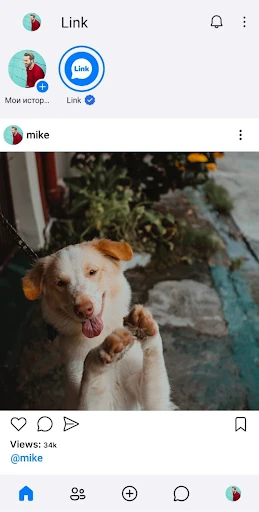
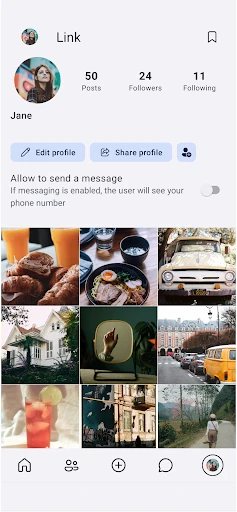
Link Messenger is a modern instant messaging application designed to prioritize user privacy and seamless communication. It offers a clean, intuitive interface coupled with robust security features, positioning itself as a reliable alternative in the crowded messaging landscape. The app facilitates text, voice, and video conversations, along with efficient file sharing, aiming to connect individuals and groups without compromising on speed or data protection. Its core philosophy centers on creating a private digital space where conversations remain confidential and user experience is streamlined for daily interaction.
Chapter 1: Function
Link Messenger provides a comprehensive suite of core communication functions. Users can send and receive text messages in individual or group chats, supporting rich media including images, videos, and documents. The app features high-quality voice and video calls over both Wi-Fi and mobile data, ensuring stable connections. Key functional elements include message status indicators (sent, delivered, read), customizable notifications, and contact management. It also offers basic organizational tools such as chat search, message archiving, and the ability to create and share location pins. The functionality is built upon a stable technical infrastructure to deliver messages promptly and reliably.
Chapter 2: Value
The primary value proposition of Link Messenger lies in its commitment to privacy and a frictionless user experience. Unlike many mainstream platforms, it emphasizes end-to-end encryption by default for all forms of communication, ensuring that only the sender and intended recipient can access message content. This provides significant security advantages for users concerned about data mining and surveillance. Furthermore, the app is designed to be lightweight, consuming minimal device storage and data, which is a key advantage for users with limited resources or in regions with unstable internet. Its interface is ad-free and avoids unnecessary clutter, focusing purely on communication. This combination of strong security, performance efficiency, and a clean design offers tangible value to users seeking a trustworthy and straightforward messaging tool. It positions itself not just as another app, but as a conscientious choice for private digital dialogue.
Chapter 3: Scenarios
Link Messenger primarily targets privacy-conscious individuals, professionals handling sensitive information, and users in environments where data security is paramount. This includes journalists, activists, legal professionals, and business teams discussing confidential projects. Its everyday use cases are broad: a family group chat sharing personal updates securely, a remote team conducting encrypted video conferences, or friends coordinating plans via text and location sharing without privacy concerns. It is also highly suitable for users in areas with slower internet connections due to its optimized data usage. The app serves as a daily driver for anyone who prioritizes the confidentiality of their digital conversations over social features or platform lock-in, providing a secure channel for both personal and professional communication needs.
Uninstall Instructions
For step-by-step guidance on how to safely remove this application from your device, please refer to our 《Uninstall Instructions》 document.
Pros
- end-to-end encrypted chat with self-destructing messages
- no phone number required for anonymous sign-up
- peer-to-peer mode works without central servers
- lightweight app with minimal data storage footprint
- open-source code allows independent security audits
Cons
- requires both parties online for p2p messaging
- limited group chat features compared to mainstream apps
- no cloud backup for message history recovery
- smaller user base complicates contact discovery
- advanced settings need technical understanding
Frequently Asked Questions
What is Link Messenger and what does it do?
Link Messenger is a secure instant messaging application focused on private communication. Its core function is to provide end-to-end encrypted text, voice, and video calls. The app positions itself as a privacy-focused alternative, with unique features often including self-destructing messages and no storage of metadata on central servers. Basic usage involves downloading the app, registering with a phone number, and connecting with other users to start secure chats.
Is Link Messenger free to use, and are there in-app purchases?
Link Messenger is fundamentally free to download and use for its core messaging and calling features. The app does not typically employ in-app purchases for basic functionality. Its business model may rely on optional donations or a separate premium tier for enterprise features, but standard user communication remains free. There is no information suggesting the need for additional paid equipment to use the app's primary services.
On which devices and operating systems is Link Messenger available?
Link Messenger is designed for cross-platform use. It is generally available for smartphones on both Android (via Google Play Store) and iOS (via Apple App Store). There is often also a desktop application for Windows, macOS, and sometimes Linux, which syncs with the mobile app. The service is adapted for general consumer use and does not target a specific niche demographic, aiming for broad accessibility.
How does Link Messenger's end-to-end encryption work?
Link Messenger's end-to-end encryption ensures that only you and the person you're communicating with can read or listen to what is sent. Calls and messages are secured with locks, and only the recipient has the special key needed to unlock and read them. This technical characteristic means the data is encrypted on your device and decrypted on the recipient's device, preventing third parties, including the app's servers, from accessing the content during transmission.
What happens if I lose my phone or change my device?
Due to its strong privacy design, Link Messenger typically does not store your message history or encryption keys on its servers. Therefore, if you lose your phone or install the app on a new device without a backup, your previous chat history may not be automatically restored. The app may offer a local, encrypted backup feature that you must manually enable and transfer to retain your data when switching devices. It's crucial to follow the app's specific backup instructions.
App Info
Technical Info
Recommended For You

SmartWatch & BT Sync Watch App
Communication

Dreame-Read Romance Stories
Books & Reference

Car Gauge Pro (OBD2 + Enhance)
Communication

أرت نوين
Comics

MangaToon: Comic & Manga
Comics

Men's Hair Cuts & Hairstyles
Beauty

Ulta Beauty: Makeup & Skincare
Beauty

Police Radar - Camera Detector
Auto & Vehicles

Carmin
Auto & Vehicles

Bible Study - Verse & Audio
Books & Reference

Logos Bible Study App
Books & Reference

Dynamic Drive
Auto & Vehicles

Genius Scan - PDF Scanner
Business

TMCARS
Auto & Vehicles

Mangamello - مانجاميلو
Comics

K MANGA
Comics

CloudLibrary
Books & Reference

Fax.Plus - Send Fax from Phone
Business

PSA | Card Grading Service
Books & Reference

Messages: SMS Message Text App
Communication