
Messages - SMS, Chat Messaging
Screenshots


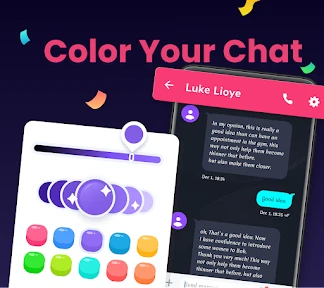

Description
About Messages - SMS, Chat Messaging Feature
Messages - SMS, Chat Messaging is the default messaging application pre-installed on most Android devices, developed by Google. It serves as a central hub for both traditional SMS/MMS text messaging and modern Rich Communication Services (RCS) chats. The app provides a clean, intuitive interface for managing all personal and group conversations, integrating seamlessly with the Android ecosystem. It is designed to be a reliable, fast, and feature-rich replacement for carrier-specific messaging apps, offering users a unified platform to stay connected with anyone, regardless of whether they are using RCS or standard SMS.
Chapter 1: Function
The core function of the Messages app is to send and receive text-based communications. It handles standard SMS and MMS, enabling users to exchange individual messages, group texts, and multimedia like photos and videos with any mobile number. A key functional pillar is its implementation of RCS Chat, which, when enabled between users, upgrades the experience to include typing indicators, read receipts, high-quality media sharing, and messaging over Wi-Fi or data. The app also organizes conversations into a simple list, allows for message search, supports message scheduling, and enables archiving or deletion of threads. Basic spam protection is integrated to filter suspicious messages. For verification, it can automatically populate one-time codes sent via SMS.
Chapter 2: Value
The primary value proposition of Google Messages lies in its effort to modernize and secure the universal SMS standard while remaining accessible. By championing RCS, it delivers a iMessage-like experience within the open Android ecosystem, providing enhanced features without requiring recipients to install a specific third-party app—only that both parties use an RCS-supported client and carrier. This bridges the gap between platform-specific apps and universal SMS. Its key advantages include a clean, ad-free interface deeply integrated with Google services like Phone, Contacts, and Gemini for contextual suggestions. Messages for Web allows users to text from any computer, enhancing productivity. Strong emphasis on security, with end-to-end encryption for one-on-one RCS chats, protects user privacy. Furthermore, features like automated spam detection, business message verification, and organized categories for personal and business chats help users manage their communication efficiently. As Google's official messenger, it receives consistent updates, ensuring reliability and access to the latest communication technologies, making it a future-proof choice for Android users.
Chapter 3: Scenarios
The primary target users are Android device owners seeking a reliable, default messaging solution. It is ideal for individuals who communicate frequently with contacts using a mix of Android and iOS devices, as it seamlessly falls back to SMS when RCS is unavailable. Everyday use cases are abundant. For personal communication, users engage in one-on-one chats with friends and family, share holiday photos in high resolution within RCS chats, and coordinate plans through group messaging. In professional or logistical scenarios, users receive verified one-time passwords for banking or service logins, interact with legitimate business updates from airlines or delivery services, and schedule text messages to be sent at appropriate times. Students and remote workers find value in the Messages for Web feature, allowing them to send and receive texts directly from their laptop browser while focusing on other tasks. The app is also crucial for users in areas with poor data coverage, as traditional SMS provides a reliable fallback, ensuring essential communication is never lost.
Uninstall Instructions
For step-by-step guidance on how to safely remove this application from your device, please refer to our 《Uninstall Instructions》 document.
Pros
- integrates multiple messaging protocols into one unified inbox
- offers granular
- per-contact notification and privacy controls
- scheduled messaging and send later features for convenience
- lightweight app size with minimal background battery usage
- backup and restore functions work without cloud dependency
Cons
- advanced features like encryption require manual per-chat setup
- no built-in video calling compared to mainstream messaging apps
- customization options can overwhelm basic SMS users
- group chat management lacks some cross-platform read receipts
- initial setup for aggregating chats requires multiple permissions
Frequently Asked Questions
What is the main function of Messages?
Messages is the default SMS and chat messaging app for Android devices. Its core function is to send and receive traditional SMS/MMS text messages with any mobile number. It also supports Rich Communication Services (RCS) for enhanced, internet-based messaging with other users on compatible networks, featuring read receipts, high-quality media sharing, and typing indicators.
Is the Messages app free to use?
Yes, the Google Messages app is completely free to download and use. Sending SMS/MMS may incur standard messaging charges from your mobile carrier, which depend on your cellular plan. Using its RCS chat features over Wi-Fi or mobile data typically does not involve extra fees from the app itself, but data usage may apply.
What devices and systems is Messages available on?
Google Messages is primarily designed for Android devices. It is commonly pre-installed as the default messaging app on many Android phones and is also available for download from the Google Play Store. It is not officially available for iOS devices. The app requires an Android phone with a mobile number and supports integration with web browsers for messaging from a computer.
How does RCS chat in Messages differ from SMS?
RCS (Rich Communication Services) in Messages provides an upgraded experience over SMS. It requires both sender and recipient to have RCS enabled and uses an internet connection. Key features include seeing typing indicators and read receipts, sharing high-resolution photos and large files, and creating better group chats. It falls back to standard SMS/MMS if the recipient's device or carrier does not support RCS.
Can I back up and restore my Messages chat history?
Yes, you can back up your Messages chat history. The app can back up your texts, photos, and other message data to your Google Account. This backup is tied to your account and can be restored when you set up a new Android device. You can manage backup settings within the app's settings menu under 'Chat features' or 'Backup'. This does not include backing up to local device storage.
App Info
Technical Info
Recommended For You

Yolla: International Calling
Communication

Blink Beauty Cam: Photo Makeup
Beauty

MyChoice Benefits
Business

Key Collector Comics
Comics

Fuel Forward
Auto & Vehicles

Chirp Audiobooks
Books & Reference

Obd Mary – Car Scanner for ELM
Auto & Vehicles

DMV Prueba de Práctica 2024
Auto & Vehicles

AR Tracer: Trace Drawing
Art & Design

Goods Unite Us
Books & Reference

AppSheet
Business

Resume Builder - CV Maker
Business

2nd Phone Number - Call & Text
Communication

Dynamic Drive
Auto & Vehicles

Messages: SMS Message Text App
Communication

Mirror Plus - HD Mirror app
Beauty

Carrier Services
Communication

Color by Number for Adults
Art & Design

Bible App by Olive Tree
Books & Reference

Legion Workforce Engagement
Business