
FotoFusion - Editor Photo
Screenshots
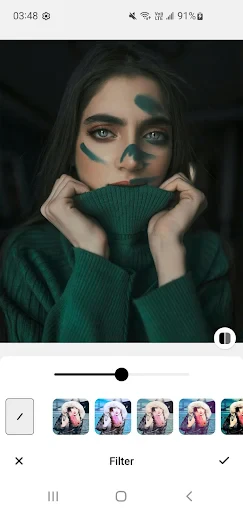
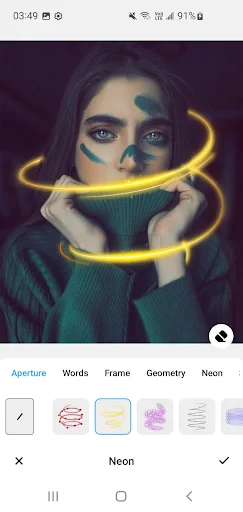

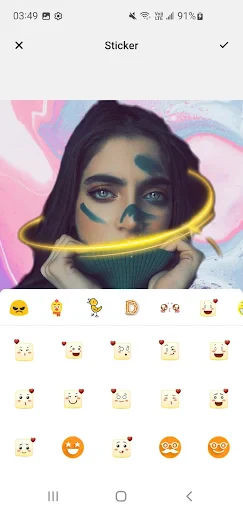
Description
About FotoFusion Photo Editor Features
FotoFusion is a comprehensive mobile photo editing application designed to empower users to transform their ordinary snapshots into visually striking images. It integrates a wide array of editing tools, creative filters, and advanced effects into a user-friendly interface, catering to both casual photographers and editing enthusiasts. The app stands out by merging essential correction features with artistic elements, allowing for everything from quick touch-ups to elaborate multi-layer compositions. Its core philosophy revolves around providing a seamless, all-in-one editing experience directly on your mobile device, eliminating the need for complex desktop software for most creative projects.
Chapter 1: Function
FotoFusion's core functionality is built upon a robust and layered editing toolkit. At its foundation are standard adjustment tools for fine-tuning basic parameters like brightness, contrast, saturation, and sharpness. It offers precise cropping, rotation, and perspective correction tools. Beyond basics, the app provides a rich library of artistic filters and lens effects to instantly alter an image's mood. Advanced features include tools for object removal, background editing, and selective adjustments using brush strokes. A key functional pillar is its fusion and blending capabilities, allowing users to combine multiple photos, apply double exposures, and add text or graphic overlays with customizable transparency and blending modes, enabling the creation of complex, composite images directly from a smartphone.
Chapter 2: Value
The primary value proposition of FotoFusion lies in its powerful yet accessible all-in-one solution for mobile photo artistry. Its key advantage is the democratization of advanced editing techniques, packaging features typically found in professional software into an intuitive mobile interface. This saves users significant time and resources, bypassing the steep learning curve and cost associated with high-end desktop applications. The app delivers exceptional value through depth and breadth; it is not merely a filter app but a creative suite. Users gain the ability to execute detailed retouching, intricate compositions, and stylistic transformations within a single platform. Furthermore, the non-destructive editing approach and high-quality output processing ensure that final images retain clarity and are suitable for both social media sharing and personal printing. By continuously updating its filter and asset libraries, FotoFusion provides ongoing creative inspiration, ensuring users have fresh tools to express their vision, thereby offering sustained value beyond the initial download.
Chapter 3: Scenarios
FotoFusion primarily targets mobile-centric individuals who actively engage in visual storytelling. Key user groups include social media enthusiasts, bloggers, and small business owners who need to create eye-catching content for platforms like Instagram, Facebook, or online stores. They use the app to consistently brand their visuals with specific filters, create engaging promotional graphics, and enhance product photos. Another significant user segment is hobbyist photographers and creative explorers who enjoy experimenting with artistic concepts such as double exposures, surreal landscapes, and portrait enhancements during their daily commutes or travels. The app is also highly suitable for everyday users looking to improve personal photos—from correcting lighting in a family portrait to creatively blending vacation snaps into a unique collage for a digital album. Its simplicity for basic tasks and depth for complex projects makes it a versatile tool for a wide range of everyday editing needs.
Uninstall Instructions
For step-by-step guidance on how to safely remove this application from your device, please refer to our 《Uninstall Instructions》 document.
Pros
- blends multiple exposures into a single artistic image
- layer-based editing mimics professional desktop software workflow
- non-destructive editing preserves original image files
- precise masking tools controlled by adjustable brush strokes
- exports high-resolution composites without watermark compression
Cons
- steep learning curve for layer and mask concepts
- real-time preview lags with multiple high-res layers
- advanced blending modes require in-app purchases
- manual brush adjustments needed for each composite edge
- large project files quickly consume device storage
Frequently Asked Questions
What is FotoFusion and what does it do?
FotoFusion is a photo editing application focused on creative compositing and blending. Its core function is to allow users to merge multiple photos into a single, artistic image through features like double exposure, layer blending, and cut-out tools. It is positioned as a tool for creating unique visual art from personal photos, suitable for making posters, social media content, or abstract artwork. Basic usage involves selecting photos, applying blend modes, and adjusting transparency.
Is FotoFusion free to use or does it have in-app purchases?
FotoFusion typically operates on a freemium model. The app can be downloaded and used for basic editing and blending functions at no initial cost. However, access to advanced features, premium filters, high-resolution exports, or the removal of watermarks usually requires a subscription or one-time in-app purchase. Specific pricing tiers and features are detailed within the app's store listing or settings menu.
What devices and systems is FotoFusion compatible with?
FotoFusion is primarily designed for mobile devices. It is available for both iOS and Android operating systems. You can download it from the Apple App Store or Google Play Store. The app is generally optimized for smartphones and may also be compatible with some tablets. For specific minimum OS version requirements (e.g., iOS 13.0 or Android 8.0), please check the current information on the respective app store page.
How does the photo blending feature work technically?
The app uses layer-based editing and alpha channel manipulation to blend images. Technically, it allows you to overlay photos, apply blend modes (like Multiply, Screen, Overlay), and use precision cut-out tools to isolate subjects. It processes images locally on your device, maintaining photo quality during editing. The core technical characteristic is its algorithm for seamless fusion, which adjusts edges and transparency for a natural composite result without requiring professional skills.
Can I recover edited photos if the app crashes?
FotoFusion may include an auto-save or project recovery feature for ongoing edits, but this is not guaranteed. It is highly recommended to manually save your project frequently using the app's internal save function. If the app crashes, reopening it might prompt a recovery option. For definitive information on crash recovery and data loss policies, please refer to the app's official support documentation or contact the developer directly through the channels provided in the app store listing.
App Info
Technical Info
Recommended For You
Rosa Mystica
Books & Reference

Coinoscope: Coin identifier
Books & Reference

MM-Calendar
Books & Reference

Smart Watch app - BT Notifier
Communication

Jewelry Women Jewellery Photo
Beauty

AR Draw Sketch: Trace & Paint
Art & Design

Joist Invoices for Contractors
Business

Messages: Text Message, SMS
Communication

Holy Bible - KJV+Audio+Verse
Books & Reference

Paychex Flex
Business

NIV Bible version, Offline app
Books & Reference

AI Dress up-Try Clothes Design
Beauty

BambooHR
Business

myAudi
Auto & Vehicles

Imikimi Photo Frames & Effects
Art & Design

Zoom Workplace for Intune
Business

MySpot Driver
Auto & Vehicles

KeyConnect Digital Car Key
Auto & Vehicles

Messenger Kids – The Messaging
Communication

Talkatone: Texting & Calling
Communication