
My crochet designer
Screenshots
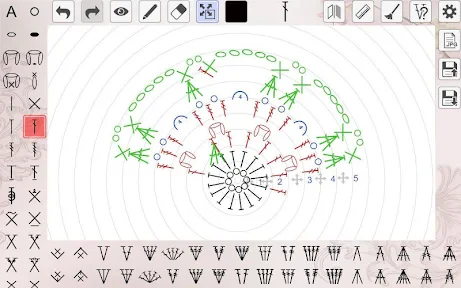

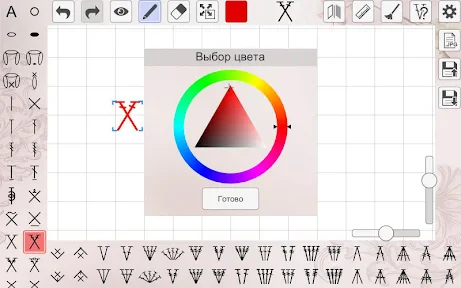
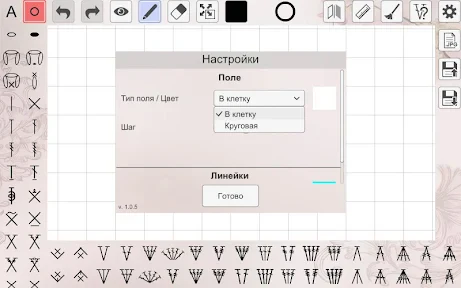

Description
About My Crochet Designer Feature
My Crochet Designer is a specialized mobile application tailored for crochet enthusiasts, from beginners to seasoned artisans. It serves as a comprehensive digital toolkit that transforms the traditional craft of crochet into a streamlined, creative, and organized process. The app empowers users to design, plan, and execute crochet projects with greater precision and inspiration, effectively bridging the gap between creative vision and tangible creation. By integrating intuitive design tools with practical project management features, it modernizes the crafting experience, making it more accessible and enjoyable for the global community of fiber artists.
Chapter 1: Function
My Crochet Designer's core functionality revolves around digital pattern creation and project management. Users can design custom crochet patterns using a virtual grid-based canvas, selecting stitches from a comprehensive library to visualize their ideas before making a single physical stitch. The app includes tools for calculating precise yarn requirements based on stitch type, gauge, and project dimensions, preventing material shortages or waste. It also allows crafters to document their projects with notes and photos, track progress row-by-row, and store color palettes. Furthermore, the app can interpret written patterns into visual charts and vice versa, acting as a versatile translator between different pattern formats. These integrated functions consolidate the entire design and crafting workflow into one portable, user-friendly platform.
Chapter 2: Value
The primary value of My Crochet Designer lies in its ability to democratize and professionalize crochet design. It eliminates the guesswork and frustration associated with planning complex projects, thereby saving users significant time, money, and materials. A key advantage is its empowerment of user creativity; it lowers the barrier to designing original patterns, enabling crafters to express their unique style without needing advanced technical drafting skills. The app's error-reduction tools, such as stitch counting and repeat tracking, enhance the accuracy and quality of finished pieces. For the community, it fosters sharing and learning, as users can export and share their digital patterns. Compared to generic note-taking apps or physical notebooks, My Crochet Designer offers a structured, craft-specific ecosystem that increases efficiency. Its long-term value accumulates as users build a personalized, searchable library of their designs and project history, creating an invaluable digital portfolio of their craft journey and intellectual property.
Chapter 3: Scenarios
My Crochet Designer primarily targets hobbyist crocheters, independent pattern designers, and crafting instructors. Hobbyists use the app to plan personal projects like custom blankets or garments, ensuring they purchase the correct amount of yarn and can easily follow complex patterns they've designed or adapted. Independent designers find it indispensable for prototyping, professionally charting patterns for sale, and managing multiple design projects simultaneously. Crafting teachers utilize it to create clear, visual class materials and tutorials. Everyday use cases include a beginner using the stitch library to learn and experiment, a parent designing a unique baby toy and tracking their progress during spare moments, or an advanced artist preparing a portfolio for a craft fair. It is also particularly useful for collaborative projects, where a digitally shared pattern ensures all participants are synchronized. Essentially, any scenario requiring foresight, organization, and creativity in crochet benefits from this dedicated digital assistant.
Uninstall Instructions
For step-by-step guidance on how to safely remove this application from your device, please refer to our 《Uninstall Instructions》 document.
Pros
- generates crochet patterns from user sketches instantly
- calculates precise yarn requirements for any design
- offers 3D preview of finished garment before starting
- converts photos into workable stitch diagrams
- adjusts patterns automatically for different skill levels
Cons
- requires paid subscription for advanced stitch libraries
- 3D rendering slows on older mobile devices
- limited to mainstream yarn brands for material calculations
- complex sketches sometimes misinterpret stitch types
- offline mode restricts pattern generation features
Frequently Asked Questions
What is My Crochet Designer and what does it do?
My Crochet Designer is a specialized mobile application for crochet enthusiasts. Its core function is to assist users in designing, planning, and visualizing crochet projects. The app allows you to create custom stitch patterns, calculate yarn requirements, and generate visual charts for your designs. It serves as a digital sketchbook and planning tool, helping to translate creative ideas into structured crochet patterns before you start working with physical yarn.
Is My Crochet Designer free to use or does it have in-app purchases?
My Crochet Designer typically operates on a freemium model. The app can be downloaded for free, offering basic design and planning functionalities. However, access to advanced features—such as exporting high-resolution charts, using premium stitch libraries, or saving an unlimited number of projects—usually requires a one-time purchase or a subscription. Specific pricing details are available within the app's store listing or its settings menu after download.
What devices and operating systems is the app compatible with?
My Crochet Designer is primarily designed for mobile devices. It is available for both iOS and Android operating systems. You can download it from the Apple App Store for iPhones and iPads, and from Google Play for Android phones and tablets. The app is optimized for touch interfaces and does not require any additional external hardware to function. For the specific minimum OS version required, please check the technical details on your device's respective app store page.
How does the app help in creating a crochet pattern?
The app provides a digital grid where you can place different symbols representing various crochet stitches (like single, double, or treble crochet). You select colors and stitches from a toolbar to draw your design. As you build the visual chart, the app can automatically calculate the estimated amount of yarn needed for each color. This process helps in planning complex colorwork and stitch combinations accurately before you begin the actual crocheting, reducing mistakes and material waste.
Can I share or print the patterns I create with this app?
Yes, My Crochet Designer includes options to export and share your created patterns. Commonly, you can save your design as an image file to your device's photo gallery or share it directly via email or social media. The ability to print the pattern chart or generate a detailed written instruction sheet is typically a feature included in the premium version of the app. For detailed steps on sharing and exporting, please refer to the app's built-in tutorial or help section.
App Info
Technical Info
Recommended For You

Bible Hub
Books & Reference

Fuel Forward
Auto & Vehicles

Infinite Painter
Art & Design

Yes Madam - Salon at Home
Beauty

Adblock Browser: Fast & Secure
Communication

PSA | Card Grading Service
Books & Reference

Paint
Art & Design

Key Collector Comics
Comics

Easy Pose - 3D pose making app
Art & Design

Azar: 1 on 1 Video Chat Online
Communication

Genius: AI Photo Generator
Art & Design

Logo Master - Design & Maker
Art & Design

Draw Cartoons 2
Comics

Portable WiFi - Mobile Hotspot
Communication

Translate Now: All Languages
Business

Firefox Fast & Private Browser
Communication

Manga Renta
Comics

Cat Maker: Cat Emoji Sticker
Art & Design

Black Magic
Books & Reference

Resume - Intelligent CV maker
Business