
Logo Master - Design & Maker
Screenshots

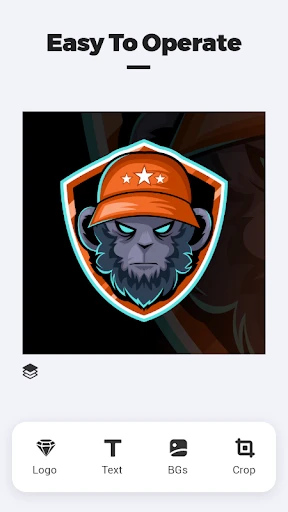
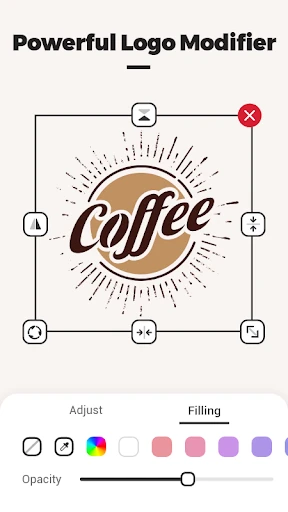


Description
About Logo Master - Design & Maker Feature
Logo Master - Design & Maker is a professional yet user-friendly mobile application dedicated to logo creation and graphic design. It empowers individuals and small businesses to design high-quality logos, social media graphics, and branding materials directly from their smartphones or tablets, without requiring prior design experience. The app provides a vast library of templates, icons, fonts, and editing tools, streamlining the design process into a simple, intuitive, and efficient experience. It serves as a portable design studio, making professional-grade visual identity creation accessible to everyone.
Chapter 1: Function
Logo Master's core functionality revolves around providing a comprehensive, all-in-one design toolkit for logo creation. Users begin by selecting from thousands of professionally crafted templates across various industries, which serve as a perfect starting point. The app features an extensive asset library including millions of scalable vector icons, shapes, and a wide selection of fonts. A powerful editor allows for deep customization: users can modify colors, adjust layers, add text with advanced typography controls, and apply effects. Key tools include a color picker, alignment guides, transparency adjustments, and the ability to import personal images. The final designs can be exported in high-resolution PNG or vector SVG formats, suitable for both digital use and professional printing. The process is designed to be step-by-step, guiding users from a blank canvas or template to a polished logo in minutes.
Chapter 2: Value
The primary value proposition of Logo Master lies in its democratization of professional design, offering significant cost and time savings. For small business owners, startups, and freelancers, hiring a professional designer can be prohibitively expensive. This app provides a viable alternative, putting creative control directly in their hands. Its key advantages include an immense and regularly updated resource library, ensuring fresh and modern design elements. The intuitive interface lowers the technical barrier to entry, making design approachable for novices while still offering enough depth for more experienced users to fine-tune their work. Unlike many online logo makers, Logo Master operates fully offline after initial asset download, providing flexibility and reliability. It also supports transparent background exports, which is crucial for versatile logo application across websites, merchandise, and marketing materials. Furthermore, its value extends beyond logos to creating cohesive branding suites, such as business cards, social media banners, and profile pictures, ensuring brand consistency. By consolidating multiple design needs into a single, affordable mobile platform, Logo Master delivers exceptional utility and empowers users to build a professional visual identity independently, fostering creativity and business growth.
Chapter 3: Scenarios
Logo Master primarily targets small to medium-sized business owners, entrepreneurs, and startup founders who need to establish a brand identity quickly and on a limited budget. It is equally valuable for freelancers, content creators, and social media influencers seeking to design distinctive logos and channel art to enhance their online presence. Non-profit organizations and community groups can utilize it to create official-looking logos for events and initiatives. Common use cases include a cafe owner designing a logo for a new shop front and matching menu graphics; a podcaster creating a unique show avatar and cover art for distribution platforms; an Etsy seller crafting a logo to brand handmade product packaging and shop profile; a student working on a project presentation requiring a custom team logo; or a local sports team developing jerseys and merchandise with a professionally designed emblem. In everyday situations, users turn to the app for on-the-fly design needs, making it an essential tool for anyone requiring instant, professional-looking visual content without complex software.
Uninstall Instructions
For step-by-step guidance on how to safely remove this application from your device, please refer to our 《Uninstall Instructions》 document.
Pros
- generates logo concepts instantly from text prompts
- offers extensive vector editing tools for precise customization
- exports final designs in multiple high-resolution formats
- provides brand identity mockups for realistic previews
- maintains a simple interface despite advanced design features
Cons
- requires a learning curve for full vector tool utilization
- premium assets and exports need a subscription plan
- ai-generated concepts can sometimes lack originality
- advanced editing may feel cramped on smaller phone screens
- limited typography library compared to desktop design suites
Frequently Asked Questions
What is Logo Master and what does it do?
Logo Master is a mobile application for logo design and graphic creation. Its core function is to enable users, especially small business owners and content creators, to design professional-looking logos and branding materials directly on their devices. It provides templates, icons, fonts, and editing tools to simplify the design process without requiring advanced skills.
Is Logo Master free to use, or are there in-app purchases?
null
What devices and systems is Logo Master compatible with?
Logo Master is primarily designed for mobile devices. It is available for both iOS and Android operating systems. For optimal performance, it requires a relatively recent version of either OS. The app is optimized for smartphones but may also function on tablets. It does not require any additional external hardware to operate.
How can I export and use the logos I create?
Logos created within the app can be exported to your device's photo gallery or files. The free version may export images with a watermark or at standard resolution. Paid subscriptions typically allow for high-resolution (e.g., PNG) downloads suitable for professional use on websites, social media, and print materials. The app does not handle printing or physical merchandise production directly.
What should I do if the app crashes or I lose my design?
If the app crashes, ensure your device's operating system and the app itself are updated to the latest versions. Clearing the app's cache or restarting your device can often resolve performance issues. For design recovery, check if the app has an auto-save or project history feature within its workspace. For persistent problems, contact the developer's support team via the contact details provided in the app store listing.
App Info
Technical Info
Recommended For You

Pixilart - Make Pixel Art
Art & Design

Pixel Studio: pixel art editor
Art & Design

Bible: Advent Prayers & Verses
Books & Reference

Diamond Painting by Number
Art & Design

Coinoscope: Coin identifier
Books & Reference
TurboScan™ Pro: PDF scanner
Business

OBD JScan
Auto & Vehicles

Jooble — Job Search App
Business
Draw Cartoon - AR Drawing App
Art & Design

Job Hai - Search Job, Vacancy
Business

Staples - Deals & Shopping
Business

Imikimi Photo Frames & Effects
Art & Design

طاقچه؛ کتاب الکترونیکی و صوتی
Books & Reference

BikeWale- Bikes & Two Wheelers
Auto & Vehicles

WOMBO Dream - AI Art Generator
Art & Design

ヘア&ビューティーサロン検索/ホットペッパービューティー
Beauty

QuickBooks Online Accounting
Business

CDisplayEx Comic Reader
Comics

Switch Natural
Beauty

PrinterShare Premium Key
Business