
Pixel Studio PRO: editor
Screenshots

Description
About Pixel Studio PRO Editor Features
Pixel Studio PRO is a professional-grade pixel art creation and animation application designed for artists, game developers, and hobbyists. It provides a comprehensive suite of tools tailored specifically for the intricate craft of pixel art, blending a user-friendly interface with powerful editing capabilities. Available on both mobile and desktop platforms, the app supports a seamless workflow from initial sketch to animated sprite sheets. Its core philosophy centers on making detailed pixel art creation accessible and efficient, whether for indie game development, digital illustrations, or nostalgic art projects. By focusing on the unique needs of pixel artists, Pixel Studio PRO establishes itself as a dedicated environment distinct from generic drawing software.
Chapter 1: Function
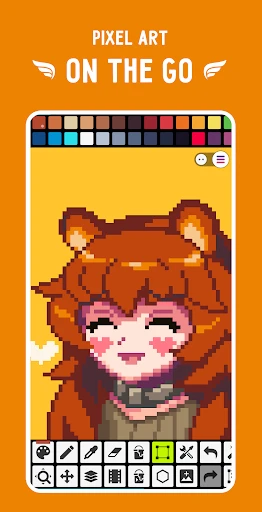
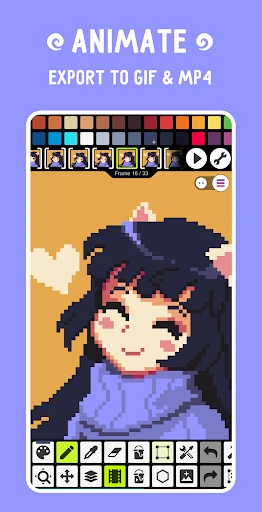
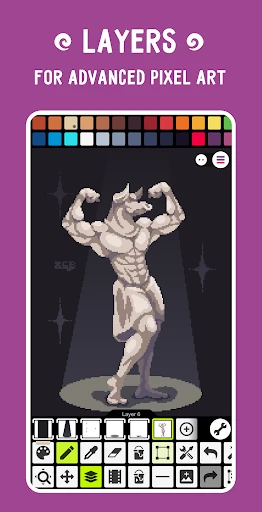
Pixel Studio PRO's functionality is built around a robust set of features essential for pixel art. The app offers a versatile canvas with support for layers, layer groups, and various blend modes, allowing for complex compositions. Its core drawing tools include customizable brushes, pencils, and shapes, all with precise control over size and opacity. A defining feature is its advanced color palette system, supporting indexed color modes, dithering effects, and easy color swapping. The frame-by-frame animation timeline is integral, enabling users to create smooth sprite animations with onion skinning for reference. Additional key functions include tilemap editing for game level design, symmetry drawing modes, and export options in multiple formats like PNG, GIF, and sprite sheets. The interface is highly customizable, with layouts adjustable for different screen sizes and workflows.
Chapter 2: Value
The primary value of Pixel Studio PRO lies in its specialized, all-in-one environment that eliminates the need to juggle multiple general-purpose programs. Its key advantage is the deep integration of animation tools directly into the pixel art workflow, a feature often missing or cumbersome in other apps. This streamlines the process from static art to living sprites, significantly boosting productivity for game developers. The app's cross-platform synchronization ensures projects can be started on a phone and finished on a desktop without compatibility issues, offering unparalleled flexibility. Furthermore, its commitment to professional features like tilemap editing, indexed color palettes, and detailed export settings caters directly to the technical requirements of indie game development. Compared to free alternatives, Pixel Studio PRO offers a more polished, ad-free experience with more powerful tools; compared to complex desktop software, it maintains a lower learning curve and a more accessible price point. This positions it as an optimal balance between capability and usability, delivering high professional value without overwhelming the user.
Chapter 3: Scenarios
Pixel Studio PRO primarily serves indie game developers and pixel artists. Game developers utilize it to create character sprites, environmental tilesets, UI elements, and full animation cycles directly exportable to game engines like Unity or Godot. Hobbyist pixel artists and digital illustrators use the app to craft detailed artwork, icons, and emotes for social media or personal projects, appreciating its precise tools and nostalgic aesthetic. Additionally, it is valuable for educators and students learning the fundamentals of digital art and animation due to its focused toolset. Common use cases include designing a protagonist sprite sheet with walk, jump, and attack animations for a platformer game; creating a seamless isometric tileset for a strategy game; illustrating a detailed pixel art portrait; or crafting animated stickers for messaging apps. The mobile version is ideal for sketching ideas on the go, while the desktop version handles complex, large-scale animation and detailed final artwork.
Uninstall Instructions
For step-by-step guidance on how to safely remove this application from your device, please refer to our 《Uninstall Instructions》 document.
Pros
- offers frame-by-frame animation on an infinite canvas
- integrates pixel art drawing with sprite sheet generation
- supports custom color palettes and dithering brushes
- exports animations directly as GIFs or sprite sheets
- provides layer-based editing for complex pixel scenes
Cons
- steep learning curve for traditional digital artists
- limited vector or high-resolution painting tools
- sprite sheet automation requires manual fine-tuning
- real-time collaboration features are not supported
- advanced animation timelines need tutorial guidance
Frequently Asked Questions
What is Pixel Studio PRO and what does it do?
Pixel Studio PRO is a professional-grade pixel art editor designed for creating digital art, sprites, and animations. Its core functions include a comprehensive suite of drawing tools, layer management, frame-by-frame animation support, and a color palette system. It is positioned as a versatile tool suitable for game developers, hobbyists, and artists focused on pixel art creation.
Is Pixel Studio PRO free to use or does it have in-app purchases?
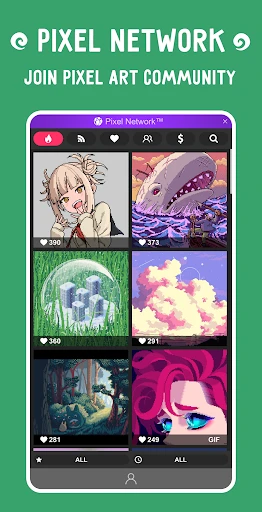
Unique professional features include a powerful animation timeline with onion skinning, support for sprite sheet export in various formats (PNG, GIF), and advanced layer blending modes. It also offers scripting support for automation, custom brush creation, and a dedicated community asset sharing platform. These tools are specifically tailored for game asset development and detailed pixel art projects.
How can I recover my work if the app crashes?
Pixel Studio PRO operates on a freemium model. The core app is free to download and use with a robust set of features. A one-time purchase or subscription unlocks the PRO version, which provides advanced tools like unlimited layers, advanced animation features, custom brushes, and an ad-free experience. No additional physical equipment is required.
What devices and operating systems does Pixel Studio PRO support?
Pixel Studio PRO is a multi-platform application. It is available and fully functional on Android, iOS, Windows, and macOS devices. It supports seamless cloud syncing across these platforms, allowing users to start a project on one device and continue it on another. It is adapted for use with touchscreens, styluses, and traditional mouse/keyboard inputs.
What are the unique professional features of Pixel Studio PRO?
Pixel Studio PRO features an auto-save and recovery system. Your work is periodically saved to a local cache. In case of a crash, upon reopening the app, you should be prompted to recover any unsaved work from the last session. For permanent safety, it is recommended to manually save projects frequently and utilize the cloud sync feature available in the PRO version for backup across devices.
App Info
Technical Info
Recommended For You

Remodel AI - Home Renovation
Art & Design

ICS Mobile
Communication

myAudi
Auto & Vehicles

Textify- Art Font Photo Editor
Art & Design

XBrowser - Mini & Super fast
Communication

Girls Hairstyle Step By Step
Beauty

Booksy for Customers
Beauty

Invoice Maker - Invoice Fly
Business

Call Blocker - Block Numbers
Communication

VIN Check Report for Used Cars
Auto & Vehicles

KJV Bible: Audio+Verse
Books & Reference

kungfu city fighting game
Comics

Pratilipi Novel
Books & Reference

Freelancer: Hire & Find Jobs
Business

AlfaOBD
Auto & Vehicles

iFnovel - Books,Web Novel
Books & Reference

Adobe Capture: Illustrator,Ps
Art & Design

NovelFlow
Books & Reference

Calls Blacklist PRO - Blocker
Communication
Krita
Art & Design