
Grubhub for Drivers
Screenshots



Description
About Grubhub for Driver App Features – A Comprehensive Guide
Grubhub for Drivers is the official companion application for delivery partners working with the Grubhub food delivery platform. Designed specifically for independent contractors, it serves as the central hub for managing all delivery activities, from receiving order offers to navigating to restaurants and customers, and finally tracking earnings. The app streamlines the entire delivery process, empowering drivers to efficiently connect local restaurants with hungry customers while maximizing their own flexibility and income potential.
Chapter 1: Function
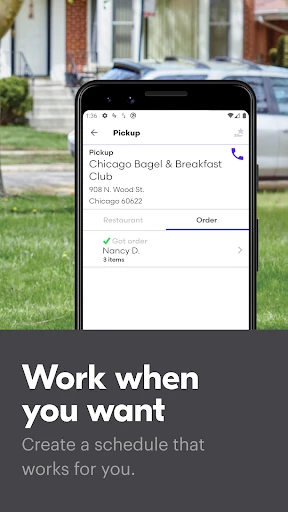
The Grubhub for Drivers app provides a suite of core functionalities essential for executing food deliveries. Its primary feature is the real-time order offer system, which displays delivery requests including pickup location, drop-off point, and estimated pay. Drivers can accept or decline offers based on their preference. Upon acceptance, the app offers integrated turn-by-turn navigation to guide the driver first to the restaurant for pickup and then to the customer's delivery address. It includes features for confirming arrival at both locations, notifying the customer of status updates, and securely handling order issues through in-app support. Furthermore, the app provides a detailed earnings tracker, showing a breakdown of pay for each delivery, tips, and weekly totals, along with a schedule management tool for drivers in markets where scheduling blocks is required to access orders.
Chapter 2: Value
The value proposition of Grubhub for Drivers lies in its role as an empowering tool that facilitates flexible, efficient, and transparent earning opportunities. Its key advantage is granting drivers complete autonomy over their work schedule; they can log in and work whenever they choose, accepting only the orders that fit their goals. The integrated navigation and streamlined workflow minimize downtime and confusion, allowing drivers to complete more deliveries per hour. Financial transparency is another critical value point. The app provides immediate and clear visibility into earnings, including a clear distinction between base pay and customer tips, which fosters trust and allows for real-time income tracking. For drivers seeking consistency, the scheduling feature in certain zones helps secure preferred time slots. The app also reduces operational friction by digitizing the entire process—from order management to payment—eliminating the need for cash handling in most cases and providing direct deposit of earnings. Ultimately, it lowers the barrier to entry for gig work while providing the necessary tools for drivers to optimize their time and maximize their profits on the road.
Chapter 3: Scenarios
The primary target users for Grubhub for Drivers are individuals seeking flexible, independent contracting work. This includes students needing to earn money around their class schedules, part-time workers looking to supplement their primary income, rideshare drivers diversifying their gig economy portfolio, and anyone valuing control over their working hours. Typical use cases are diverse. A college student might use the app to make deliveries during evening hours and weekends, turning spare time into income. A parent could schedule deliveries during school hours to maintain work-life balance. A full-time employee might log in for a few hours after their day job to earn extra savings for a specific goal. During peak times like lunch and dinner rushes, drivers use the app to capitalize on high-demand periods and surge incentives. The app is also crucial for those exploring entrepreneurial ventures with minimal overhead, as it provides all the logistical tools without requiring a traditional employment commitment.
Uninstall Instructions
For step-by-step guidance on how to safely remove this application from your device, please refer to our 《Uninstall Instructions》 document.
Pros
- automatically batches nearby orders for efficient routing
- in-app navigation integrates directly with delivery addresses
- shows detailed payout breakdown before accepting trips
- real-time heat maps highlight high-demand zones
- direct in-app chat with customer for hassle-free coordination
Cons
- peak pay bonuses limited to very specific restaurant partners
- requires manual refresh to update available delivery blocks
- navigation occasionally mislabels restaurant pickup entrances
- cash-out fee applies for instant transfers to debit card
- detailed trip history only accessible via web dashboard
Frequently Asked Questions
What is Grubhub for Drivers and what does it do?
Grubhub for Drivers is a companion app for independent delivery drivers and couriers working with Grubhub. Its core function is to connect drivers with local food delivery orders. The app allows drivers to view available delivery opportunities, navigate to restaurants and customer addresses, manage their delivery schedule, and track their earnings. It is designed specifically for the gig economy workforce facilitating food delivery.
Is Grubhub for Drivers free to use for delivery drivers?
Yes, the Grubhub for Drivers mobile application is free to download and use. Drivers are independent contractors, not employees, and there are no fees to access the app or receive delivery offers. Earnings are based on completed deliveries, which typically include a base pay, potential bonuses, and 100% of customer tips. Drivers are responsible for their own vehicle expenses like fuel and maintenance.
What are the main requirements to become a Grubhub driver?
To drive with Grubhub, you must meet several requirements. You need a valid driver's license, auto insurance, and a reliable vehicle (or bicycle in some markets). You must be at least 19 years old (18 in some areas) and eligible to work in the U.S. A smartphone that can run the app (iOS or Android) is required. After applying, you must pass a background check before being approved to receive delivery offers through the app.
How does Grubhub for Drivers handle delivery payments and tips?
Earnings for each delivery are displayed in the app before acceptance. Payment consists of a base pay calculated on time, distance, and desirability, plus any promotional bonuses. Customers can add tips before or after delivery, and drivers retain 100% of tips. Earnings are tracked in the app and paid weekly via direct deposit. A detailed breakdown of each delivery's pay components is available in the earnings section.
What should I do if I encounter an issue during a delivery?
The app includes in-app support for common delivery issues. For problems like incorrect orders, closed restaurants, or access difficulties, you can use the 'Help' section within the active delivery screen to contact Grubhub driver care. For non-urgent account or payment questions, support is available through the app's help center or email. It is recommended to report issues through the app during the delivery for the fastest resolution.
App Info
Technical Info
Recommended For You

EVgo - Fast EV Charging
Auto & Vehicles

EPUB Reader for all books
Books & Reference
KeyConnect Digital Car Key
Auto & Vehicles

Perfect365 Makeup Photo Editor
Beauty

Draw Cartoon - AR Drawing App
Art & Design

SelfComic: Super Saiyan Photo
Comics

Autotrader: Shop Cars For Sale
Auto & Vehicles

DSLR HD Camera : 4K HD Camera
Beauty

Our Daily Bread
Books & Reference

JobStack for Work | Job Search
Business

Plus Messenger
Communication

ReadEra – book reader pdf epub
Books & Reference

Challenger Comics Viewer
Comics

@Voice Aloud Reader (TTS)
Books & Reference

Carrier Services
Communication

RepairSolutions2
Auto & Vehicles

Audible: Audio Entertainment
Books & Reference

DaVinci - AI Image Generator
Art & Design

Manga Library - مكتبة المانجا
Comics

OBD2 Car Scanner - ELM Torque
Auto & Vehicles