
Passport Photo: ID Photo Print
Screenshots


Description
About Passport Photo: ID Photo Print Feature
Passport Photo: ID Photo Print is a specialized mobile application designed to simplify the creation of compliant official photographs. It serves as a digital photo studio, enabling users to generate, edit, and print passport, visa, and various ID photos directly from their smartphones. The app addresses the common inconvenience of visiting a photo studio by providing tools that ensure photos meet the specific size, background, and composition requirements of over a hundred countries and document types. Its core promise is to deliver professional-grade, acceptable photos with convenience, speed, and significant cost savings, making it an essential tool for travelers, students, and professionals alike.
Chapter 1: Function
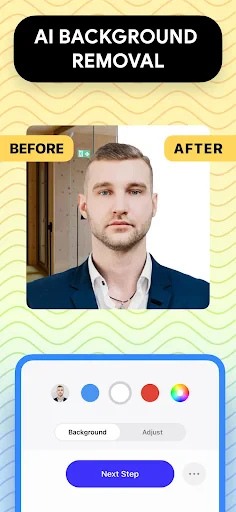
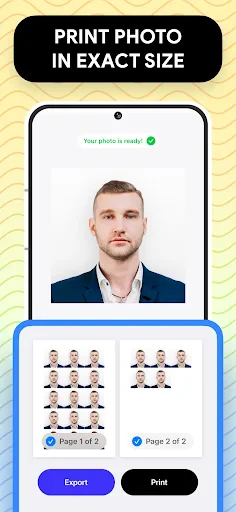
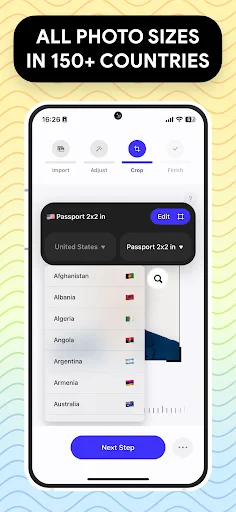
The app's core functionality revolves around three key areas: photo capture, automated compliance editing, and printing preparation. Users can either take a new photo using the in-app camera with guidance overlays or select an existing image from their gallery. The app then automatically removes the existing background and replaces it with a pure white or other required color. Its intelligent system detects the face and crops the image to precise official dimensions for passports, visas, ID cards, or driver's licenses from a vast selection of countries. It includes tools for fine-tuning alignment, adjusting lighting, and correcting minor imperfections. Finally, it formats the photos into standard printing templates, such as 4x6 inches, allowing users to print multiple copies at home or at a retail photo kiosk, ensuring they get the correct number of prints from a single sheet.
Chapter 2: Value
The primary value proposition of Passport Photo: ID Photo Print lies in its unparalleled convenience and reliability. It eliminates the need for costly and time-consuming visits to professional photographers by putting studio-quality control in the user's pocket. The app's extensive and regularly updated database of photo specifications for governments and institutions worldwide is a significant advantage, drastically reducing the risk of photo rejection due to non-compliance. This translates into direct cost savings, as users avoid paying premium prices for simple ID photos and prevent potential delays in application processes. Furthermore, the app offers exceptional flexibility; photos can be created anytime, anywhere, which is invaluable for last-minute applications or in regions with limited access to photo services. The ability to save digital copies ensures users always have a compliant photo ready for online applications or future reprints. By demystifying official photo requirements through an intuitive, step-by-step process, the app empowers users, saving them not only money but also considerable time and anxiety associated with bureaucratic formalities.
Chapter 3: Scenarios
The app is ideally suited for frequent international travelers, students, job seekers, and expatriates who regularly need visa and passport photos. It is equally valuable for parents obtaining passports for children, as it allows for quick retakes in a comfortable home environment. Professionals applying for licenses, certifications, or company badges that require specific ID photos form another key user group. Everyday use cases include preparing for an upcoming international trip, applying for a new driver's license or national ID card, completing university admission or visa application forms online, and creating photos for official permits or memberships. The app is particularly crucial in urgent situations where a photo is needed outside of regular business hours or before a sudden trip. It also serves users in remote areas with limited access to photo studios, providing a reliable and immediate solution for all official photographic needs.
Uninstall Instructions
For step-by-step guidance on how to safely remove this application from your device, please refer to our 《Uninstall Instructions》 document.
Pros
- generates compliant photos for 100+ countries' passports
- one-tap background replacement with AI segmentation
- offline processing ensures user privacy and data security
- direct integration with home printer or local photo kiosks
- real-time guidance on pose and lighting via camera overlay
Cons
- strict biometric rules may cause repeated retakes
- print quality depends on user's own printer hardware
- premium templates and outfits require in-app purchase
- no built-in retouching to alter facial features
- requires well-lit environment for automatic validation
Frequently Asked Questions
What is Passport Photo: ID Photo Print app?
Passport Photo: ID Photo Print is a mobile application designed to create and print compliant official photos for documents like passports, visas, and ID cards. Its core function is to guide users in taking a selfie that meets specific government and institutional requirements for size, background, and composition. The app then formats the image into a standard print layout for easy printing at home or a photo kiosk, eliminating the need for a professional studio visit.
Is the app free to use or are there in-app purchases?
The app typically operates on a freemium model. Basic features like photo capture guidance and formatting for some common sizes may be free. However, to access the full library of templates for various countries' documents, remove watermarks, or export high-resolution printable files, users usually need to make an in-app purchase for a premium version or a specific photo pack. No additional physical equipment is required beyond a smartphone with a camera.
What devices and systems is this app compatible with?
Passport Photo: ID Photo Print is primarily available for iOS and Android mobile devices. It is optimized for smartphones with decent camera quality. The app generally does not require specialized hardware but relies on standard device permissions like camera and photo library access. There is no specific information about compatibility with tablets, but it may function on them depending on the operating system version.
How accurate is the app's compliance check for official photos?
The app uses automated algorithms to check for common compliance issues such as head size, background color, and glare on glasses. While it is a highly useful tool for ensuring basic format adherence, it cannot guarantee 100% acceptance by all authorities. Final approval is always at the discretion of the passport or visa issuing office. Users are advised to double-check the specific, detailed requirements of their application authority before finalizing the photo.
What should I do if my printed photo gets rejected?
The app developer provides standard digital customer support for issues related to app functionality. However, they typically do not offer refunds or assume liability for photos rejected by official authorities, as acceptance depends on variable government standards. If a photo is rejected, users can utilize the app to retake and reformat a new photo, paying close attention to the specific rejection reason provided by the authority. For technical app issues, contact support through the app store listing.
App Info
Technical Info
Recommended For You

Watchgram for Telegram
Communication

TeamSpeak 3 - Voice Chat
Communication

Robokiller - Spam Call Blocker
Communication

Boat AI Browser: Web & Tools
Business

Color Analysis - Dressika
Beauty

Pixel Studio PRO: editor
Art & Design

Hwahae(Korea’s Beauty APP)
Beauty

Second Phone Number - 2Number
Communication

TapRead - Romance Stories
Books & Reference

Toonsutra: Webtoon & Comics
Comics

10-4 by WEX
Auto & Vehicles

FoxFi Key (supports PdaNet)
Communication

Bible Homescreen - Read Now
Books & Reference

Holy Bible Time-Verses&Audio
Books & Reference

USAA DriveSafe
Auto & Vehicles
Watch Sync App - BT Notifier
Communication

TrueCar Used Cars and New Cars
Auto & Vehicles

randstad: jobs for workers
Business

AI Image Generator: ImagineArt
Art & Design

UKG Dimensions
Business