
AR Drawing: Paint & Sketch Art
Screenshots

Description
About AR Drawing: Paint & Sketch Art Feature
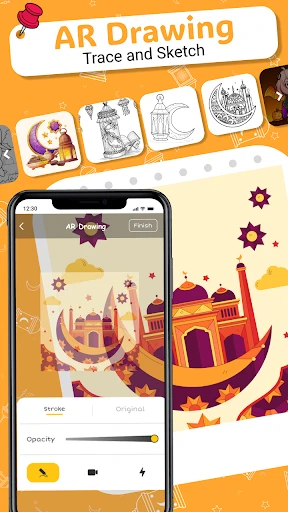
AR Drawing: Paint & Sketch Art is an innovative mobile application that merges the physical and digital worlds to revolutionize the drawing process. By leveraging augmented reality technology, it projects reference images or outlines directly onto any physical surface, such as paper or canvas, allowing users to trace and replicate complex designs with remarkable ease and precision. This app serves as a powerful digital assistant for artists of all levels, transforming smartphones into portable projectors. It bridges the gap between digital inspiration and traditional hand-drawn art, making the act of sketching and painting more accessible, accurate, and enjoyable. The core promise of AR Drawing is to lower technical barriers, enabling users to focus on the creative and enjoyable aspects of art creation.
Chapter 1: Function
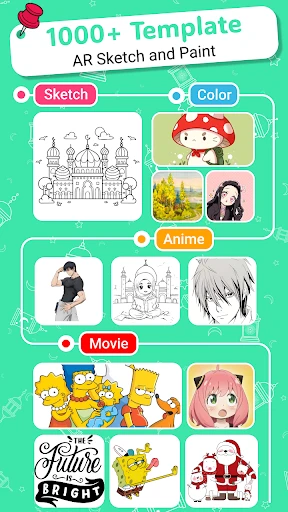
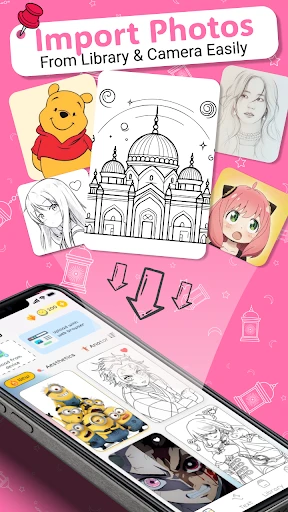
The core functionality of AR Drawing: Paint & Sketch Art centers on its augmented reality tracing system. Users begin by selecting or importing an image from their device's gallery or the app's built-in library. The app then accesses the phone's camera and uses AR to superimpose the chosen image as a semi-transparent overlay onto the real-world view seen through the screen. This projected guide can be adjusted for size, opacity, and orientation to fit the user's physical drawing surface perfectly. The primary function is to provide a real-time, traceable guide, effectively turning any complex drawing into a manageable step-by-step process. Beyond this, the app includes basic digital sketching tools for planning and annotation directly on the reference image. It also offers features like layer separation for complex images, a grid mode for proportional scaling, and the ability to take progress photos. Essentially, it functions as a smart, interactive stencil that empowers users to accurately transfer digital designs onto physical media with their own hands.
Chapter 2: Value
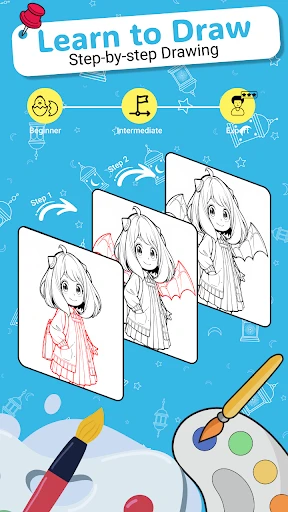
The primary value proposition of AR Drawing lies in its democratization of artistic skill. It significantly lowers the steep learning curve associated with drawing accurate proportions, perspectives, and complex outlines. For beginners and hobbyists, this builds confidence and reduces frustration, allowing them to achieve satisfying results quickly and fostering a love for art. For seasoned artists, it offers immense practical value by saving time on the initial sketching and layout phases of a project, enabling them to bypass tedious grid methods or freehand approximations. The app's key advantages are precision, convenience, and educational utility. The precision of AR projection ensures high-fidelity reproduction of details. Its convenience stems from being a portable, all-in-one tool that eliminates the need for physical projectors or lightboxes. Educationally, it helps users internalize forms and structures by allowing them to physically draw over projected lines, enhancing muscle memory and observational skills. Unlike simple tracing paper, it offers dynamic adjustment and a vast library of references. Compared to full-fledged digital drawing apps, it uniquely supports and enhances traditional media creation. Therefore, AR Drawing creates value by being a unique hybrid tool that accelerates skill development, boosts creative output, and makes the process of creating physical art more efficient and accessible for everyone.
Chapter 3: Scenarios
AR Drawing: Paint & Sketch Art caters to a diverse range of users across various creative scenarios. Its primary target groups include art enthusiasts and absolute beginners who wish to start drawing without being intimidated by blank page anxiety. It is equally valuable for crafters and DIY hobbyists who need to transfer specific designs onto surfaces like wood, fabric, or walls for personalized projects. Students learning art fundamentals can use it to practice forms and compositions accurately. Parents find it a engaging educational tool to draw with their children, making art activities collaborative and successful. In everyday use, a user might employ the app to sketch a beloved pet's portrait onto canvas by projecting a phone photo. A bullet journal enthusiast could use it to trace intricate mandala designs for monthly spreads. A teacher might project a historical map outline for students to trace in a classroom activity. During holiday seasons, users can trace complex patterns for handmade greeting cards or window paintings. It seamlessly integrates into scenarios requiring precise replication, creative hobby time, educational practice, and personalized gift-making, effectively serving anyone with a desire to create tangible art from digital inspiration.
Uninstall Instructions
For step-by-step guidance on how to safely remove this application from your device, please refer to our 《Uninstall Instructions》 document.
Pros
- projects virtual canvas onto any surface via AR
- uses device motion for intuitive spatial brush control
- exports time-lapse videos of the 3D drawing process
- no physical paper or wall space required for creation
- real-time perspective correction maintains sketch proportions
Cons
- requires significant empty floor/wall space for AR calibration
- rapid device movement can cause AR tracking instability
- limited layer functionality compared to desktop digital art apps
- high battery consumption during continuous AR rendering
- exported AR drawings lose interactivity on standard screens
Frequently Asked Questions
What is AR Drawing: Paint & Sketch Art?
AR Drawing: Paint & Sketch Art is a mobile application that utilizes augmented reality (AR) technology to assist users in drawing and sketching. It projects a reference image onto a physical surface (like paper) through your device's camera, allowing you to trace and learn drawing techniques. Its core positioning is as a digital tracing tool and practice aid for beginners and hobbyists to improve their sketching skills.
Is the app free to use or are there in-app purchases?
The app typically follows a freemium model. It is free to download and offers basic drawing and tracing functions. However, advanced features, a wider library of reference images, removal of watermarks, or ad-free experiences usually require one-time purchases or subscriptions. Specific pricing is available within the app's store page or its in-app purchase section.
What devices and systems are compatible with this app?
AR Drawing requires a smartphone or tablet with a rear camera and sufficient processing power to handle AR. It is primarily available for iOS (via the App Store) and Android (via Google Play). Compatibility depends on the device's AR capabilities (like ARCore for Android or ARKit for iOS). Older devices may not support the AR features optimally. Check your specific device's compatibility on the app store listing.
How does the AR tracing feature actually work?
The AR tracing feature works by using your device's camera. You select an image from your gallery or the app's library, and the app superimposes a semi-transparent version of that image onto the live camera feed of your physical drawing surface. You then position your paper or canvas under this projection and trace the outlines. It requires stable lighting and holding the device steadily on a stand is recommended for best results.
Can I use the app without an internet connection?
Core tracing and drawing functions likely work offline once the app is installed and necessary assets are downloaded. However, downloading new reference images, accessing online galleries, updating the app, or restoring purchases may require an active internet connection. For uninterrupted offline use, ensure you have your desired reference images saved locally on your device.
App Info
Technical Info
Recommended For You

Snagajob - Jobs Hiring Now
Business

LogMeIn Rescue Customer
Business

Contacts
Communication

AI Home Design: Interior DecAI
Art & Design

Cloned Voices
Comics

Zebra Comics: Webtoons & Manga
Comics

Motive Driver
Business

Comics Price Guide
Comics

Garmin Drive™
Auto & Vehicles

Solo: Your Gig Business App
Business

N5_Theme for Car Launcher app
Auto & Vehicles

Blink Charging Mobile App
Auto & Vehicles

Sweet Editor Camera Lite
Beauty

maxim — order a taxi & food
Auto & Vehicles
Stickman: draw animation maker
Art & Design
Handy Art Reference Tool
Comics

Kiwi Browser - Fast & Quiet
Communication

AMarkets: Trade & Invest
Business

JusTalk Kids - Safe Messenger
Communication

Cat Maker: Cat Emoji Sticker
Art & Design