
Contacts
Screenshots


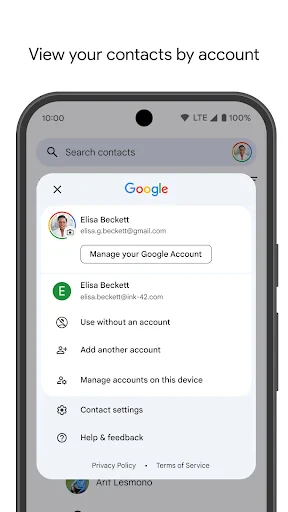


Description
About Contacts App Feature
The Contacts app is a fundamental and pre-installed application on smartphones, serving as the central digital address book for users. It goes beyond simple name and number storage by integrating deeply with the device's operating system to manage and synchronize contact information across various communication and social platforms. Its primary role is to organize, preserve, and provide instant access to personal and professional connections, forming the backbone of a device's communication ecosystem. Designed with simplicity and efficiency in mind, it ensures that essential contact details are always secure, up-to-date, and readily available for calls, messages, and other interactions.
Chapter 1: Function
The core function of the Contacts app is to act as a comprehensive digital Rolodex. It allows users to create, edit, store, and organize contact entries. Each entry can hold a multitude of details including phone numbers, email addresses, physical addresses, birthdays, notes, and profile photos. The app seamlessly integrates with phone, messaging, email, and third-party apps like WhatsApp or social media, auto-filling information during communication. A key feature is its ability to merge duplicate entries and synchronize data with cloud accounts (like iCloud or Google Account), ensuring consistency across all user devices. Furthermore, it facilitates contact grouping for efficient management, supports quick search, and allows for easy sharing of contact cards via various channels.
Chapter 2: Value
The value proposition of the native Contacts app lies in its reliability, deep system integration, and role as a unified hub for connection management. Its foremost advantage is privacy and security; as a system-level app, it handles sensitive personal data with protocols aligned with the device's OS security standards, unlike many third-party alternatives. The seamless synchronization via cloud services provides immense value by maintaining an identical, updated contact list across a user's smartphone, tablet, and computer, preventing data loss and ensuring accessibility. It eliminates the friction of manually managing contacts across different apps by centralizing information pulled from email accounts, social networks, and call logs into one searchable interface. This consolidation saves significant time and reduces clutter. Its simplicity is another key asset—it performs its intended function without unnecessary complexity or bloat, offering a fast and predictable user experience. By being pre-installed and optimized for the platform, it guarantees stability and efficient performance, forming an indispensable, trustworthy utility that users rely on daily without needing to seek alternatives.
Chapter 3: Scenarios
The Contacts app is universally essential for all smartphone users, but it holds particular importance for professionals, parents, and individuals with extensive social networks. Business professionals use it to manage client, colleague, and partner information, often utilizing groups to segment contacts for work projects or departments. The synchronization feature is crucial for them when switching between a work phone and a laptop. Parents and family organizers rely on it to store numbers for schools, healthcare providers, family members, and babysitters, often adding photos for quick identification. Social users benefit from its integration with apps like Facebook or Instagram, automatically updating contact pictures and details. Everyday use cases include quickly finding and calling a friend, texting a group of contacts for an event, emailing a colleague directly from their contact card, or sharing a new acquaintance's details with a simple tap. In emergencies, its easy access can be vital. It is the first point of reference for any communication need, making it indispensable for both routine interactions and critical connections.
Uninstall Instructions
For step-by-step guidance on how to safely remove this application from your device, please refer to our 《Uninstall Instructions》 document.
Pros
- integrates contact sharing via QR codes
- automatically merges duplicate entries
- syncs across devices with end-to-end encryption
- allows adding custom fields and notes
- backup and restore via cloud or local file
Cons
- requires manual permission for auto-merge
- QR sharing needs both parties using app
- advanced sorting limited to premium version
- no built-in dialer or call logs
- cross-platform sync limited to own ecosystem
Frequently Asked Questions
What is the main function of the Contacts app?
The Contacts app is a core system application for managing your address book. Its primary function is to store, organize, and sync your contacts' information, including phone numbers, email addresses, and physical addresses. It integrates deeply with other apps like Phone, Messages, and Mail, allowing you to easily initiate calls or messages directly from your contact list. The app typically uses your device's local storage or your associated cloud account (like iCloud or Google) to save and back up this data.
Is the Contacts app free to use?
Yes, the Contacts app is a pre-installed system application provided free of charge with your device's operating system (iOS, Android, etc.). There are no in-app purchases or subscription fees required to use its core contact management features. However, if you choose to sync or back up your contacts using a cloud service (e.g., iCloud, Google One), that service may have its own free tier with storage limits and optional paid upgrades, which are separate from the app itself.
How do I merge or fix duplicate contacts?
The Contacts app often includes a feature to find and merge duplicate entries. Typically, you can find this option under 'Settings' or 'Preferences' within the app. The process is usually automatic: the app scans for contacts with similar names or details and suggests merges for your approval. For manual cleanup, you can edit individual contacts to combine information. If the app lacks a built-in tool, duplicates may be managed through the linked cloud account's web interface (e.g., iCloud.com, contacts.google.com).
Can I access my contacts on other devices?
Yes, access across devices is possible through cloud synchronization. By enabling sync in your device's settings (e.g., iCloud for Apple devices, Google Account for Android), your contacts are securely uploaded and kept consistent across all devices logged into the same account. This allows you to view and edit your address book on smartphones, tablets, and computers. The process is automatic once configured. Without cloud sync, contacts are stored locally on the single device only.
What happens to my contacts if I change phones?
If your contacts are backed up via a cloud service (iCloud, Google), they will automatically transfer when you sign into the same account on your new device. For local-only storage, you must manually export/import a vCard file or use a device-to-device transfer tool provided by the manufacturer during setup. It is strongly recommended to enable cloud sync or create a backup before switching devices to prevent data loss. The app itself does not provide independent recovery services for lost local data.
App Info
Technical Info
Recommended For You

Homebase: Employee Scheduling
Business

KeyConnect Digital Car Key
Auto & Vehicles

DeepL Translate
Books & Reference

Pocket Novel
Books & Reference

EPUB Reader for all books
Books & Reference
All Document Reader:PDF Viewer
Business

Upwork for Freelancers
Business

MERO - Programări Online
Beauty

Cheogram (Jabber, Call, Text)
Communication

مانجا بلاير - Manga Player
Comics

AutoTempest - Car search
Auto & Vehicles

봄툰
Comics

Sound Amplifier
Communication
Car play/Android Auto Sync
Auto & Vehicles

Shopify Point of Sale (POS)
Business

RateByFresh
Beauty

القرآن الكريم كامل بدون انترنت
Books & Reference

Tor Browser
Communication

CastChat - Match & Voice Chat
Communication

2ndLine - Second Phone Number
Communication