
LogMeIn Rescue Customer
Screenshots

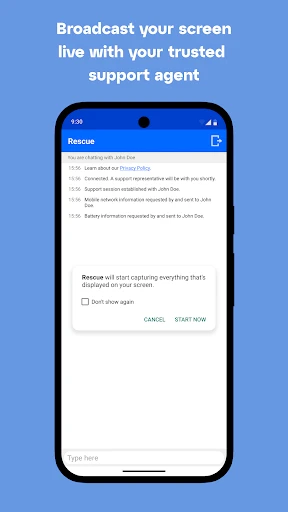


Description
About LogMeIn Rescue Customer Feature – Remote IT Support at Your Fingertips
LogMeIn Rescue Customer is a robust and secure mobile application designed to facilitate immediate remote technical support. It allows customers to connect seamlessly with support agents or IT professionals who can diagnose and resolve issues directly on the customer's device. As the client-side component of the broader LogMeIn Rescue platform, this app is engineered for simplicity and efficiency, enabling quick problem resolution without the need for complex configurations or physical access to the device. It serves as a critical bridge between end-users and support teams, transforming how technical assistance is delivered in today's digital-first environment.
Chapter 1: Function
The core function of the LogMeIn Rescue Customer app is to enable a secure, remote support session between a user and a technician. Upon receiving a support code or link from the help desk, the user simply enters it into the app to initiate a connection. Once connected, the app grants the authorized technician temporary, view-only or interactive access to the user's device screen. This allows the technician to visually diagnose problems in real-time. Furthermore, the app supports file transfer for delivering necessary tools or documents, a chat function for clear communication, and the ability to restart the session if needed. Crucially, the user maintains ultimate control, with the ability to pause screen sharing or disconnect the session at any moment. All these functions operate within a highly encrypted environment to ensure data privacy and security throughout the support interaction.
Chapter 2: Value
The primary value proposition of LogMeIn Rescue Customer lies in its ability to drastically reduce resolution times and improve the quality of technical support, thereby enhancing customer satisfaction and operational efficiency. For businesses, it translates into significant cost savings by minimizing on-site visits and enabling support agents to handle more cases effectively. The app's key advantages are multifaceted. First is its exceptional ease of use; customers require no pre-installation in many cases and can join a session swiftly via a lightweight app or even a web interface, lowering the barrier to receiving help. Second, its cross-platform compatibility is a major strength, providing a consistent support experience across iOS, Android, Windows, and macOS devices. Third, security is paramount. Sessions are protected with end-to-end encryption, and explicit user permission is required for every level of access, ensuring compliance and building trust. Fourth, the reliability and performance of the connection are optimized for stability, even on lower bandwidths, ensuring a smooth support experience. Finally, by integrating with the powerful backend Rescue console, it provides technicians with deep diagnostic tools, making problem-solving more accurate and proactive. This combination of convenience, security, and power makes it an indispensable tool for any organization committed to delivering superior remote technical support.
Chapter 3: Scenarios
LogMeIn Rescue Customer is ideally suited for a wide range of user groups and everyday scenarios. Its primary target includes any individual or employee using a smartphone, tablet, or computer who requires immediate technical assistance. Common use cases are prevalent in corporate IT help desks, where employees working remotely or in the office encounter software issues, email configuration problems, or need guidance using specific applications. The app is equally valuable in customer support centers for consumer electronics, software companies, or financial institutions, where agents can guide customers through app setup, troubleshooting steps, or online banking procedures directly on their device. Educational institutions utilize it to assist students and staff with device or software issues. Additionally, it is perfect for supporting less tech-savvy family members from afar, helping them resolve settings issues or remove unwanted software. In any scenario where explaining a problem over the phone is cumbersome, and physical presence is impractical, LogMeIn Rescue Customer provides an efficient, visual, and secure solution to resolve issues on the first contact.
Uninstall Instructions
For step-by-step guidance on how to safely remove this application from your device, please refer to our 《Uninstall Instructions》 document.
Pros
- allows support agents to initiate sessions without pre-installed software
- provides detailed system diagnostics before remote connection
- file transfer and session recording during live support
- persistent background mode for uninterrupted troubleshooting
- granular permission controls for security during remote access
Cons
- requires a stable internet connection for both technician and user
- high pricing tier for small-scale or individual IT teams
- occasional compatibility issues with niche or locked-down enterprise systems
- background mode can be blocked by aggressive endpoint security software
- diagnostic data overload may overwhelm novice technicians
Frequently Asked Questions
What is LogMeIn Rescue Customer and its main function?
LogMeIn Rescue Customer is a mobile app in the remote support/IT tools category. Its core function is to allow customers or end-users to securely connect with a support technician for remote assistance. The app enables screen sharing, file transfer, and diagnostic tools to facilitate problem resolution. It is positioned for businesses providing technical support to their clients on mobile devices.
Is LogMeIn Rescue Customer free to use?
LogMeIn Rescue Customer is typically not a consumer-facing paid app. Access is generally provided by the business or support organization offering assistance. The end-user (customer) downloads the app for free from app stores. There are no in-app purchases for the user; the licensing and costs are managed by the supporting company using the LogMeIn Rescue technician console.
What devices and systems does this app support?
The app supports a wide range of Android and iOS devices, including smartphones and tablets. It is designed to be installed by end-users on their personal or corporate devices to receive support. Specific version compatibility can change; users should check the current requirements in the Google Play Store or Apple App Store listing for the most accurate minimum OS version information.
How does the remote control feature work for support?
The remote control feature requires explicit user permission. After connecting, the technician can request view-only access or full control. The user must grant permission via an on-screen prompt. During a session, the user can see all actions and can terminate control instantly. The connection is encrypted, and no software is permanently installed on the user's device after the session ends.
What should I do if the session connection fails?
If a connection fails, first ensure you have a stable internet connection (Wi-Fi or cellular data). Restart the app and re-enter the session code provided by your support agent. If issues persist, check that the app has necessary permissions (like Overlay or Accessibility) enabled in your device settings. For persistent technical problems, contact your support provider directly, as app-specific after-sales is handled by the organization that initiated the support session.
App Info
Technical Info
Recommended For You

Photo App - AI Photo Enhancer
Art & Design

Galatea: Books & Audiobooks
Books & Reference

Truecaller: Caller ID Blocker
Communication

T Shirt Design - T Shirts Art
Art & Design

LibriVox Audio Books
Books & Reference

VSD Viewer for Visio Drawings
Business

Car Gauge Pro (OBD2 + Enhance)
Communication

Chevron
Auto & Vehicles

Robokiller - Spam Call Blocker
Communication

Logos Bible Study App
Books & Reference

Spam Call Blocker for Android
Communication

Beauty Camera -AI Photo Editor
Beauty

Shiftsmart - Find Work
Business

Draw Anime: Paint & Sketch App
Art & Design

King James Bible - Verse+Audio
Books & Reference

Remodel AI - Home Renovation
Art & Design

Messages: Text SMS
Communication

CamToPlan
Business

Car Engine Sounds - Gas Pedal
Auto & Vehicles

Monster Job Search
Business