
Garmin Drive™
Screenshots
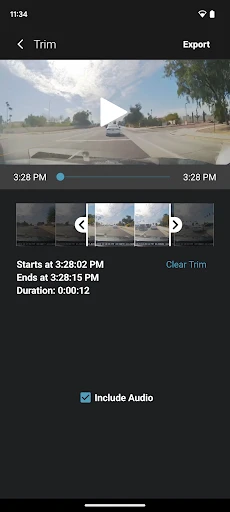
Description
About Garmin Drive™ Feature – Your Trusted Co-Pilot for the Road
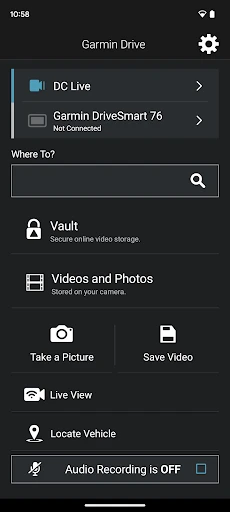
Garmin Drive™ is a dedicated GPS navigation app designed to transform your smartphone into a powerful and reliable driving companion. Developed by Garmin, a leader in navigation technology, this app brings the trusted functionality of a standalone Garmin navigation device directly to your mobile phone. It offers detailed, pre-loaded maps, real-time traffic updates, and driver alerts to ensure a safer, more efficient, and less stressful journey. Unlike many free navigation apps, Garmin Drive™ focuses on providing an ad-free, distraction-minimized interface with features built specifically for drivers, making it an excellent choice for those who prioritize clarity, reliability, and comprehensive road guidance.
Chapter 1: Function
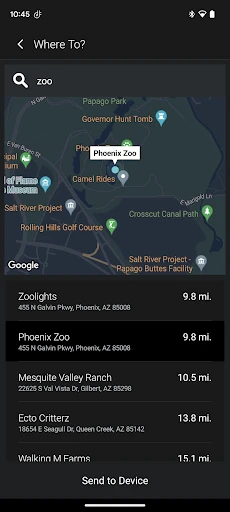
Garmin Drive™ delivers robust core navigation functions centered on a superior driving experience. The app provides detailed, pre-loaded maps of your region, allowing for full functionality without a constant cellular data connection. It offers turn-by-turn voice-guided directions with clear visual prompts. A key feature is its proactive driver alerts, which warn you about upcoming sharp curves, speed changes, school zones, and fixed camera locations. The app includes live traffic updates to help you avoid congestion and find faster routes. Additionally, it supports route planning for multiple stops and features lane guidance with junction views to prepare you for complex highway interchanges. Basic search for points of interest, such as fuel stations and restaurants, is also integrated, ensuring you have essential information at your fingertips.
Chapter 2: Value
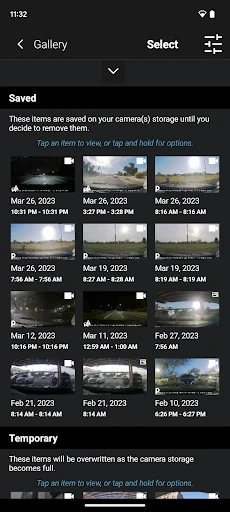
The value proposition of Garmin Drive™ lies in its specialized, driver-first design and its commitment to reliability and safety. Its primary advantage is the offline navigation capability through pre-loaded maps, ensuring you never lose guidance in areas with poor or no cellular service—a significant edge over data-dependent apps. The interface is clean, intuitive, and free of advertisements, minimizing distractions while driving. The comprehensive suite of driver alerts adds immense value for safety, actively helping you avoid traffic violations and hazardous road conditions. While it may lack the extensive, crowd-sourced real-time data of some free apps, Garmin Drive™ compensates with proven, accurate map data and stable performance. The app also integrates with Garmin's ecosystem, allowing for compatibility with certain Garmin dash cameras for added functionality. For users who seek a dependable, safety-oriented navigation tool that works consistently everywhere, the one-time purchase or subscription fee represents a worthwhile investment in peace of mind and journey predictability, free from the uncertainties of data coverage and intrusive ads.
Chapter 3: Scenarios
Garmin Drive™ is ideally suited for specific user groups who demand reliability and detailed driving assistance. Frequent travelers and road trippers who often venture into rural areas or regions with unreliable mobile networks benefit greatly from its offline maps. Commuters in metropolitan areas will appreciate the live traffic updates and proactive alerts for traffic cameras and road hazards, aiding in daily route optimization. The app is also valuable for professional drivers, such as delivery personnel or sales representatives, who require efficient multi-stop route planning. Furthermore, safety-conscious drivers, including parents with new teen drivers or individuals who prefer a less cluttered, distraction-free interface, will find the driver alert system and ad-free environment particularly advantageous. Everyday use cases include planning a cross-country road trip without worrying about data roaming charges, navigating daily commutes with real-time traffic rerouting, safely traversing unfamiliar cities with complex highway systems using junction view, and simply having a dependable backup navigation solution when primary apps fail due to connectivity issues.
Uninstall Instructions
For step-by-step guidance on how to safely remove this application from your device, please refer to our 《Uninstall Instructions》 document.
Pros
- offline maps with lifetime updates for remote areas
- built-in dash cam integration for safety alerts
- driver alerts for sharp curves and speed changes
- real-time traffic via smartphone link
- voice control for hands-free navigation
Cons
- requires smartphone for live services
- premium traffic features need subscription
- complex alerts may overwhelm new users
- mounting hardware can be bulky
- map updates require computer connection
Frequently Asked Questions
What is Garmin Drive™ and what does it do?
Garmin Drive™ is a dedicated GPS navigation app designed for drivers. Its core function is to provide turn-by-turn driving directions, real-time traffic updates, and lane guidance. It positions itself as a reliable offline and online navigation tool, featuring detailed maps, speed limit alerts, and points of interest search. The app leverages Garmin's extensive mapping data to offer routing optimized for trucks, RVs, or standard vehicles based on your profile.
Is Garmin Drive™ free to use, or are there in-app purchases?
The Garmin Drive™ app itself is free to download. However, its full functionality is tied to a compatible Garmin Drive GPS navigation device purchased separately. The app acts as a companion for managing the device, receiving smart notifications, and accessing certain connected features. Some services, like detailed live traffic or map updates, may require an active subscription or one-time purchase, depending on your device model and region.
What devices and systems is Garmin Drive™ compatible with?
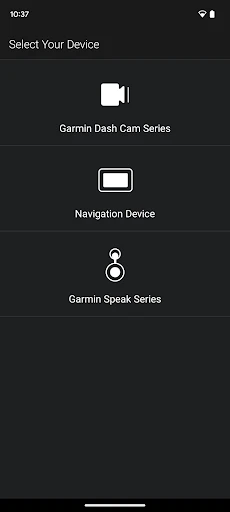
The Garmin Drive™ smartphone app is compatible with iOS and Android devices. However, its primary purpose is to pair with and manage a compatible Garmin Drive series GPS navigation unit via Bluetooth. The app is not a standalone replacement for the physical GPS device. You need both the hardware device and the smartphone app for connected features like live services, smart notifications, and Garmin Drive app functionality.
How does the live traffic and map update feature work?
Live traffic and map updates for Garmin Drive™ devices are delivered through the Garmin Drive app on your paired smartphone via a Bluetooth connection. The smartphone shares its data connection to provide real-time information to the GPS unit. Some models include a limited period of free live services. For ongoing updates, a subscription may be required. Map updates can be managed through the Garmin Express computer software or via the app, depending on the model.
Can I use Garmin Drive™ for navigation without a cellular signal?
Yes, a core technical characteristic of Garmin Drive™ GPS devices is full offline navigation. The detailed maps are stored directly on the device, so routing and guidance do not require a continuous cellular data connection. The companion smartphone app enhances the experience with connected features when available, but basic turn-by-turn navigation, pre-loaded points of interest, and saved locations function independently without a signal.
App Info
Technical Info
Recommended For You

AR Drawing Sketch Paint
Art & Design

GoDaddy Studio: Create & Grow
Art & Design

AR Drawing: Art, Trace, Sketch
Art & Design

Coinoscope: Coin identifier
Books & Reference

Yahoo Mail
Communication

Skype
Communication

Oxford Dictionary & Thesaurus
Books & Reference

Christmas Wallpaper
Art & Design

Easy hairstyles step by step
Beauty

AGE-R medicube Digital clinic
Beauty

밀리의 서재 - 독서와 무제한 친해지리
Books & Reference

Bookmory - reading tracker
Books & Reference

Kobo | eBooks & Audiobooks
Books & Reference

Messenger - Texting App
Communication

UC Browser-Safe, Fast, Private
Communication

Holy Quran - Deeper journey
Books & Reference

ArtistAI: AI Photo Generator
Art & Design

OBDeleven VAG car diagnostics
Auto & Vehicles

Amazon A to Z
Business

O'Reilly Pro
Business