
Cartoon Comic Strip Maker
Screenshots
Description
About Cartoon Comic Strip Maker Feature
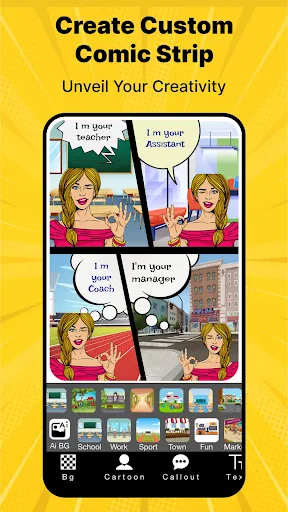
Cartoon Comic Strip Maker is a user-friendly mobile application designed to empower individuals to create personalized comic strips and cartoons directly from their smartphones or tablets. It transforms everyday photos, ideas, and stories into visually engaging comic art with minimal effort. By providing a suite of intuitive editing tools, a rich library of templates, characters, and effects, the app demystifies the comic creation process, making it accessible to users of all skill levels. Whether for entertainment, education, or social sharing, it serves as a digital canvas for unleashing creativity and storytelling in a fun, structured format.
Chapter 1: Function
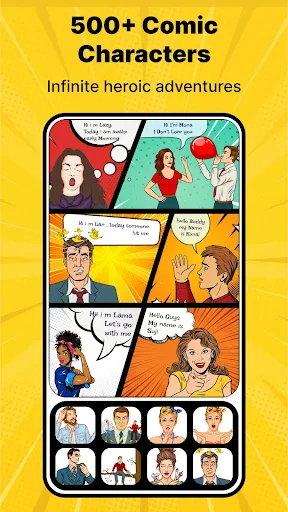
The app's core functionality revolves around simplifying comic strip creation. Users begin by selecting from a wide array of pre-designed templates or starting with a blank canvas. The primary toolset includes the ability to import photos from the device's gallery and instantly convert them into cartoon-style images using various artistic filters. A comprehensive library offers hundreds of customizable comic characters, speech bubbles, thought balloons, sound effect stickers (like 'BAM!' or 'POW!'), and background scenes. The editor allows for easy drag-and-drop placement, resizing, and rotation of all elements. Text tools enable customization of font, size, and color within the bubbles. Additional features include panel editing to adjust the layout of comic strips, basic drawing tools for freehand additions, and layer management. Finally, completed projects can be saved in high-resolution formats and shared directly to social media platforms, messaging apps, or exported for printing.
Chapter 2: Value
The fundamental value proposition of Cartoon Comic Strip Maker lies in its ability to democratize comic creation, offering professional-looking results without requiring artistic expertise or expensive software. Its key advantage is profound accessibility; anyone with a story to tell can become a cartoonist. The app saves significant time and effort by providing ready-made assets and intuitive controls, eliminating the steep learning curve associated with traditional graphic design tools. For educators, it presents a valuable pedagogical asset, making lessons more engaging and facilitating visual learning and student expression. For businesses and marketers, it offers a unique tool for creating eye-catching, informal promotional content for social media. On a personal level, it provides immense entertainment value, allowing users to create humorous strips from personal photos, commemorate events in a creative way, or simply explore artistic hobbies. The app fosters creativity and visual communication skills in a low-pressure, enjoyable environment. Compared to complex desktop software, its mobile-first design ensures convenience and spontaneity, capturing ideas on the go. The regular addition of new stickers, templates, and features keeps the content fresh and inspires ongoing use, delivering continuous value to its user base.
Chapter 3: Scenarios
The primary target users span a diverse range. First are hobbyists and creative enthusiasts, including teenagers and adults looking for a fun, creative outlet to turn daily life moments or imaginative stories into shareable comics. Second, educators and students form a significant group; teachers can create visual aids or storytelling exercises, while students can use it for book reports, historical timelines, or science projects, enhancing learning through creation. Third, parents find it engaging for creating personalized stories with their children, fostering family bonding and creativity. Fourth, social media content creators and small business owners utilize the app to produce relatable, cartoon-style promotional posts or advertisements to engage their audience in a lighthearted manner. Everyday use cases include crafting birthday or greeting cards with a personal comic touch, summarizing travel experiences in a visual diary, illustrating step-by-step guides or recipes, generating memes for social sharing, and creating visual jokes or commentaries on current events. The app serves as a versatile tool for any scenario where a quick, engaging, and personalized visual narrative is desired.
Uninstall Instructions
For step-by-step guidance on how to safely remove this application from your device, please refer to our 《Uninstall Instructions》 document.
Pros
- creates multi-panel comics from single photos automatically
- offers diverse cartoon filters and speech bubble styles
- simple drag-and-drop editor for quick layout adjustments
- exports high-resolution strips suitable for social media
- includes genre-specific templates for instant storytelling
Cons
- advanced art styles require separate in-app purchases
- auto-layout struggles with complex photo compositions
- watermark persists on free version exports
- limited text customization for non-latin alphabets
- high-res exports slow on older mobile devices
Frequently Asked Questions
What is Cartoon Comic Strip Maker and its main functions?
Cartoon Comic Strip Maker is a mobile application designed for creating comic strips and cartoon-style images. Its core functions include providing a library of customizable characters, backgrounds, and props, along with tools for adding speech bubbles, text, and applying visual filters. Users can combine these elements to design multi-panel comic strips for storytelling, social media content, or personal entertainment. The app focuses on user-friendly, drag-and-drop editing without requiring advanced artistic skills.
Is the app free to use or does it have in-app purchases?
The app is typically free to download and use with basic features. However, it includes in-app purchases to unlock premium content such as additional character packs, specialized backgrounds, advanced editing tools, and the removal of watermarks from final creations. Subscription models or one-time purchase options may be available for accessing the full asset library. No additional physical equipment is needed beyond a compatible smartphone or tablet.
What devices and operating systems does this app support?
Cartoon Comic Strip Maker is primarily available for iOS and Android mobile devices. Specific version requirements, such as iOS 11.0 or later or Android 5.0 and up, apply. It is optimized for smartphones and tablets. The app is generally suitable for a wide user group, including teenagers and adults interested in casual comic creation. There is no dedicated version for desktop operating systems like Windows or macOS.
How can I save or share the comics I create?
Completed comic strips can be saved directly to your device's photo gallery or internal storage in common image formats like JPEG or PNG. The app integrates sharing options, allowing you to export your work directly to various social media platforms, messaging apps, or via email. Some advanced export features, such as high-resolution saves or specific formats, might be part of the premium offering. Ensure you have granted the app necessary storage permissions for saving.
What should I do if the app crashes or fails to load assets?
First, ensure your device meets the system requirements and has a stable internet connection, as some assets may need to download. Try restarting the app and your device. If the issue persists, check for app updates in your device's app store, as updates often contain bug fixes. Clearing the app's cache from your device settings can also resolve loading problems. For persistent issues, you can contact the developer's support team via the contact details provided in the app store listing.
App Info
Technical Info
Recommended For You

Al QURAN - القرآن الكريم
Books & Reference

IRMO AI Video Photo Generator
Art & Design

3D Modeling App: Sculpt & Draw
Art & Design

Bible For Women-Holy Bible App
Books & Reference

JobStack for Work | Job Search
Business

MANGA Plus by SHUEISHA
Comics

5 Calls: Contact Your Congress
Books & Reference

Bible Homescreen - Read Now
Books & Reference

Plus Messenger
Communication

Thumbnail Maker - Channel art
Art & Design

WEBTOON: Manga, Comics, Manhwa
Comics

DAT One
Business

Zello PTT Walkie Talkie
Communication

Comics Price Guide
Comics

Penny Puss 2.0
Business

Spirit Fanfiction and Stories
Books & Reference

Phone Dialer - Call Recorder
Communication

Bookshelf-Your virtual library
Books & Reference

Astonishing Comic Reader
Comics

Freelancer: Hire & Find Jobs
Business