
Microsoft Authenticator
Screenshots
Description
About Microsoft Authenticator Feature
Microsoft Authenticator is a robust security application designed to provide multi-factor authentication (MFA) for a wide range of online accounts, most notably Microsoft accounts, Azure AD work or school accounts, and many other popular services. It enhances account security by requiring a second form of verification beyond just a password, significantly reducing the risk of unauthorized access. The app offers multiple verification methods, including time-based one-time passcodes (TOTP), push notifications for approval, and passwordless sign-in using phone biometrics. Its integration with the Microsoft ecosystem makes it a cornerstone for personal and enterprise security strategies, offering a seamless and user-friendly approach to protecting digital identities in an increasingly vulnerable online landscape.
Chapter 1: Function
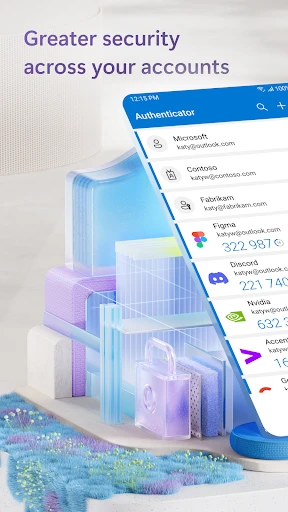
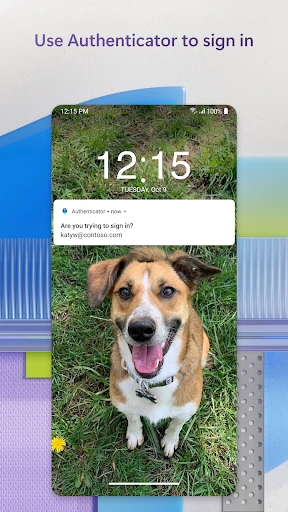
Microsoft Authenticator primarily functions as a multi-factor authentication tool. Its core operation revolves around generating time-based, six-digit verification codes for accounts that support standard TOTP protocols, similar to other authenticator apps. A distinctive feature is its ability to receive push notifications; when a user attempts to sign in to a linked account, a notification is sent to the app, allowing them to approve or deny the request with a single tap, often without needing to manually enter a code. For compatible Microsoft accounts, it enables a truly passwordless experience, allowing users to sign in using their phone's fingerprint, facial recognition, or PIN. Additionally, the app can securely back up and restore account credentials to a user's personal cloud storage, facilitating easy migration to a new device. It also supports account management, letting users add, organize, and remove accounts from a centralized interface.
Chapter 2: Value
The value proposition of Microsoft Authenticator lies in its powerful blend of enhanced security, exceptional convenience, and deep ecosystem integration. Its primary advantage is dramatically strengthening account security. By implementing MFA, it effectively neutralizes threats from stolen or weak passwords, making accounts exponentially harder to compromise. The convenience factor is equally significant. The push notification approval method is faster and simpler than manually typing codes, streamlining the login process. The pinnacle of this convenience is passwordless sign-in, which eliminates the need to remember and manage passwords for Microsoft services, reducing friction and the risk of phishing. For enterprises, its seamless integration with Azure Active Directory provides a critical security layer for accessing organizational resources, supporting conditional access policies. The encrypted cloud backup feature addresses a major pain point of authenticator apps—the fear of losing access to all accounts when changing phones—by securely restoring the account details. Furthermore, its support for non-Microsoft accounts (like Google, Facebook, or GitHub) makes it a versatile, one-stop authentication solution. This combination of ironclad security, user-centric design, and reliable backup establishes Microsoft Authenticator as a highly valuable tool for both individual users and IT administrators seeking to enforce robust security protocols without sacrificing usability.
Chapter 3: Scenarios
Microsoft Authenticator serves a broad spectrum of user groups across personal and professional contexts. The primary target users are individuals with Microsoft accounts (Outlook, Office, OneDrive) or those working in organizations that use Azure AD, as the app offers the deepest functionality within this ecosystem. Everyday use cases for these users include signing into their email, accessing Microsoft 365 applications, or approving access to corporate networks and cloud services. IT professionals and security-conscious individuals form another key group, utilizing the app to secure a wide array of online accounts—from social media and banking to password managers and development platforms—using its TOTP code generator. A common scenario involves receiving a push notification on the phone while logging into a laptop, allowing quick approval. For users who have enabled passwordless sign-in, the scenario simplifies to opening the app and using biometrics to authenticate directly. In enterprise scenarios, employees use it daily to verify their identity for accessing sensitive company data, VPNs, or internal portals, often as part of a conditional access policy that requires MFA from specific locations or devices. Students and faculty at institutions using Microsoft services also frequently rely on it for secure access to educational resources.
Uninstall Instructions
For step-by-step guidance on how to safely remove this application from your device, please refer to our 《Uninstall Instructions》 document.
Pros
- seamlessly replaces passwords for microsoft accounts
- one-tap approval for sign-ins via push notification
- offline passwordless login using phone biometrics
- backs up and restores credentials to the cloud
- supports time-based codes for non-microsoft accounts
Cons
- primary utility tied closely to microsoft ecosystem
- cloud backup requires a personal microsoft account
- push notifications can be delayed on unstable networks
- no built-in authenticator transfer between platforms
- limited organizational features for non-enterprise users
Frequently Asked Questions
What is Microsoft Authenticator and what does it do?
Microsoft Authenticator is a security app in the two-factor authentication (2FA) and password manager category. Its core function is to add an extra layer of security to your online accounts. It generates time-based verification codes for websites and apps that support 2FA. It can also securely store and autofill passwords, and enable passwordless sign-in for Microsoft accounts and other supported services.
Is Microsoft Authenticator free to use?
Yes, Microsoft Authenticator is completely free to download and use. There are no subscription fees or in-app purchases required for its core authentication and password management features. The app is supported by Microsoft as part of its ecosystem security services. It does not contain advertisements.
What devices and systems is Microsoft Authenticator compatible with?
The app is widely adapted. It is available for iOS (iPhone/iPad, requires iOS 13.0 or later) and Android (requires 6.0 or later). It functions on smartphones and tablets. A device with a camera is needed for QR code setup. It is designed for individual users and organizations using Microsoft Entra ID (formerly Azure AD) for work or school accounts.
How does the passwordless sign-in feature work?
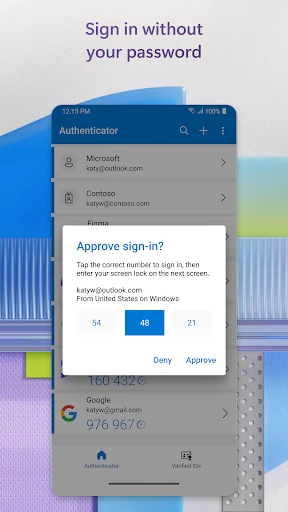
For supported accounts, you can approve sign-in notifications directly on your phone instead of typing a password. After entering your username, a notification is sent to the Authenticator app. Tapping 'Approve' after verifying the sign-in details grants access. This uses cryptographic proof on your registered device, making it more secure than traditional passwords.
What happens if I lose my phone or get a new one?
To prevent account lockout, it is crucial to have recovery options set up beforehand. For personal Microsoft accounts, ensure you have a backup phone number or email for recovery. For work/school accounts, contact your administrator. The app's cloud backup feature (for personal accounts) can restore your account details to a new device. You should also keep your account recovery codes in a safe place.
App Info
Technical Info
Recommended For You

Messages - Text SMS App
Communication

Wahy (Holy Quran)
Books & Reference

StoryFont for Instagram Story
Art & Design

Repixel: AI Photo Enhancer
Art & Design

telebirr
Business

OBD Fusion (Car Diagnostics)
Communication

Buenovela - Webnovel & Stories
Books & Reference

Wear OS by Google Smartwatch
Communication

Arch - AI Home Design
Art & Design

WhenToWork Employee Scheduling
Business

Mirror Plus - HD Mirror app
Beauty

Speak and Translate Languages
Communication

Manga Library - مكتبة المانجا
Comics

Biblia Católica en español
Books & Reference

Mirror - Fullscreen Mirror App
Beauty

네이버 웹툰 - Naver Webtoon
Comics

My Collection: Comic Scanner
Comics

MM-Calendar
Books & Reference

Fuelio: gas log & gas prices
Auto & Vehicles

AR Drawing: Art, Trace, Sketch
Art & Design