
Google Meet
Screenshots
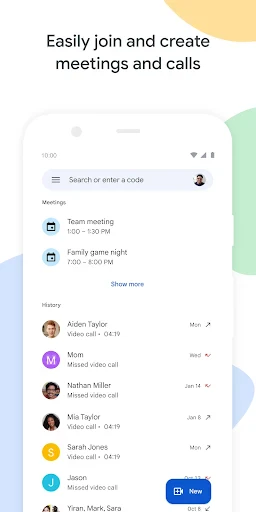



Description
About Google Meet Feature – Seamless Video Conferencing for Everyone
Google Meet is a secure and reliable video conferencing application developed by Google, designed to facilitate high-quality virtual meetings for individuals, teams, and organizations. Integrated within the Google Workspace ecosystem, it enables users to easily host or join meetings from any device with a web browser or via its dedicated mobile app. With a focus on accessibility and user-friendly design, Google Meet has become a cornerstone tool for remote collaboration, online education, and personal connections, offering features like real-time captions, screen sharing, and robust security measures to ensure productive and safe interactions.
Chapter 1: Function
Google Meet's core functionality centers on enabling seamless video and audio communication. Users can instantly start or schedule meetings, sharing links or dial-in numbers for participants to join with a single click, even without a Google account for most cases. During meetings, it supports essential collaborative features such as real-time screen sharing for presentations or demonstrations, interactive digital whiteboarding through Jamboard integration, and in-meeting text chat. The app provides adjustable layouts, including a tiled view for up to 49 participants on screen and a spotlight mode for speakers. It also incorporates live captions powered by Google's speech recognition technology, enhancing accessibility. Administrative controls allow hosts to manage participants, mute entrants, and control who can share their screen, ensuring orderly meetings. All sessions are encrypted for security.
Chapter 2: Value
The primary value proposition of Google Meet lies in its combination of enterprise-grade reliability, deep Google ecosystem integration, and straightforward accessibility. A key advantage is its robust security; meetings are encrypted in transit, and Google's infrastructure provides strong anti-abuse protections, making it a trusted choice for businesses and educational institutions. Its seamless integration with Google Calendar and Gmail allows users to schedule and join meetings with unparalleled ease, directly from calendar invites or email links. For Google Workspace users, value expands further with features like recording to Google Drive, larger participant limits, and advanced administrative controls. The platform is engineered for performance, maintaining high-quality video and audio even on low-bandwidth connections through adaptive technology. Unlike many competitors, it requires no software installation for web users, lowering the barrier to entry. Its cross-platform availability on iOS, Android, and web ensures a consistent experience. Furthermore, the free tier offers substantial functionality, including 60-minute group meetings, making professional-grade video conferencing accessible to everyone. This blend of security, integration, performance, and accessibility positions Google Meet as a comprehensive solution that reduces friction in digital communication.
Chapter 3: Scenarios
Google Meet serves a diverse range of users across multiple scenarios. For businesses and remote teams, it is indispensable for daily stand-ups, project collaboration, client presentations, and all-hands meetings, facilitating seamless communication regardless of employee location. Educational institutions and teachers leverage it for virtual classrooms, online lectures, tutoring sessions, and parent-teacher conferences, utilizing features like breakout rooms and hand raising to replicate interactive learning environments. Healthcare providers use it for secure telehealth consultations, benefiting from its compliance with privacy standards. Non-profits and community groups rely on it for organizing virtual events, board meetings, and volunteer coordination. On a personal level, families and friends use Google Meet for virtual gatherings, celebrations, and staying connected across distances. Its simplicity also makes it ideal for casual users hosting book clubs, hobby groups, or online fitness classes. Essentially, any individual or group requiring a dependable, easy-to-use platform for face-to-face interaction in a professional, educational, or personal context constitutes Google Meet's target audience.
Uninstall Instructions
For step-by-step guidance on how to safely remove this application from your device, please refer to our 《Uninstall Instructions》 document.
Pros
- one-click joining from calendar or link
- live captions in multiple languages
- adaptive layout highlights active speaker
- noise cancellation filters background sounds
- host controls like polls and Q&A built-in
Cons
- requires google account for hosting
- limited virtual backgrounds vs competitors
- large meetings may reduce video quality
- advanced features need workspace subscription
- screen sharing sometimes lags on web
Frequently Asked Questions
What is Google Meet and what does it do?
Google Meet is a video conferencing app designed for secure and reliable online meetings. Its core function is to facilitate video and audio calls, screen sharing, and real-time collaboration. It is positioned as a tool for both personal use and professional teams, integrating seamlessly with Google Workspace. Unique features include live captions, adjustable layouts, and background blur. It operates via web browsers and mobile apps, requiring only a Google account to start or join meetings.
Is Google Meet free to use, and what are its limits?
null
What devices and systems are compatible with Google Meet?
Google Meet is widely adaptable across devices and operating systems. It is accessible via modern web browsers like Chrome, Safari, and Edge. Dedicated mobile apps are available for Android and iOS. The service also supports joining meetings from hardware devices like Google Nest Hub Max. It is designed to be inclusive, supporting features like live captions for accessibility. A stable internet connection is the primary requirement for optimal functionality.
How does Google Meet ensure the security of my meetings?
Google Meet employs multiple security measures to protect meetings. All video and audio streams are encrypted in transit. Meeting hosts can control entry via features like admission requests, meeting codes, and digital waiting rooms. Meetings created within Google Workspace organizations have additional security controls. The platform is compliant with major global privacy standards. Users are advised not to share meeting links publicly to maintain privacy. Google provides detailed security and privacy documentation on its official website.
What should I do if I encounter audio or video issues?
First, check your internet connection and device permissions for the app. Ensure your browser or app is updated to the latest version. Within a meeting, you can troubleshoot using the in-call menu to switch audio sources or turn off video to conserve bandwidth. For persistent problems, Google provides an official Help Center with detailed troubleshooting guides for connectivity, audio, and video. There is no direct phone support for individual users; support is primarily community-based and through online resources.
App Info
Technical Info
Recommended For You

Thunderbird: Free Your Inbox
Communication

X Launcher Pro
Art & Design

Email for Outlook, Hotmail
Communication

Eyecon Caller ID & Spam Block
Communication

CL Theme C1
Auto & Vehicles

Face Beauty Makeup Camera-Self
Beauty

Meeting - Video Conference
Business

Manobook - Los Besos de Jacob
Books & Reference

WolframAlpha Classic
Books & Reference

Autolink
Auto & Vehicles

Shell: Fuel, Charge & More
Auto & Vehicles

Fuel Forward
Auto & Vehicles

Messenger: Text Messages, SMS
Communication

IRMO AI Video Photo Generator
Art & Design

Twenty-Four Hours a Day
Books & Reference

Messenger
Communication

Temp Mail - Temporary Email
Communication

Mirror - Fullscreen Mirror App
Beauty

StoryFont for Instagram Story
Art & Design

Hyundai Digital Key
Auto & Vehicles