
Freepik: Design & edit with AI
Screenshots



Description
About Freepik: Design & edit with AI Feature – Unleashing Creativity with Intelligent Tools
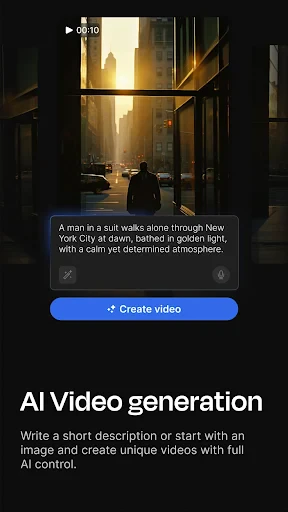
Freepik: Design & edit with AI is a comprehensive creative platform that integrates a vast library of graphic resources with advanced artificial intelligence tools. It empowers users, from professionals to beginners, to create and edit visual content efficiently. The app combines the traditional strengths of Freepik—millions of stock photos, vectors, icons, and PSD files—with cutting-edge AI features like AI image generation, background removal, and smart editing. This fusion transforms it from a mere resource repository into a dynamic, all-in-one design studio accessible directly from mobile devices, streamlining the entire creative workflow from concept to final asset.
Chapter 1: Function
The core functionality of Freepik: Design & edit with AI revolves around three pillars: discovery, creation, and enhancement. Firstly, it provides seamless access to an extensive, searchable database of premium and free design resources. Secondly, its AI-powered creation tools allow users to generate unique images from text descriptions, offering a revolutionary way to visualize ideas. Thirdly, the suite of editing tools includes one-click background removal, smart object selection, and intuitive filters for quick photo and graphic adjustments. These functions are tightly integrated, enabling users to find a template, modify it with AI suggestions, and polish it with professional editing tools, all within a single, cohesive application interface.
Chapter 2: Value
The primary value proposition of Freepik: Design & edit with AI lies in its democratization of high-quality design. It drastically lowers the technical and time barriers typically associated with graphic creation. For businesses and individual creators, this translates into significant cost savings and accelerated project timelines. The AI image generator is a key advantage, providing custom, royalty-free visuals on demand, which is invaluable for marketing, social media, and content creation where unique imagery is crucial. Furthermore, the intelligent editing tools automate complex tasks like cut-outs and retouching with impressive accuracy. The app’s integration of a massive asset library with these AI capabilities creates a virtuous cycle: resources inspire creation, and AI facilitates customization. This positions the app not just as a tool, but as a creative partner that enhances productivity, fosters originality, and ensures a consistent, professional output regardless of the user's formal design training or access to expensive desktop software.
Chapter 3: Scenarios
The app serves a diverse spectrum of users across multiple everyday scenarios. Primary target groups include social media managers and digital marketers who need to produce a high volume of engaging posts, stories, and ads quickly; small business owners or entrepreneurs crafting their own branding materials, logos, and promotional graphics without a dedicated design team; and content creators, bloggers, and educators seeking to illustrate their work with compelling visuals. In daily use, a marketing professional might use the AI generator to create a banner image for a new campaign, then refine it using the editing tools. A student might search for an infographic template for a presentation and personalize it with their data. A hobbyist could remove the background from a product photo for an online sale listing. Essentially, any scenario requiring fast, affordable, and professional-looking visual content is an ideal use case for this all-encompassing creative toolkit.
Uninstall Instructions
For step-by-step guidance on how to safely remove this application from your device, please refer to our 《Uninstall Instructions》 document.
Pros
- offers millions of royalty-free vectors
- photos
- and AI-generated images
- integrated AI image generator creates visuals from text prompts
- built-in editor allows quick graphic customization without other software
- one-stop platform for asset discovery
- generation
- and basic editing
- daily free download quota accessible without immediate subscription
Cons
- free downloads include mandatory attribution to Freepik
- advanced AI features and high-res assets require a paid plan
- built-in editor lacks the depth of professional design software
- search results can be broad
- requiring refinement for niche needs
- web-based platform limits offline access and editing capabilities
Frequently Asked Questions
What is Freepik: Design & edit with AI?
Freepik: Design & edit with AI is a mobile graphic design application that leverages artificial intelligence. Its core function is to help users create and edit visual content like social media posts, presentations, and posters. It provides AI-powered tools such as background removal, image enhancement, and text-to-image generation, positioning itself as an accessible all-in-one design tool for non-professionals.
Is Freepik free to use, and what are the costs?
The app operates on a freemium model. You can download and use it for free with access to basic features and a limited number of daily AI generations. For unlimited access to premium resources, higher-resolution downloads, and advanced AI features, a paid subscription (Freepik Premium) is required. Subscription plans are auto-renewing and can be managed through your app store account.
How does the AI image generation feature work?
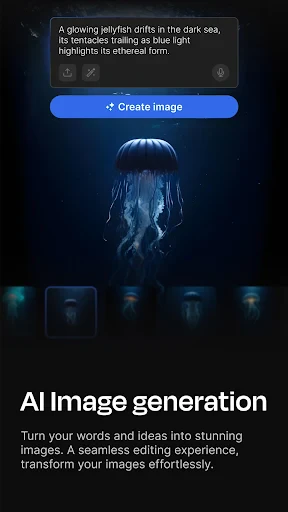
The AI image generator allows you to create images from text descriptions (prompts). You simply type what you want to see, and the AI generates multiple visual options. This feature is integrated into the design workflow, enabling you to add unique, custom graphics directly to your projects. Usage may be limited per day for free users, with subscribers receiving more generations.
What devices and systems is the app compatible with?
Freepik: Design & edit with AI is primarily available as a mobile application for both iOS and Android devices. It is optimized for smartphones and tablets. For comprehensive information on specific version requirements, please check the listing on the Apple App Store or Google Play Store, as these details are subject to change by the developer.
Can I use my designs commercially?
Usage rights depend on the licensing of the resources. Content created with your own assets or generated by AI is typically yours to use. However, using Freepik's pre-made premium elements (like stock photos or icons) requires a Premium subscription for most commercial uses. Always review the app's specific licensing terms for detailed information on commercial and editorial use cases.
App Info
Technical Info
Recommended For You

Whoscall - Caller ID & Block
Communication

GetCode - Virtual Number SMS
Business

Tappytoon Manhwa & Novels
Comics

Online chat, calls - Gem Space
Communication

Staffmark WorkNOW
Business
ATOM Store, Myanmar
Communication

Mary Kay® Skin Analyzer
Beauty

Cortes de Pelo Hombre 2024
Beauty

MM-Calendar
Books & Reference

myColorado
Business

WASticker-Sticker for WhatsApp
Comics

BOSS Revolution: Call & Top up
Communication

Staples - Deals & Shopping
Business

PrinterShare Mobile Print
Business

MediBang Paint:Draw Art, Comic
Art & Design

Picify: AI Art Editor
Art & Design
Housecall Pro
Business

Face Swap Magic: AI Avatars
Art & Design

UKG Pro
Business

TapRead - Romance Stories
Books & Reference